Virtual Office Requirements for WFH:
Here’s an image of my home office setup:
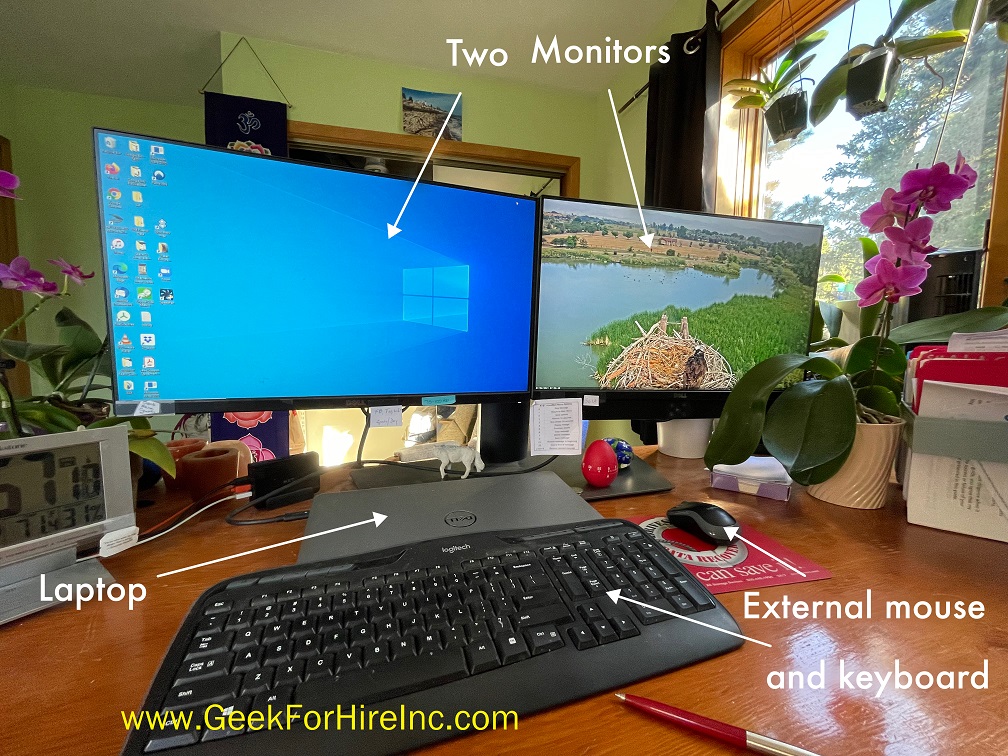
I’ve got two monitors with my closed laptop on the base of the monitor stand. I have an external wireless mouse and keyboard. On the back of the monitor stand, Chris has mounted a docking station with everything plugged in there. When I leave and need to take my laptop with me, I only need to unplug the laptop. I’ve since added a TV which functions as a third monitor.
WIFI:
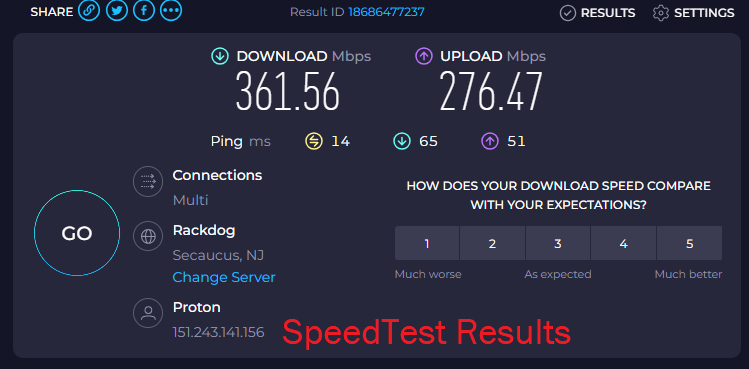
A virtual office must have fast WiFi. A minimum of 100mbps is recommended. You may need to upgrade your router in order to provide the contracted speed flowed from your ISP to your devices. (Check your actual speed at SpeedTest.) Good routers can support many simultaneous users and fast speed. When you’re ready to upgrade your router, give Chris a call for his current recommendation.
Tablet:
Sometimes a laptop is just too heavy! My iPad has been perfect for internet research, sending emails, and keeping the Geek For Hire calendar up-to-date. And it’s great for watching AmazonPrime movies, playing games, or keeping up with Social Media. Here’s our Buying Guide of what to look for in a tablet.
Cell Phone:
Well, this kind of goes without saying, but it’s important that folks can reach you. If you’re working in your car in between appointments, make sure you’ve got great cell service.
Sometimes, when my service doesn’t work well, I’ll turn airplane mode on and off, or I’ll turn my VPN off and select a new site, or I’ll turn my iPhone off completely and then back on.
Charging Cords:
Do you have the proper charging cables for all of your devices? I keep an extra laptop charging cable in my bag along with several different USB cables.
Optional Equipment to WFH in your Virtual Office:

WFH Laptop or Desktop:
Sure, you can get a lot of business accomplished with just your Smartphone and tablet. But sometimes, you just need a computer to do certain tasks. For example, QuickBooks won’t let me enter all the detail I’d like on their mobile app. I need to login to QuickBooks from my laptop to do that.
TV:
You can setup your TV to be a second or third monitor, or just to provide some background noise or visuals while WFH. I’ve found a few interesting webcams I play on my TV with the sound off.
Headphones:
If there is more than one person in your household, headphones are essential. Chris and I both use Apple AirPods. I have the newer model which includes hearing aid technology. I’m testing that out as well. (WHAT?! Yes, I’ll let you know how well they work.)
External Keyboard for Tablet:
Typing on a tablet can be cumbersome. The hands – so big. The keyboard – so small. The mistakes – so many! Get yourself a Bluetooth keyboard and typing will be much easier. The newer ones have back-lighting which makes it easier to type when the lights are dimmed. I use the Apple Magic Keyboard for my iPad. It’s a case with a keyboard!
Speech to Text Software:
Does your WFH setup make it easy to to use speech-to-text? My current laptop doesn’t have the capability, but I can open a text app in my iPhone or iPad. When I’m done dictating, I can send the text to my computer and incorporate it into a document or email I’m working on.
Do you have a Virtual Office so you can WFH? What tools do you rely on?
Please share this with your friends who don’t work in an office building.
INFORMATION ABOUT GEEK FOR HIRE, INC.
Chris Eddy of Geek For Hire, Inc. has provided computer service to families and small businesses with Macs and PCs for the past twenty-plus years. You can find more on our website or give us a call. Geek For Hire, Inc. provides on-site computer repair service (Tier 3 support) to the Denver / Boulder / Front Range area and remote PC and Mac service throughout North America.
We’ve been using Amazon Prime for the past few years. We like the free and fast shipping. With Prime, we have access to online streaming, too. You can get a free 30-day trial by clicking on this link: Try Amazon Prime 30-Day Free Trial. As an Amazon Associate, we earn from qualifying purchases.
More Tips Here:
- Should I keep Windows 10?
- Data Storage in the Cloud
- Summer of Scams
- Road Trips & Summer Travel Apps
- Secure Messaging Apps
- Printer Ink Subscription
- STEM Toys for kids
- Holiday Phishing Scams
