Moving your office tech is a big deal! Last week I decided that my office upstairs was “too far” away from the rest of the house, and I was feeling very isolated. We’ve got a library-slash-exercise room on the main floor, and we decided to move my office there. As you can imagine, anytime you’re moving technology from one location to another, you are going to run into a myriad of issues. Good thing I know a Geek! (FYI, if you purchase anything from the links on this page, we may receive a small commission. As an Amazon Associate, we earn from qualifying purchases.)
PRINTER:
The first problem I ran into was that my laptop no longer wanted to talk to my printer over Wi-Fi. The short term solution is to connect my laptop with a USB cable to the printer. But this means the printer isn’t connected to WiFi at all. And THAT means I can’t print from my phone or tablet. Chris is noodling on a few solutions.
First Solution:
Involves moving the printer into his workspace where it could be hard-wired into the house Wi-Fi network. Downside: This means I’ll be taking up some of Chris’ valuable space with my printer, AND I won’t have the immediate satisfaction of printing a page and looking at the results.
Second Solution:
This is my preference but seems a lot more involved. Chris will drill a hole from the basement to my first floor office. He’ll pull an ethernet cable through to set up a dedicated work group network switch for my desk. Frankly, I don’t really understand why I need a “dedicated work group network”, but if I can print from any device, and the printer is near my desk, I’m happy!
THIRD MONITOR:
The other problem I had with office tech was connecting the TV in the room to act as my third monitor. This is mostly used to live stream pretty or interesting views around the world. In the spring, I watch the Osprey at their nest in Boulder County Open Space in Longmont. In the fall, I’m watching the bears at Katmai National Park. But right now of course, I’m watching Artemis on their trip to the moon and back via NASAs YouTube channel.
At any rate, we had trouble connecting it because it was too far from my desk. Chris got an extra-long 50’ Optical HDMI cable. Why so long? It must go around the perimeter of the room so there’s no tripping hazard. Then Chris configured the placement of the three monitors, and I was good to go. 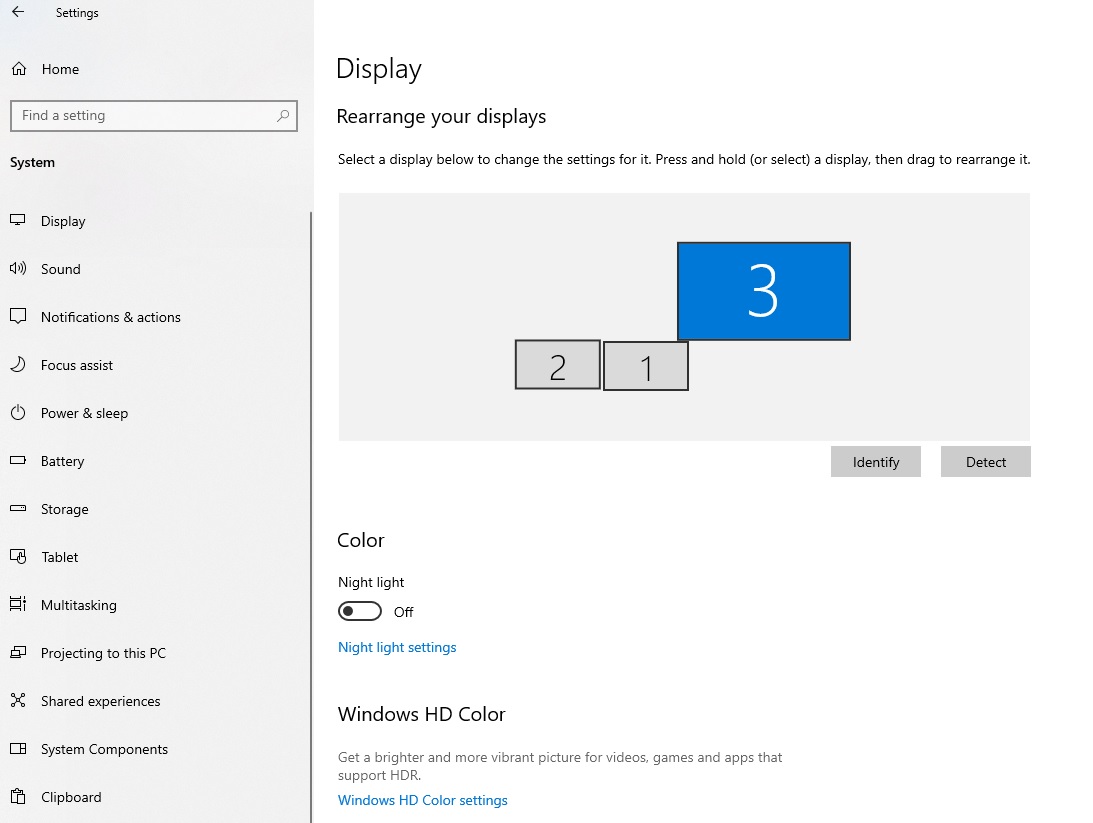
Conclusion:
If you’ve thought about moving your office tech, but are worried about the issues you may run into, let us know. Chris has the knowledge and tools to craft a perfect solution. If this was forwarded to you from a friend, you can get your own copy emailed to you every month by signing up here.
Information about Geek For Hire, Inc.
Chris Eddy of Geek For Hire, Inc. has provided computer service to families and small businesses with Macs and PCs for the past twenty-plus years. You can find more on our website or give us a call. Geek For Hire, Inc. provides on-site computer repair service (Tier 3 support) to the Denver / Boulder / Front Range area and remote PC and Mac service throughout North America.
We’ve been using Amazon Prime for the past few years. We like the free and fast shipping. With Prime, we have access to online streaming, too. You can get a free 30-day trial by clicking on this link: Try Amazon Prime 30-Day Free Trial. As an Amazon Associate, we earn from qualifying purchases.
More Tips Here:
- Thinking about getting AirPods?
- How to set up a Virtual Office for WFH
- What to know about Cash Back Apps
- Still using Windows 10?
- Printer Ink Subscription
- STEM Toys for kids
- I Got Scammed
- Secure Password Tips
- Fire Season
