Yes, it’s Wildfire Season again. Even if there isn’t a fire nearby, the smoke blows far and wide. Sometimes it’s hard to breathe; and sometimes we just get pretty sunsets. But, when you live in the West, you need to be prepared to evacuate at a moment’s notice. Especially after this past winter which had very little moisture.
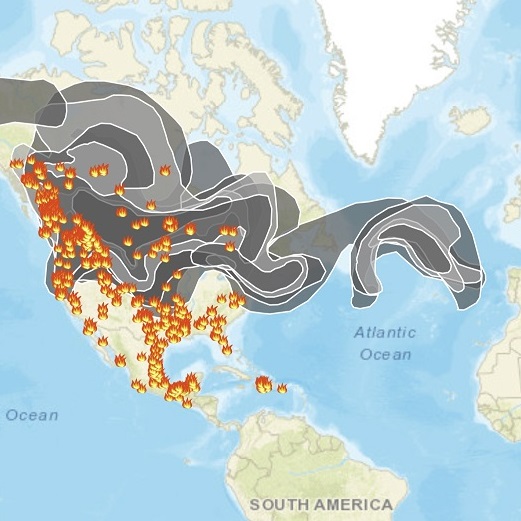
Here’s a screenshot I took from the AirNow.Gov app on my phone during the summer of 2018. I call it the “Smoke Monster”. The dark and light grey areas indicate smoke. In 2018, the smoke blew almost all the way to Europe!
Recommendations for Wildfire Season:
Here are our recommendations for preparing for Fire Season, keeping your data safe, and making sure your technology continues to work wherever you land.
Use a laptop or MacBook for your daily computer:
- For most people, there isn’t a huge difference between a desktop and a laptop. Get a computer that will allow you to grab it fast. You can still have a large monitor, mouse, and keyboard on your desk. If you need to bug out, just unplug everything, grab the computer, and go!
Get two charging cables for your laptop:
- Keep one at your desk and the other in your laptop case. This way you can just take the computer without worrying if you’ve packed everything.
Wildfire Season or not – Store your files in the Cloud:
- Make sure you use the Cloud to back up your data. An external hard drive can accidentally get left behind. Or worse, you may not even have time to grab your laptop. (One of our customers was evacuated during a recent wildfire west of Boulder. He didn’t have a chance to grab anything, but did have his files uploaded to Dropbox. He was able to continue working on a borrowed computer until the evacuation was lifted. Thankfully the firefighters stopped the fire before it reached his house, but there was a lot of smoke damage.)
- There are several cloud systems to choose from including Dropbox, iCloud, or OneDrive. Use the one that works best for your system. I’ve been using Dropbox for a decade at least. I like that I can view files on my phone or tablet, and, like our customer, can open and modify files anywhere with a computer, especially when I’m traveling.
Get a Hot Spot:
- Talk to your cell phone provider about turning your cell phone into a hot spot. As long as you have access to a strong cellular signal, you can send a good WiFi signal to your laptop from anywhere.
- Speaking of “Hot Spots”, here’s a great video from Jefferson County Parks and Open Space on what to do if you think you spot smoke or a wildland fire. This details what you should say to 911 when you call. (This is an old video, but still has great information.)
(Click on the “Watch on YouTube” link if it doesn’t want to open from the blog.)
POWER!
- Make sure you have several fully charged battery packs. I recommend getting two of these Power Banks which have space for both USB-A and USB-C cables. Keep one in your laptop case and the other in your car. Make sure it’s kept charged!
More Tips for Wildfire Season:
- Keep the Geek For Hire phone number handy for remote access or just questions. We can talk you through most of the issues you may be having. Remember, if you just have a quick question, we don’t charge for phone calls under 10 minutes.
- During Fire Season, remember to keep your precious photos and other valuables in a bin by the door, ready to go in case you do get evacuated. Some families have a “station” car. They take a bus from the mountains to the city and use that car to get to work or run errands. If you do this, keep some of your gear and precious items in that car.
- Keep your fuel tanks at least half full throughout Fire Season.
- If you are evacuated, grab your laundry basket. All your favorite clothes are already in there!
Keep Informed about Wildfire Season:
We went to Glacier and Yellowstone last week to celebrate our 40th anniversary. We kept a close eye out for wildfires in those areas using these favorite resources saved to my phone:
Inciweb shows where the fires are right now. (This is a screenshot and is not current.) I like Inciweb because it shows not only where the fires are right now, but also how big they are, and percentage of containment. 
Earth::Wind is one of my favorite apps. With friends in Hawaii and Florida, I keep a close eye on this app during Hurricane season as well. My only complaint is that there aren’t enough landmarks to tell where you are. But if you know your latitude/longitude to 20 degrees and all the major rivers, you’ll do fine!:

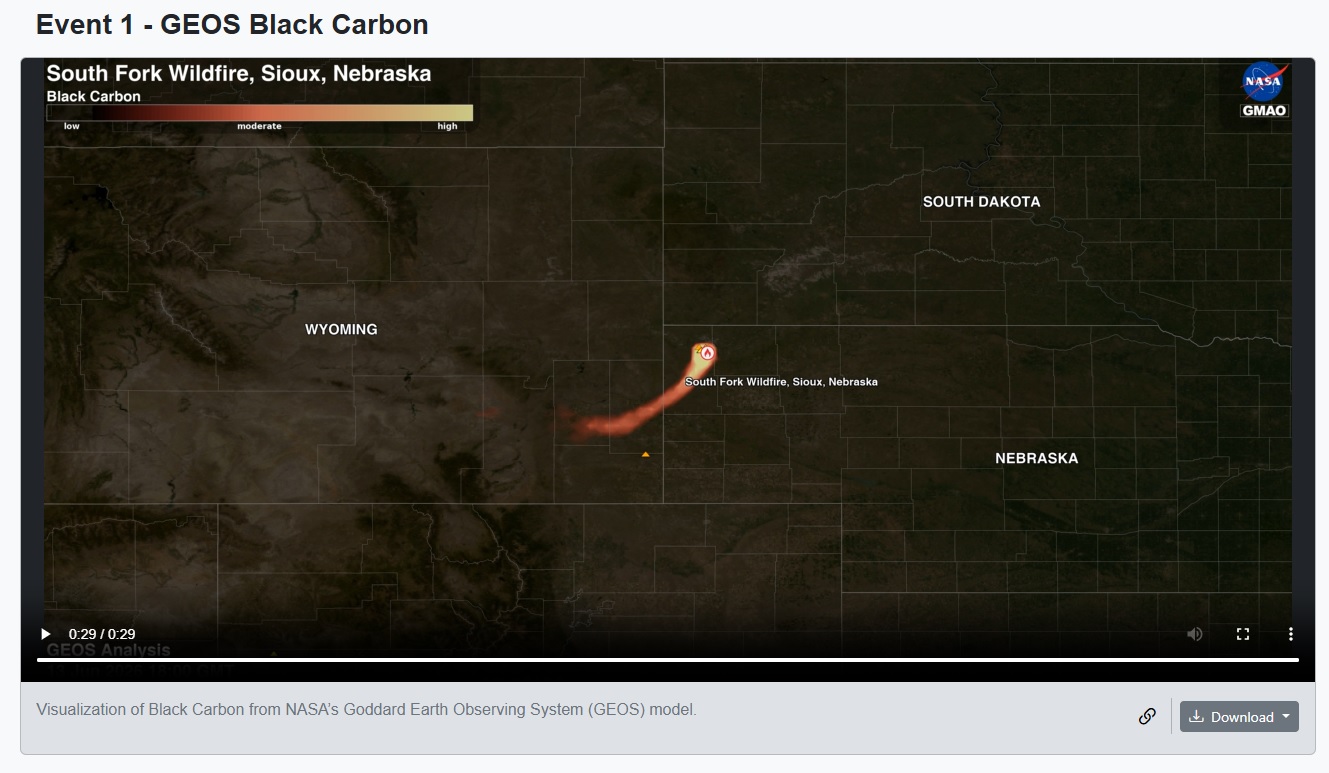
NASA publishes “Daily Visualizations of the Largest Wildfires in the US“. These are satellite videos of big wildfires. It’s amazing the heat and extent of a wildfire that can be picked up from space. Here’s a screenshot of the South Fork fire in Sioux, NE. Click on the link for the latest videos.
For the future, NCAR is developing a “hyperlocal wind forecasting” model. Watch the video with NCAR scientist James Pinto here.
Note: in the past we recommended AirNow.gov to see where the smoke plumes were. Now they seem to just report fire locations. InciWeb is a better resource for wildfire locations.
Conclusion:
To keep your tech ready for wildfire season, it’s crucial to have a plan. Talk with your family and make sure each person in your household is prepared. And please share this with friends and family who may find this useful too.
INFORMATION ABOUT GEEK FOR HIRE, INC.
Chris Eddy of Geek For Hire, Inc. has provided computer service to families and small businesses with Mac’s and PCs for the past eighteen years. Angie’s List and the BBB rate Geek For Hire very highly. You can find more on our website, or give us a call. Geek For Hire, Inc. provides onsite service (Tier 3 support) to the Denver / Boulder / Front Range area and remote service throughout North America.
We’ve been using Amazon Prime for the past few years. We like the free and fast shipping. With Prime, we have access to online streaming too. You can get a free 30-day trial by clicking on this link: Try Amazon Prime 30-Day Free Trial. As an Amazon Associate, we earn from qualifying purchases.
