Screen Time – Managing time on your Mobil Devices

Recently I was out to dinner with a couple of friends.  During almost the entire evening at least one of them had their nose in their phone.  They were responding to texts/private messages, or answering a phone call, or listening to voice mails, or responding to emails.  I was appalled by their lack of manners, not just to me, but to each other! Several of these friends are also obsessed with the news.  When I pressed them on it, they didn’t seem to think they had spent that much screen time and that it wasn’t disruptive. I wondered to myself just how much time they were actually spending on their phone.

And then I started wondering how much time /I/ actually spend on my phone!

What is Screen Time?

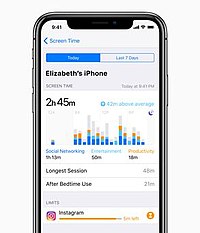
Well, lucky me, because the next iOS for my iPhone and iPad will be available in September and includes a new app called “Screen Time”. I’ve signed up for the beta version of iOS 12 to try it out. Of course I’m installing it on my iPad and not my iPhone.  I use my iPhone extensively for business.  If my iPhone were to be suddenly unavailabe, I’d be up a creek without a paddle! So far, here is what I have found:screen time

  1. Although I installed Screen Time on my iPad, it says that it is providing results for “All Devices”.  Since I generally use the same apps on my phone and my tablet, I wasn’t really sure if it was showing results for both.  I did a little test and played a game on my phone that is not on my iPad.  The time I spent playing that game did not show up on the results.  In addition, it said I picked up my “phone”, on average, every 22 minutes.  Again, it is showing results for the iPad.
  2. Since I don’t use my iPad that much, and when I do, it is primarily for entertainment, the results are a little skewed.  Once I install iOS 12 on my iPhone, I’ll have a better idea of how I’m actually using my devices.
  3. I do like that it tells me where I’m spending my time: Productivity, Social Networking, Entertainment, and Games.

Helpful hints:

Are you concerned about how much time you are spending on your mobile devices? Telling yourself to just put it down isn’t really much help. Here are some things I have found helpful on my iPhone:

  1. Putting my phone in another room during meals.  I can still hear it ring, and if it is important, I can easily get up
  2. Turning off all notification sounds.  In Settings, select “Notifications”.   Then you can go through the list of all of your apps one by one.  Which of these apps should be allowed to interupt you with notifications?  Which should not?
  3. If I really don’t want to be disturbed, I turn the ringer off.  My phone still communicates with my Fitbit watch, so when someone is calling I get a notification on my watch.  Again, if it’s important, I can easily get up. If I really, really don’t want to be disturbed, I will take off my Fitbit.
  4. Changing my iPhone to greyscale.  It is a much less attractive distraction when there is no color involved.  In Settings, select General, then select Accessibility.  Scroll to the bottom of that screen and select “Accessibility Shortcut”. Click on “Color Filters”.  Then triple tap the home button to make your iPhone greyscale.  Triple tap again to bring the color back.
  5. Use a timer.  If you do want to check social media but want to make sure you’re not spending two hours catching up with your Facebook friends, set a timer.  It’s best if you set it in a different room.  For example, if I’m in my home office, I can set the microwave timer.  That provides me with a persistent reason to get up and head to the kitchen to turn off the timer!

Screen Time for Kids:

Screen Time will also allow you to restrict your children’s use of their iPhone and iPad.  I would suggest trialing Screen Time for yourself first. Then you’ll know how best to introduce it to your kids.


Chris Eddy of Geek For Hire, Inc. has been providing computer service to families and small businesses with Mac’s and PCs for the past fifteen years. His company is highly rated by both the BBB (Better Business Bureau) and by Angie’s List. You can find more on our website, or give us a call 303-618-0154. Geek For Hire, Inc. provides onsite service (Tier 3) to the Denver / Boulder / Front Range area as well as remote service throughout North America.

We’ve been using Amazon Prime for the past few years.  We like the free 2-3 day shipping and the online streaming. I haven’t tried the Kindle lending library yet.  I’ll try that next!   Prime is normally $119/year ($59 for students!), but you can try it for 30 day for free by clicking on this link: Try Amazon Prime 30-Day Free Trial (Any links to products or services in this post may be affiliate links. If they are, we may receive a small commission when you click on it. Rest assured, your price will be the same!)  If you’d like to receive our newsletters in your email, please click here.

Tech News – What We’re Watching

There sure has been a lot going on in the technology world.  Here’s some of the tech news I’ve been reading about:

Facial Recognition is back in the news.  Between China and Facebook, it is something we all need to be aware of.Tech News - Year In Review

  • This article in the Sunday New York Times gives an overview of how facial recognition is being used in China.  From catching criminals to just keeping track of people, their system is pretty impressive.  “Beijing is embracing technologies like facial recognition and artificial intelligence to identify and track 1.4 billion people.”
  • This article reminds us to stop taking selfies if we want to stay out of facial recognition databases.  “A 2016 Georgetown University study found that one in two American adults, or 117 million people, are in facial recognition databases with few rules on how these systems may be accessed.”
  • If you want to turn off fingerprint or facial recognition on your smartphone you should read this article.

Next Monday is Amazon Prime Day and all the tech news outlets want you to know what the best deals are.  Remember to still check the internet to see if you can get a better deal on that coveted item from somewhere else – Best Buy, Target, etc.

  • You do need to be a member of Amazon Prime in order to take advantage of these deals.  Check out this link to Try Amazon Prime for a 30-Day Free Trial. If you don’t like the benefits, remember to cancel before the 30 day trial is up!
  • There are some tips in this article to help you take the best advantage of Prime Day.
  • Then there is always eBay which is also offering great deals next week.
  • And these 10 stores will price match Amazon all year long!

July and August are great times to travel.  Here are some Tech Tips to make international travel easier.

  • Remember to check with your phone carrier before making an international trip.  They will probably be able to offer you special plans for the duration of your trip.
  • Here are some tips to unplug from tech while you are on vacation.  My personal favorite is the nuclear email option!
  • Remember to set your Dropbox so that it automatically uploads your photos to the cloud.  That way, if you’re taking the perfect picture at the ocean, and a wave destroys your phone, you’ll still have most of the photos saved.  (Dropbox does need wifi in order to upload any videos.)
  • And, please don’t use all of your data!  Here are some tips to help you conserve your data plan.

Some of our favorite sites for tech news include Wired, Fast Company, arsTechnica, and C|Net.  Check them out!


Chris Eddy of Geek For Hire, Inc. has been providing computer service to families and small businesses with Mac’s and PCs for the past fifteen years. His company is highly rated by both the BBB (Better Business Bureau) and by Angie’s List. You can find more on our website, or give us a call 303-618-0154. Geek For Hire, Inc. provides onsite service (Tier 3) to the Denver / Boulder / Front Range area as well as remote service throughout North America.

We’ve been using Amazon Prime for the past few years.  We like the free 2-3 day shipping and the online streaming. I haven’t tried the Kindle lending library yet.  I’ll try that next!   Prime is normally $119/year ($59 for students!), but you can try it for 30 day for free by clicking on this link: Try Amazon Prime 30-Day Free Trial (Any links to products or services in this post may be affiliate links. If they are, we may receive a small commission when you click on it. Rest assured, your price will be the same!)  If you’d like to receive our newsletters in your email, please click here.

New Tablet Instead of a laptop? Here’s What To Look For

Updated January 2025.

Face it. You’ve been thinking about getting a new tablet.  You’re only using your personal computer for email, social media, and movies. Now, I’m not talking about the machine you use for work.

When you get home at the end of the day though, your computing needs change. You don’t need to create a database or a white paper or even a simple spreadsheet.

You’re sending photos to your brother, or writing a thank you email to your Aunt or posting an old bookcase for sale in your local Facebook group.   You can do all of that on your phone.  You would hardly ever power up your Mac or PC  if it weren’t for your eyes!

What does this mean for you?  If you’ve been thinking about replacing your older computer, start thinking about getting a tablet instead of another computer.  There are a number of good tablets out there, and you’ll save some money by choosing a tablet over a laptop or desktop.

Important!

If you are thinking about replacing your computer, please remember to back up all of your data.  Do it now!  If you’ve stopped using it regularly, you may not remember about all the precious photos you have on that machine until it is too late.

What should you look for when getting a new tablet?New tablet

Operating System (OS):

First, which operating system are you most comfortable with?  Which apps do you like and which OS do those apps work with?  Your choices here are iOS, Windows, and Android.  If you have an iPhone, you may be most comfortable with an iPad.

Cell Service:

Do you expect to only use your tablet in locations that have reliable WiFi? If not, take a look at tablets that provide cell service. This has been handy when out on the road using the mapping function.

Battery Life:

If there is one thing that bugs me, it is having to recharge a device after only a short period of time being used. Take a close look at how long each new tablet is expected to last on its battery.

Screen Size:

Screen size and weight go hand in hand.  Do you want something that fits easily into your backpack without being too cumbersome?  The most common screen size is around 11″.  In that size, your new tablet could weigh about one to 1 1/2 pounds.

Storage:

If you’ll be storing a lot of photos or music on your tablet, get the biggest size you can afford.  Tablets normally run in sizes from 128gb, 512gb, and 1 TB. Other than screen size, this is the one thing that will really bump up the price.

Camera:

Will you be taking a lot of photos with your new tablet? Or will you continue to primarily use your phone for photos? Will you use your tablet for Zoom or FaceTime calls? Think about the quality of the camera. Most tablets have cameras with 8 to 13 megapixels.

Price:

Most tablets are currently selling for $150 to $800.  Make sure you know what is important to you, what you absolutely need, and what you can live without.

Think about:

I got the Apple pencil and Magic keyboard when I got my last iPad. The keyboard/case is a godsend! I hardly ever use the pencil.


INFORMATION ABOUT GEEK FOR HIRE, INC.

Chris Eddy of Geek For Hire, Inc. has provided computer service to families and small businesses with Macs and PCs for the past twenty-plus years. You can find more on our website or give us a call. Geek For Hire, Inc. provides on-site computer repair service (Tier 3 support) to the Denver / Boulder / Front Range area and remote PC and Mac service throughout North America.

We’ve been using Amazon Prime for the past few years.  We like the free and fast shipping.  With Prime, we have access to online streaming, too. You can get a free 30-day trial by clicking on this link: Try Amazon Prime 30-Day Free Trial. As an Amazon Associate, we earn from qualifying purchases.

More Tips Here:

Tagged

Router Virus aka VPNFilter Malware

The Router Virus

Have you heard in the past few weeks about the router virus that is impacting hundreds of thousands of routers?  The FBI even issued a report recommending that everyone reboot their routers because:

“Foreign cyber actors have compromised hundreds of thousands of home and office routers and other networked devices worldwide.”

Over the past week or so, we’ve been getting calls from our customers who are very concerned about the router virus they keep hearing about.  And they’re right to be concerned.  The malware has been programmed into hundreds of thousands of routers. Big deal, right?  Because I don’t run any programs on my router, I’m protected, right?  I don’t store any of my data on my router.  It’s just that black box that sits in the corner that brings my WiFi signal from my ISP to my tablet. Completely harmless, right?

What can go wrong?

Harmless? Well, no.  This particular router virus can make your router inoperable.  Even worse, it can collect any information passing through the router. And then it could possibly collect your ID and password for your bank account.

How do you protect yourself?

The FBI is recommending that you reboot your device and then upgrade to the latest firmware.  You should also change the router password to a super-super secure password.

How do you reboot your router?The Router Virus aka VPNFilter Malware

Rebooting your router is just like rebooting your computer.  Unplug the router (or turn it off if the on/off switch is clearly marked), Wait 30 seconds, then plug it back in.

Will a reboot of the router always work?

Several privacy and security companies are saying that a reboot does a partial job.  Apparently, a router has two kinds of memory: Volatile and non-volatile memory.  Sometimes the router virus will also write data to the non-volatile memory too.  A reboot will clear volatile memory only.  In order to clear non-volatile memory, you’ll need to reset your router.

Should I reset my Router instead?

A router reset is more complicated than just turning the device off and on.  You’ll need to enter certain information and then follow certain steps. ESET (the company we like for antivirus software) has provided instructions for performing the reset.  You can find them in this article.

Which routers have this virus?

ESET has published a list of routers known to be infected with the router virus.  There are probably many others and the best thing would be for you to reboot your router regardless of which model you have.  Here is the list from ESET:

  • “Asus: RT-AC66U, RT-N10, RT-N10E, RT-N10U, RT-N56U, RT-N66U
  • D-Link: DES-1210-08P, DIR-300, DIR-300A, DSR-250N, DSR-500N, DSR-1000, DSR-1000N
  • Huawei: HG8245
  • Linksys: E1200,  E2500, E3000, E3200, E4200, RV082,  WRVS4400N
  • Mikrotik: CCR1009,  CCR1016,  CCR1036,  CCR1072, CRS109, CRS112, CRS125, RB411, RB450, RB750, RB911, RB921, RB941, RB951, RB952, RB960, RB962, RB1100, RB1200, RB2011, RB3011, RB Groove, RB Omnitik, STX5
  • Netgear: DG834, DGN1000,  DGN2200, DGN3500, FVS318N, MBRN3000,  R6400,  R7000,  R8000,  WNR1000,  WNR2000, WNR2200, WNR4000, WNDR3700, WNDR4000, WNDR4300, WNDR4300-TN, UTM50
  • QNAP: TS251, TS439 Pro, Other QNAP NAS devices running QTS software
  • TP-Link: R600VPN, TL-WR741ND, TL-WR841N
  • Ubiquiti: NSM2, PBE M5
  • Upvel: according to Talos, malware targeting Upvel as a vendor has been discovered, but researchers have not yet determined which devices are targeted.”

Will you reboot your router or reset it?

If you decide you want to “re-set” your router rather than “reboot” it, let us know if you need help.

Information about Geek For Hire, Inc.

I’ve created a Free Report to protect you from “phishing” scams. Click here to receive it!

Chris Eddy of Geek For Hire, Inc. has been providing computer service to families and small businesses with Mac’s and PCs for the past eighteen years.  His company is highly rated by both the BBB and by Angie’s List.  You can find more on our website, or give us a call 303-618-0154. Geek For Hire, Inc. provides onsite service (Tier 3) to the Denver / Boulder / Front Range area as well as remote service throughout North America.

We’ve been using Amazon Prime for the past few years.  We like the free and fast shipping.  With Prime, we have access to online streaming too. Prime is usually $119/year, but you can get a free 30 day trial by clicking on this link: Try Amazon Prime 30-Day Free Trial. As an Amazon Associate, I earn from qualifying purchases.

Privacy Policy and the EU’s GDPR

Privacy Policy Overload

Oh. My. Goodness!  Another Privacy Policy in my email inbox!  What is going on? And why is every single company all of a sudden updating their Privacy Policy?!

Well, the European Union has just enacted a new law called the General Data Protection Regulation.  The GDPR governs what companies can do with your data. It also governs how they can ask you for your consent to those new policies.  Right now it is only in effect in the EU, but so many companies have a global presence that they do need to make sure they are in compliance.

In my opinion, this could not have come at a better time.  It seems to me that so many companies are just running roughshod on our information.  It is perfectly reasonable to ask:

  1. Who has my data – my email, my age, my address, my phone, my likes, etc.?
  2. What are they doing with my data?

GDPR

Under GDPR, and if you live in the EU, companies must disclose in their Privacy Policy, what data they are collecting and retaining about you, AND, receive your direct permission to do this.  You can also request the data that a company has compiled about you.  It is only a matter of time before something similar to GDPR goes into effect globally, so many US companies are jumping the gun to update their Policies and Procedures now.  However, it doesn’t appear that US companies are actually providing that info to people in the US.  They do need to comply if the person lives in the EU.   There was an interesting article in the NY Times last week where two journalists, one in the US, and one in Britain, requested their data from a number of different tech firms.  The difference in the data provided to each was astounding.  From one source, the person in the US received one piece of data.  The person in the UK received 543 lines of data!privacy policy

As far as I can see, Twitter has made it relatively easy to get all of your data from them.  Click on your account, then on “Settings and Privacy”.  Near the bottom, you can click on “Request Your Archive”.  You’ll receive an email when the archive is ready to be downloaded.

Did you recieve an updated Privacy Policy or two?  How many?! Did you read any of them?  Let us know!


Chris Eddy of Geek For Hire, Inc. has been providing computer service to families and small businesses with Mac’s and PCs for the past fifteen years. His company is highly rated by both the BBB (Better Business Bureau) and by Angie’s List. You can find more on our website, or give us a call 303-618-0154. Geek For Hire, Inc. provides onsite service (Tier 3) to the Denver / Boulder / Front Range area as well as remote service throughout North America.

We’ve been using Amazon Prime for the past few years.  We like the free 2-3 day shipping and the online streaming. I haven’t tried the Kindle lending library yet.  I’ll try that next!   Prime is normally $119/year ($59 for students!), but you can try it for 30 day for free by clicking on this link: Try Amazon Prime 30-Day Free Trial (Any links to products or services in this post may be affiliate links. If they are, we may receive a small commission when you click on it. Rest assured, your price will be the same!)  If you’d like to receive our newsletters in your email, please click here.

3 Best Routers – Does Your WiFi Reach Into Your Yard?

Best Routers

We’ve been getting a lot of questions about routers recently.  What are the best routers?  How do I get the most secure router?  My internet is super fast – can I get a router that is super-fast too? Of course, Chris has his favorites, but I thought it would be good to head over to Amazon to find the very best routers with top ratings. So I looked for a router which has at least 100 reviews with an average rating above four stars. I’ve also copied an actual review of these three best routers.  (Full disclosure – if you buy something using these links, Geek For Hire may earn a small commission at no increase in cost to you.) See the bottom of this page for Chris’ favorites.

eero Home WiFi System (4.6 Stars / 1,536 Reviews)

Ok, I will admit that I bought these with the full intention of probably having to send them back. Through the years I have tried several different systems to put good wireless throubest routers - eeroghout our 3-story home. I’ve used several different routers, and have had an Apple AirPort Extreme and two Airport Express’ running (which still provide the backbone in the house for our less needy machine system). But nothing I did could get a good signal into the master bedroom in the back of the house, especially with the main router being in the home office upstairs on the other side of the house. My better half constantly let me know I was a poor excuse of a Network Engineer when she wasn’t even able to watch the latest Korean drama in peace while laying in bed.  Unpacking – simple and clean. … Once I had all the Beacons set up I went through the house trying to find a weak spot or dead spot. Couldn’t find one – not one! Guess I won’t be sending this stuff back after all. Sure put a smile on my better half’s face! Oh, and is this thing FAST!!!

NETGEAR Nighthawk Pro Gaming WiFi Router (4.6 Stars / 244 Reviews)

“Being a casual gamer with a DSL connection in today’s world is a real disadvantage. My ping speeds were in the 190s prior to this routbest routers - netgearer. After using the geo filter and anti buffer bloat they dropped into the 20s!!!! Yes, the 20s. Only having 10 MBps, the traffic prioritisation is a must have. I put my PS4 at the top of the list and if somebody decides to fire up youtube while I’m playing its not an issue anymore. This is a game changer. But the real benefit is the DUMA OS. It is perfect for a novice like myself to manage my home network however I want. Kid wont put down the IPad and take out the trash? No problem, one click and that IPad is offline. Want to block sites for certain devices? Done. There are super technical things you can do on this but I’m too scared to mess with those so I don’t. It seems like a lot of money but once you realize the benefits of this you’ll wish you’d have done it sooner.

Linksys Velop Tri-band Whole Home WiFi Intelligent Mesh System (4.5 Stars / 1,656 Reviews)

“I replaced my Apple Airport Extreme with this. It felt like a better experience for Wi-Fi in my house was possible. I HAD best routers - linksysNO IDEA how much better it could be. I bought a SINGLE Velop node and it covers my entire home better than the Airport Extreme *combined* with an Airport Express did. I will likely need a second Velop node come summer to reach our back yard, but my entire house is now completely covered. It gives FULL download speeds from my modem (350Mbps) and I could not be happier. I researched all the Mesh systems out there (Google, Eero, etc.,) and this one seemed the way to go. Of course I didn’t buy the others, but I am VERY VERY happy with the Velop and will recommend it to everyone who asks me about home Wi-fi.

What do you consider the Best Router?

What are Chris’ favorites?

The following are the routers and mesh routers that Chris likes the best:

WiFi Mesh Routers

These ORBI WiFi mesh routers are ideal if you have a medium to large house, and one stand-alone router doesn’t provide enough WiFi coverage.  These mesh routers are ideal for “pushing” the WiFi coverage through your house, and have a separate WiFi radio for the dedicated “back haul” that provides low latency and high bandwidth.  If you have a medium sized house or larger, and have internet service that is faster than 300Mbps, these WiFi mesh routers are the best solution that I know of.

ORBI RBK50 (2 Pack, AC3000) $325 from Amazon

ORBI RBK53 (3 Pack, AC3000) $450 from Amazon

Routers

These stand-alone WiFi (Not Mesh) routers will provide good WiFi signal and network performance for small to medium sized homes and offices:

Linksys AC5400

New from Amazon $400

Used from Amazon $200

New from Best Buy $350

Netgear AC3200:

New from Amazon: $250

New from Best Buy: $250

Netgear Nighthawk AC4000:

New from Amazon: $280

New from Best Buy: $280

Netgear Nighthawk AX6000 (this looks like a manta ray):

New from Amazon $400

New from Best Buy $400


I’ve created a Free Report to protect you from “phishing” scams. Click here to receive it!

INFORMATION ABOUT GEEK FOR HIRE, INC.

Chris Eddy of Geek For Hire, Inc. has provided computer service to families and small businesses with Mac’s and PCs for the past eighteen years. Angie’s List and the BBB rate Geek For Hire very highly.  You can find more on our website, or give us a call 303-618-0154. Geek For Hire, Inc. provides onsite service (Tier 3 support) to the Denver / Boulder / Front Range area and remote service throughout North America.

Here’s a link to our Covid19 Policy.

We’ve been using Amazon Prime for the past few years.  We like the free and fast shipping.  With Prime, we have access to online streaming too. Prime is usually $119/year, but you can get a free 30-day trial by clicking on this link: Try Amazon Prime 30-Day Free Trial. As an Amazon Associate, we earn from qualifying purchases.

If you’d like to receive our newsletters in your email, please click here.

Scam Phone Calls – One Simple Thing To Protect Yourself

Scam Phone Calls:

We’re getting more calls for technical support from people who have fallen for one of the scam phone calls. They receive the call, and let the “tech” from “Microsoft” or “Dell” gain access to their machine. Or, the “tech” asks them if they have a particular file on their machine, and then express concern and alarm when the person says “Yes I do have that file.  Is that bad?”  Of course, this is a file that every Windows machine must have to function, but the average person doesn’t know that. These people are highly skilled in the art of persuasion.  They are very convincing. This is their job, and they won’t want to let you go.

And, it’s not your imagination.  These “bad operators” are stepping up their activity.  Even Microsoft has recognized the problem.  Virus headlines like these keep coming across my newsfeed.

And here are two articles who recognized the scam and played along:

scam phone calls
Phone Operators

From the Microsoft website:

“It is a SCAM!!! Microsoft does not do that nor do they have partners who do that nor do they hire sub-contractors or people or even get volunteers to do that. There are probably thousands of such companies out there doing this every day.”

One Simple Thing to Protect Yourself From Scam Phone Calls:

Remember that Microsoft, or Google, or Dell, or anyone else won’t call you to tell you have a virus.  Those phone calls are always scams.  So, there really is just one thing you can do to protect yourself. Hang up!  These folks are well-practiced and very convincing.  Hang up!

Apple Scam Phone Calls:

Sorry, Mac users.  It’s only a matter of time before you start getting targeted too.  As more and more people transition to Mac’s, they won’t let you out of the fun. Your solution is the same.  Hang up!

If you do allow access:

If you do allow the scammer access to your computer, run your anti-virus as soon as you realize your mistake.

Be careful with who you allow to access your machine. Hang up if your spider sense starts tingling.

Chris Eddy of Geek For Hire, Inc. has been providing computer service to families and small businesses with Mac’s and PCs for the past fifteen years. His company is highly rated by both the BBB (Better Business Bureau) and by Angie’s List. You can find more on our website, or give us a call 303-618-0154. Geek For Hire, Inc. provides onsite service (Tier 3) to the Denver / Boulder / Front Range area as well as remote service throughout North America.

We’ve been using Amazon Prime for the past few years.  We like the free and fast shipping.  With Prime, we have access to online streaming too. Prime is usually $119/year, but you can get a free 30-day trial by clicking on this link: Try Amazon Prime 30-Day Free Trial. As an Amazon Associate, I earn from qualifying purchases.

If you’d like to receive our newsletters in your email, please click here.

Streaming Music Apps – Part 1

Streaming Music Apps

I’ve used Pandora for streaming music for years. Whether I’m on a road trip or just driving to Staples, it’s been easy and convenient.  Recently though, I’ve been hearing more about Spotify.  And that set me to wondering what other streaming music apps are out there. I wanted to find out what other options I have.  Are these other apps free? How many commercials do I have to listen to? And what are my options for commercial free streaming? (Please note that some of the links included may be affiliate links.  If you click on them, Geek For Hire may receive a small commission.)

Research:

c|net is a website that I’ve liked for a while as it gives good explanations to technical subjects.  Naturally I looked to see if they’ve done any research on this subject as a place to start.  In a recent article, they listed their top six streaming music apps:streaming music apps

  • Spotify
  • Apple Music
  • Tidal
  • Amazon
  • Pandora
  • Google Play

Pandora:

Since I’ve used Pandora for years, I already know what I like about it.  Streaming music is free (as long as I listen to commercials every five or six songs). I’m able to choose songs I like or don’t like via the thumbs up/down buttons. I can search for and find music I like, even the first CD recording from a local band. While I don’t really like the commercials, I do like that Pandora will occaisionally give me the option to watch a longer video for an hour of commercial free play. I also don’t like that you are allowed only so many thumbs down clicks per hour.  But all-in-all, it’s worked well for me, for years.  Pandora Streaming Music

Google Play:

Of the other five that c|net mentioned, I tried Google Play first.  Since it’s Google, I easily signed in with my Google login info. There are two options: the Indivicual plan for $10/month and the Family plan for $15/month for six people.  Both come with the first 30 days free. I clicked on “No thanks” and moved on.  There were a number of playlists available on the first screen.  Since none of those appealed to me, I quickly typed a favorite band into the search box and clicked the play button.

I noticed right away that there are the same thumbs up and down buttons I am used to on Pandora. Once the music was playing, I switched back to the Notes app on my iPad, and continued listening as I typed.  When the first song was done, another song, in the same genre but different band started playing.  So far, so good.  And also, so far no commercials!  (We’re on song number six now with no commercials and only one earned a thumbs down so far!)  Google Play Free Trial.

Conclusions:

Check back next week for my review of the remaining four streaming music options and my favorite choice.

Chris Eddy of Geek For Hire, Inc. has been providing computer service to families and small businesses with Mac’s and PC’s for the past fifteen years. His company is highly rated by both the BBB (Better Business Bureau) and by Angie’s List. You can find more on our website, or give us a call 303-618-0154. Geek For Hire, Inc. provides onsite service (Tier 3) to the Denver / Boulder / Front Range area as well as remote service throughout North America.

We’ve been using Amazon Prime for the past few years.  We like the free 2-3 day shipping and the online streaming. I haven’t tried the Kindle lending library yet.  I’ll try that next!   Prime is normally $99/year, but you can try it for 30 day for free by clicking on this link: Try Amazon Prime 30-Day Free Trial

Private Search Engines & Your Internet Safety

When we first started using Google, who would have thought that we’d want Private Search Engines in 2018? Privacy on the internet is something we used to take for granted. No one knew that we were logging into weird sites or making questionable purchases.  That’s all changed now.  Google tracks us.  Facebook tracks us. Even Amazon knows that we bought those pink Ugg boots at Marshalls.

Last year I learned about a search engine that doesn’t track our searches. I have installed it on my phone, my tablet, and my laptop.  It was easy to do.  While my level of trust with technology is somewhat lower than it was five years ago, I do feel good about using DuckDuckGo.

But as I started researching this article, I wondered what other search engines are out there. It turns out that there are several from which to choose.

PRIVATE SEARCH ENGINES:

DuckDuckGo

DuckDuckGo is the one of the first private search engines I became aware of.  I found that the app was easy to install on all of my devices.  I like their privacy policy which is described on their website:Private Search Engines

DuckDuckGo does not collect or share personal information. That is our privacy policy in a nutshell.”

However, SearchEncrypt doesn’t think DuckDuckGo is as secure as it could be.  Here’s a description of its major flaw on the SearchEncrypt website:

DuckDuckGo is a private search engine. It is adamant about spreading privacy around the internet. However, there is one issue we discovered that raises privacy concerns. Your search terms, while they may be sent over your network in an encrypted form, show up in plain text in browsing history.  DDG may work well for reducing advertiser tracking, avoiding filter bubbles, and limiting data profiling, however as this post explains, it may not offer the protection from surveillance organizations that some think.”

StartPage:

StartPage was originally developed in New York as the Ixquick private search engine.  It was then acquired by a Dutch company and so most of its growth was in Europe.  Now, they are becoming more well known around the world, including the US. They do utilize Google to get their results. I like how they define “Personal Information”

“Information is regarded as personal when it tells something about a human being who is or can be (uniquely) identified.
This definition stems from European law, which applies to StartPage, and is intentionally broad in order to provide a high level of privacy protection. This means, for example, that not just names and e-mail addresses can be personal information, but also numbers or other identifiers, such as your IP-address, to the extent that they link other information to a specific human being.”

SearchEncrypt:

According to HackerNoon, this is a newer edition to the private search engines. But SearchEncrypt is gaining users.  Here is HackerNoon‘s description:

“This private search engine uses local encryption to secure your searches. It combines with AES-256 encryption with Secure Sockets Layer encryption. Search Encrypt then retrieves your search results from its network of search partners. After you’re done searching, your search terms expire so they are private even if someone else has access to your computer.  Search Encrypt is a relatively new addition to this list, but it is growing quickly. Its Alexa Traffic Rank of 878 indicates that it receives millions of visitors daily.”

More About Private Search Engines:

If you’re looking for other private Search Engines, you can find a few listed in this article.

How do you do your Internet searches?  Are you using Google, Yahoo!, or something else?

Chris Eddy of Geek For Hire, Inc. has been providing computer service to families and small businesses with Mac’s and PCs for the past fifteen years. His company is highly rated by both the BBB (Better Business Bureau) and by Angie’s List. You can find more on our website, or give us a call on 303-618-0154. Geek For Hire, Inc. provides onsite service (Tier 3) to the Denver / Boulder / Front Range area as well as remote service throughout North America.

We’ve been using Amazon Prime for the past few years.  We like the free 2-3 day shipping and the online streaming. I haven’t tried the Kindle lending library yet.  I’ll try that next!   Prime is normally $99/year, but you can try it for 30 days for free by clicking on this link: Try Amazon Prime 30-Day Free Trial

(Any links to products or services in this post may be affiliate links. If they are, we may receive a small commission when you click on it. Rest assured, your price will be the same!)


Spear Phishing – What to look for

I learned a new term today.  Spear phishing.  I’ve talked about phishing before in several blogposts, but spear phishing was a totally new term to me. As you might have guessed, it’s just like phishing, but way more targeted.  They’ve got enough information about you to make you think they are legit.  And that seems to be enough for you to fall for their schemes and give them even more information about you.  But don’t fall for it!

There are several commonly used techniques including:spear phishing

  1. Flattery
  2. Trusted Source
  3. Social Engineering

Spear phishing via flattery:

This is when someone contacts you, either via an email, text, or other direct message.  The message is from someone that you admire.  They compliment you and ask you for some sort of assistance.  Once you fall for the deception, they’ll ask for more and more of your personal information.  In this article from Wired, the author actually provided her Twitter information, including her password.  Here’s a short blip of her story:

“A few weeks ago, I got a direct message on Twitter from one Larry Summers. Yes, the Larry Summers, if that nasty little aquafresh checkmark beside @LHSummers was to be believed.  Larry Summers of Harvard. Larry Summers of the World Bank. Larry Summers of the Treasury Department, for the love of god.”

Now that you know the end of the story, you can see where this is going. But, if you had been a fan of Secretary Lawrence Sanders, you might have been fooled too.

Spear phishing via a “Trusted Source”:

In this case, you receive an email from (what appears to be) someone you know. Most likely it is a work colleague, someone that you have corresponded with in the past.  They’d like you to take a look at a document (which they have conveniently attacthed) before it gets published.  Or, they’ve forgotten the password to access the company database for a specific file.  It all seems very inocuous, and, because it is from someone that you trust, you fall for the bait.

Spear phishing via Social Engineering:

Social Engineering requires that the “spear phisher” do a bit of research about the target.  They’ll learn the person’s title, the name and title of their boss, the name or subject of the person’s current project, maybe the name of one or two of their subordinates.  Then they will send an email which appears to be from a company the target is working with.They’ll make a specific request, adding enough personal information to be believable.

How do you protect yourself from Spear phishing?

  1. Don’t click on links until you have verified the end target of that link.  Is it going to companyname.com or companynome.com?  Tricky, right?  Look carefully!
  2. Don’t open any documents in an email until you have confirmed with your colleague that they actually sent it.
  3. Don’t call the phone number or reply via the information included in the message.  Use a phone number or email that you already have on file for that person.

Have you been the target of a spear phishing attack?  How did you deal with it?  Did you fall for their deception?  Let us know in the comments below!

Chris Eddy of Geek For Hire, Inc. has been providing computer service to families and small businesses with Mac’s and PC’s for the past fifteen years. His company is highly rated by both the BBB (Better Business Bureau) and by Angie’s List. You can find more on our website, or give us a call 303-618-0154. Geek For Hire, Inc. provides onsite service (Tier 3) to the Denver / Boulder / Front Range area as well as remote service throughout North America.

We’ve been using Amazon Prime for the past few years.  We like the free 2-3 day shipping and the online streaming. I haven’t tried the Kindle lending library yet.  I’ll try that next!   Prime is normally $99/year, but you can try it for 30 day for free by clicking on this link: Try Amazon Prime 30-Day Free Trial

(Any links to products or services in this post may be affiliate links. If they are, we may receive a small commission when you click on it. Rest assured, your price will be the same!)

Tagged