STEM Toys for Kids

We don’t have kids in our home anymore, so when I want a gift for a little one, I go online. We’re a tech company. My favorite gift is almost always STEM toys for kids. (Science, Technology, Engineering, and Mathematics) Generally, I’ll research to see which toys have won awards, which are well-liked by parenting magazines, which are highly rated online, and which my friends or family may have told me about.

Yup, I’ve done the work, so you don’t have to! And, so you know, if you purchase anything from the links on this page, we may receive a small commission. As an Amazon Associate, we earn from qualifying purchases. I first published this in 2021, but the idea hasn’t changed. STEM toys are still good for kids!

Why are STEM toys good for kids?

STEM toys help kids develop a love of learning while they figure out how things work. Some people think that STEM is only about teaching kids how to code, but it is so much more than that. These toys help kids develop:

  • Spatial awareness
  • Reasoning skills
  • Engineering thinking
  • Critical thinking skills
  • Engineering design
  • Problem-solving skills

Think about an infant playing on the floor with pots and pans. Can this bowl fit into this pot? Can this pot go on top of this plastic container? How high of a tower can I make with all of these cookbooks? That’s the learning process in action! STEM toys build on that early learning.

Screenshot of a colorful marble run from Amazon

What are examples of STEM toys?

Learn more about the benefits of STEM toys for your kids:

INFORMATION ABOUT GEEK FOR HIRE, INC.

Chris Eddy of Geek For Hire, Inc. has provided computer service to families and small businesses with Mac’s and PCs for the past twenty-plus years. You can find more on our website, or give us a call. Geek For Hire, Inc. provides onsite service (Tier 3 support) to the Denver / Boulder / Front Range area and remote service throughout North America.

We’ve been using Amazon Prime for the past few years.  We like the free and fast shipping.  With Prime, we have access to online streaming, too. You can get a free 30-day trial by clicking on this link: Try Amazon Prime 30-Day Free Trial. As an Amazon Associate, we earn from qualifying purchases.

More Tips Here:

Holiday Phishing Scams? Here are Four Ways to Protect Yourself

The winter holidays are coming up fast. We’re stretched thin. We’re planning trips to relatives for holiday meals, planning a holiday party for our work buddies, checking out the kid’s plays and concerts at school, shopping for gifts, and on and on and on.

And the scammers know it. They’re planning Phishing Scams.

Screenshot of Phishing definition from NIST: A technique for attempting to acquire sensitive data, such as bank account numbers, through a fraudulent solicitation in email or on a website, in which the perpetrator masquerades as a legitimate business or reputable person.
             Definition of Phishing from the National Institute of Standards and Technology (NIST)

Four Ways to Protect Yourself from Phishing Scams:

PASSWORDS:

Change your password for ALL your online financial accounts (banks, credit cards, investment, Paypal, etc.), social media accounts, shopping accounts (Amazon, LLBean, REI, etc.), and ANY account where you have saved your credit card info. Do this before Thanksgiving. There have been many data breaches recently, and millions of email/password combinations have been “harvested”.  I know! Once you change your password, you must change it on your phone, tablet, computer, and anywhere else you use the app as well. It’s a hassle, but do it. (Here’s a recent blog on creating a secure password.)

PURCHASES:

When buying something from an individual online, double-check that they are who they say they are. If they are on Etsy or eBay, check their recent ratings. Do they have a 4.8 star rating overall, but are the recent ratings all ones or twos? Are you buying something from someone you know (or a good friend knows)?  Ask them clarifying questions to make sure they haven’t recently been hacked. (Yes, that’s how I got scammed.)

EMAILS:

Read your emails very carefully. Scammers know we get a lot of emails this time of year, especially from online shopping accounts. They can guess that we might be ordering from Amazon or Costco and may email us saying there is a “problem” with our order. They want us to click on this handy link they’ve provided. The email has an excellent rendition of the Amazon logo, and they have “spoofed” the URLs to make them look like the link will direct you to Amazon. Don’t fall for it! Go to your account and verify any problems there.

One especially tricky email is from Norton and other anti-virus/security providers. They email that they will process your “subscription renewal” on a future date for big buck$. If you don’t want to renew, just call the number in the email. Then, they ask for permission to access your computer to make sure you don’t have any viruses. If you let them, they’ll have fun. You end up with stolen data and malware on your machine.

TEXTS:

Texts and emails are the most common way to get pulled into phishing scams. By now, we all know that text messages from “USPS” or “FedEx” about delayed deliveries are scams. Read the message carefully. Is it coming from a number you’ve already saved on your phone? Don’t click on that link! Go to the app or website you already have to confirm there is a problem and correct it there.

Conclusion:

Use secure passwords wherever you log in, AND change your passwords frequently. Be incredibly diligent with Social Media and Financial accounts!

Good luck and….Screen shot from Youtube Video of Michael Conrad on Hill Street Blues. He says to his team: Hey, let's be careful out there.

“Hey, let’s be careful out there.” (Hill Street Blues)

INFORMATION ABOUT GEEK FOR HIRE, INC.

Chris Eddy of Geek For Hire, Inc. has provided computer service to families and small businesses with Mac’s and PCs for the past eighteen years. Angie’s List and the BBB rate Geek For Hire very highly.  You can find more on our website, or give us a call. Geek For Hire, Inc. provides onsite service (Tier 3 support) to the Denver / Boulder / Front Range area and remote service throughout North America.

We’ve been using Amazon Prime for the past few years.  We like the free and fast shipping.  With Prime, we have access to online streaming too. You can get a free 30-day trial by clicking on this link: Try Amazon Prime 30-Day Free Trial. As an Amazon Associate, we earn from qualifying purchases.

Moving with Apple AirTags

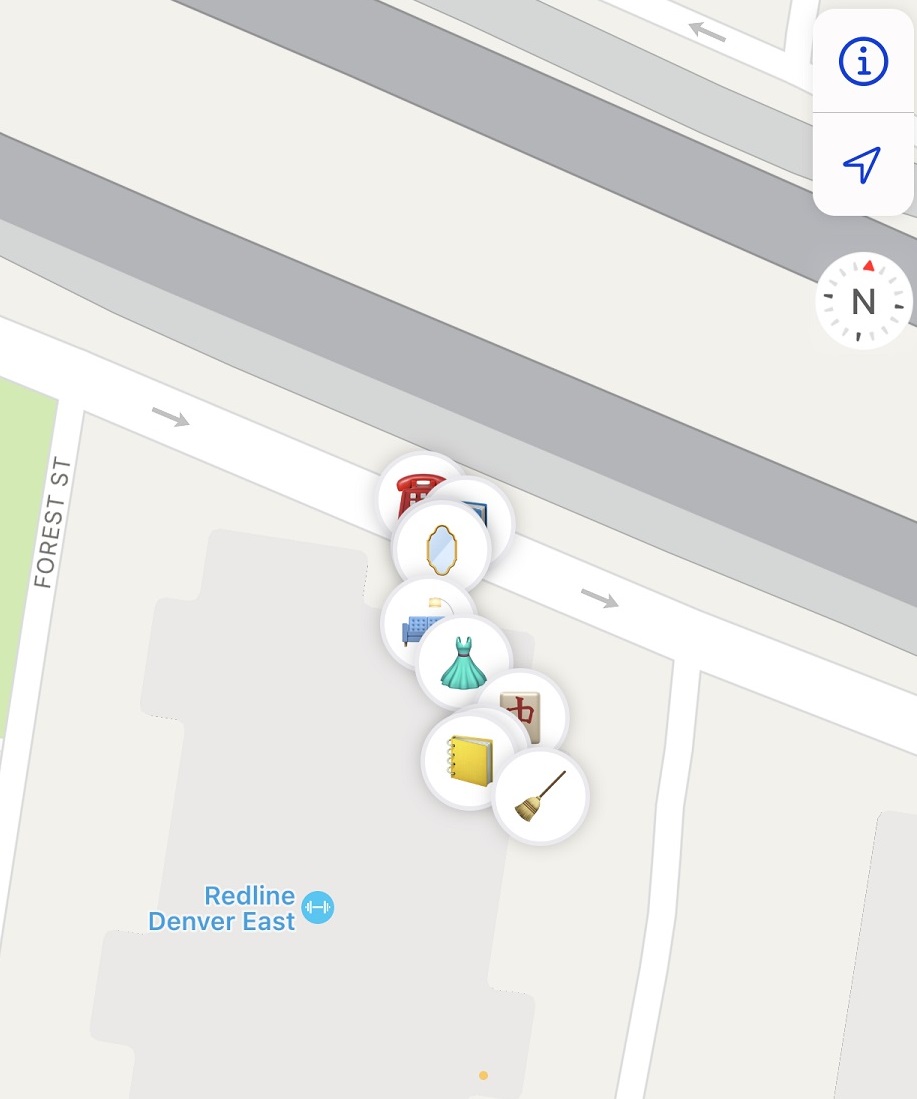
When we moved last year we hired movers, I got a little nervous (paranoid, really) about my stuff getting lost. We got a bunch of AirTags and placed them into random boxes and pieces of furniture, and waited for the movers. Moving with Apple Airtags added a little bit of extra techy fun to the adventure!

When we hired the movers, we were under the impression that they would come, load our things into a truck, drive that truck cross-country, and then unload. That’s not what happened. Once we realized what the process would be, we were even happier that we got the AirTags. (This is why you should read the fine print before you sign EVERY contract. ALL the fine print!)

Five guys came and loaded our stuff. They brought all of it to a warehouse where the truck was unpacked and then reloaded into a different truck with other people’s stuff that was also going to the East Coast.

Moving with Apple Airtags. This image shows the boxes at a warehouse.
The boxes traveled first to a Colorado warehouse before being shipped to the East Coast.

That truck was driven to a warehouse in NJ, where it was unpacked, reloaded into a smaller truck, and brought to our new home. (See photos of the trip below.) Everything arrived with very little damage, and we were relatively happy with the process.

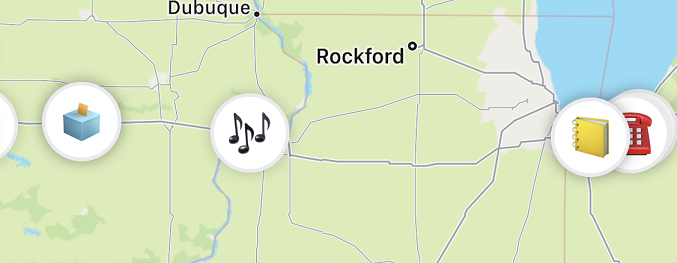
Moving with Apple Airtags helps track the location of boxes during move.
The boxes slowly made their way across the Mississippi and towards Chicago.
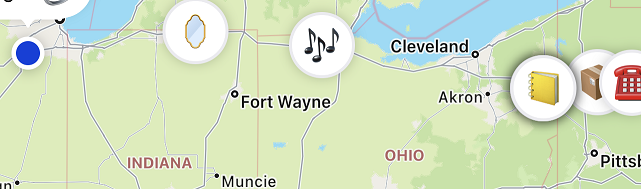
Moving with Apple AirTags track the location of boxes during move from Chicago to Pennsylvania
The boxes keep moving East, passing us overnight. Our location is the Blue Dot, located just West of Chicago.

We’ll often recommend products and services. Sometimes we’ll earn a small commission if you purchase something through our links. As an Amazon Associate, we earn from qualifying purchases.

Some common Questions & Answers:

Q: How do AirTags work?

You might be wondering how these devices actually work. They’re pretty small, just a little bigger than a quarter, and maybe three times as thick. It’s easy to slide one into a pocket or fit it into a little holder that attaches to your key ring. This is what they look like:

Essentially the AirTag works by pinging the Apple network. It can be “seen” by the Apple network using any nearby iPhone. According to Apple:

“Your AirTag sends out a secure Bluetooth signal that can be detected by nearby devices in the Find My network. These devices send the location of your AirTag to iCloud — then you can go to the Find My app and see it on a map. The whole process is anonymous and encrypted to protect your privacy. And itʼs efficient, so thereʼs no need to worry about battery life or data usage.”

When our boxes traveled east with the truck, the drivers didn’t have an iPhone so we were dependent on other cars driving by with an iPhone on to “see” where our stuff was. But on the trip from the NJ warehouse to our new home, the driver did have an iPhone so we were able to see where the stuff was practically minute-by-minute.

Q: Are AirTags legal?

Using an AirTag to track your own stuff is absolutely okay. They were designed by Apple to track your personal belongings. And Apple makes it clear that tracking items that don’t belong to you is 100% illegal. In fact, if you happen to be traveling with an AirTag that doesn’t belong to you (and its owner isn’t nearby), you’ll get an alert so that you can find it. If the AirTag has been placed to track you surreptitiously, you should notify the local police. In Apple’s words:

AirTag, AirPods, and other Find My network accessories include features to guard against unwanted tracking. They should not be used to track people, and should not be used to track property that does not belong to you. Using these products to track people without their consent is a crime in many countries and regions around the world. If an AirTag, set of AirPods, or Find My network accessory is discovered to be unlawfully tracking a person, law enforcement can request any available information from Apple to support their investigation.

Q: Do you recommend moving with Apple AirTags?

Absolutely! Having the little beacons packed with all of our household belongings gave me peace of mind. One tip though: If a box has an AirTag in it, make sure you remove it before putting that box with your recycling! We did lose one AirTag that way. We were able to track its location to a local recycling center, but it was not recoverable.

Q: I’m not moving or traveling. Do I really need an AirTag?

AirTags have a lot of uses. I’m someone who frequently misplaces my keys, so I’ve attached an AirTag to my keyring. You can also slide one into your wallet or your backpack. If you’ve got young kids, it’s easy to attach to a diaper bag or shoe. Likewise, you can attach an AirTag to a family member with dementia who tends to wander. You can attach an AirTag to the collar for your dog or cat, and watch their midnight escapades. We keep an AirTag in our car as well. This is the device I use to attach an AirTag to my keys:

Q: How do I set up my new AirTag?

It’s easy to do. Once you peel off the battery cover it guides you through the steps. Here’s a link to the Apple instructions. Lastly, remember to give each item a unique name!

Q: How do I use the FindMy feature?

Open the FindMy App on your iPhone. Then click on “Devices” to find your iPad, AirPods, or other Apple devices. Finally, click on “Items” to find the things you’ve attached to an AirTag.

Q: I have an Android phone. How can I use AirTags?

The simple answer is: you can’t.

Conclusion

Getting the Apple AirTags to help us keep track of our boxes while moving was one of the best things we did during that process. Now that we’re settled in, we’ve found other uses for the extra Airtags. We’ve even given our kids an AirTag so they can keep track of their keys as well.

Information About Geek For Hire, Inc.

I’ve created a free report to protect you from “phishing” scams. Click here to receive it!

Chris Eddy of Geek For Hire, Inc. has provided computer service to families and small businesses with Mac’s and PCs for the past eighteen years. He’s the geek for you! Angie’s List and the BBB rate Geek For Hire very highly.  You can find more on our website, or give us a call at 303-618-0154. Geek For Hire, Inc. provides onsite service (Tier 3 support) to the Denver / Boulder / Front Range area and remote service throughout North America.

We’ve been using Amazon Prime for the past few years.  We like the free and fast shipping.  With Prime, we have access to online streaming too. Prime is usually $119/year, but you can get a free 30-day trial by clicking on this link: Try Amazon Prime 30-Day Free Trial.  If you’re a college student, click here for a 6-month trial. As an Amazon Associate, we earn from qualifying purchases.

More Tips Here:

Best Car Mount Phone Holder

Earlier this year we took a road trip and used our phones for directions. I remembered that I had gotten a car mount phone holder a few years ago and searched for it in our Sprinter camper’s “junk drawer”. We mounted it on the windshield so we could easily see the map and where our next turn would be.

Sure, it was convenient to have it right there, but putting it on and taking it off was a hassle every time. You had to fiddle with the arms to make sure the holder held the phone tightly and wouldn’t fall out going over bumpy roads.

YOU TOO?

My experience has told me that when I’m having an issue with something, other people are as well. I decided that before our next trip I’d find a better solution. I eliminated all the models which mounted on the car’s vent. We had one of those in the past with an ultra-strong magnetic holder. The magnet part was great. It held even over the bumpiest of roads. But, every time we needed to move it, we broke off one of the vents.

So: window or dash mount with a magnetic holder. (I wanted to make picking the phone up and putting it back as easy as possible while driving.) Plus I only selected holders with 4+ star reviews on Amazon.

We’ll often recommend products and services. Sometimes we’ll earn a small commission if you purchase something through our links. As an Amazon Associate, we earn from qualifying purchases.

I tried out four different models. Here they are my order of preference:

PKYAA Magnetic Car Mount Phone Holder – NOT Recommended

The PKYAA is the smallest one and it folds flat when not in use. It lists at $7. The Amazon page said it could mount on the Dashboard or Windshield which is what I was looking for. However, when I received it, the box indicated that it was mounted on the air vent. It came with a metal pad to install on the back of the phone to work with the magnetic holder. My iPhone comes with MagSafe, so it SHOULD work without the metal pad.

This one never even made it to the car. It magnetically attached to the MagSafe on my phone, but when I shook it a little to emulate normal driving, it fell right off. It was returned to next day.

Note that when I purchased this one, it had 4 stars. I’m writing this two months later and it’s down to 3.3 stars.

Talk Works Magnetic Window/Dash Mount

The Talk Works car mount phone holder is also a MagSafe charger and is listed for $25. I liked that it charged my iPhone while I was driving. (Map programs use a LOT of juice!) I liked that I could stick it to the windshield or the dashboard. But the gooseneck was very wobbly.  Too wobbly. I returned this one too.

Note that this one also had over 4 stars when I purchased it 2 months ago. Today it’s down to 3.2 stars.

OtterBox Performance Car Dash & Windshield Mount for MagSafe

The OtterBox is the only name-brand model I looked at. It lists for $50. Was it worth it?

I liked that it held firmly to the windshield and didn’t bounce around under normal driving conditions. You could position it easily which was a nice touch. What I didn’t like is that it didn’t have built-in charging capability like others that I reviewed. This one was kept as a backup for the other car.

The OtterBox received an average rating of 4.3 stars from over 1000 reviewers.

MagSafe Car Mount Charger – Get This One!

The MagSafe Charger lists for $30 and received an average of 4.1 stars from 52 reviewers. It works specifically with the iPhone MagSafe system. This model will also charge your phone while it’s on the magnetic holder, so that’s a plus! The magnetic holder is charged via a USB-C cable that lights it up with pretty colors when the phone isn’t on it.

This one is my favorite and the one I use today. My only knock is that when the car is parked and the windshield gets hot, the holder falls off. Sometimes it lands on the floor and picks up pieces of grit on the sticky side.


We’ll often recommend products and services. Sometimes we’ll earn a small commission if you purchase something through our links. As an Amazon Associate, we earn from qualifying purchases.

Conclusion:

After trying out all four of these Car mount phone holders, I like the MagSafe Charger the best.

Information About Geek For Hire, Inc.

I’ve created a free report to protect you from “phishing” scams. Click here to receive it!

Chris Eddy of Geek For Hire, Inc. has provided computer service to families and small businesses with Mac’s and PCs for the past eighteen years. He’s the geek for you! Angie’s List and the BBB rate Geek For Hire very highly.  You can find more on our website, or give us a call at 303-618-0154. Geek For Hire, Inc. provides onsite service (Tier 3 support) to the Denver / Boulder / Front Range area and remote service throughout North America.

We’ve been using Amazon Prime for the past few years.  We like the free and fast shipping.  With Prime, we have access to online streaming too. Prime is usually $119/year, but you can get a free 30-day trial by clicking on this link: Try Amazon Prime 30-Day Free Trial.  If you’re a college student, click here for a 6 month trial. As an Amazon Associate, we earn from qualifying purchases.

More Tips Here:

Best Long Range WiFi Router: Here are 3 steps to strong WiFi in every backyard

If you’ve been looking for the best router for streaming or the best long-range wifi router, then you don’t want to scroll by. When you’re trying to get a good WiFi signal in your backyard, here are 3 easy steps to take.

  • Firstly, purchase a mesh router. Mesh routers have “satellite routers” to spread the signal evenly throughout your home (and yard). If your home is large, consider getting more than two or three satellites.
  • After that, test putting the satellites in different rooms to check signal strength. If you have brick or metal in your home construction, you may need to play with many locations to find the best one.
  • Finally, ensure at least one of the satellites points towards the backyard from the basement or first floor.

Recently a customer asked us which mesh router he should purchase.  So, Chris responded with this email. It includes links to the best WiFi router that Chris knows of.Best long range wifi router

We’ll often recommend products and services. Sometimes we’ll earn a small commission if you purchase something through our links. As an Amazon Associate, we earn from qualifying purchases.

Chris’ email about the best long range WiFi Router:

“Here are some purchase links for the different 2-pack and 3-pack versions of the Orbi wifi router.  Note that my rule of thumb for Wifi is that it will have a service radius of about 50 feet; the better routers and equipment will have more usable distance.  I have gotten exceptional distance using the Orbi 5 series (about 100 feet), and the new 6 series of Orbi is supposed to go farther.

The top two are the “older” technology models, which work very well.  We have a 2-pack of this, and we like it a lot.  The bottom three use the new AX6000 wifi technology, which is reported to travel a little further and transmit faster than the earlier wifi technology.

I have generally had good luck getting “refurbished” equipment from Amazon sellers.  If the equipment (new or refurbished) is defective, the Amazon return policy allows the equipment to be returned painlessly, but the installation time to determine that something is actually defective is still billable.

WiFi 5 System:

This 5-series model uses the “older” wifi technology, which I use and really like a lot:

Netgear RBK50 2-pack  – New – List =$330:

RBK53 3-pack – New – List = $700:

WiFi 6 System:

For the best long range wifi router, this 6-series model uses the “new” AX6000 wifi technology. Consequently, it is reported to give better performance and more distance. It’s probably the best router for multiple devices.

RBK852 2-Pack – Refurbished – List $700

RBK853 3-pack – Refurbished – List = $980

RBK853 3-Pack – New – List = $1000

Hope this helps.

Chris

Conclusion

Chris likes the Netgear Orbi Mesh Routers best. Here’s an article we wrote about why a Mesh Router may be a good choice for you. These ORBI WiFi routers are if you have a medium to large house, and one router won’t provide enough wifi coverage.  These mesh routers are ideal for “pushing” the wifi coverage through your house and have a separate WiFi radio for the dedicated “back haul” that provides low latency and high bandwidth.  If you have a medium-sized house or larger and have internet service that is faster than 300Mbps, these WiFi mesh routers are the best solution that I know of yet.

Information About Geek For Hire, Inc.

I’ve created a free report to protect you from “phishing” scams. Click here to receive it!

Chris Eddy of Geek For Hire, Inc. has provided computer service to families and small businesses with Mac’s and PCs for the past eighteen years. He’s the geek for you! Angie’s List and the BBB rate Geek For Hire very highly.  You can find more on our website, or give us a call at 303-618-0154. Geek For Hire, Inc. provides onsite service (Tier 3 support) to the Denver / Boulder / Front Range area and remote service throughout North America.

Here’s a link to our Covid19 Policy.

We’ve been using Amazon Prime for the past few years.  We like the free and fast shipping.  With Prime, we have access to online streaming too. Prime is usually $119/year, but you can get a free 30-day trial by clicking on this link: Try Amazon Prime 30-Day Free Trial. As an Amazon Associate, we earn from qualifying purchases.

More Tips Here:

Want to be Outrageously Happy with your Computer System?

2022 is almost here! I asked Chris what everyone should do on a regular basis to stay outrageously happy with your computer system. These are easy resolutions to keep. Here are his suggestions:

Once a Year:

  • Test your UPS (Uninterruptible Power Supply) once a year. Unplug the UPS from the wall, and plug in your computer. How long does the computer run before it’s out of power? Is it 15 minutes? Is it 4 hours? If it’s not as long as you’d like, look into replacing the UPS battery. It’ll cost around $50. A UPS battery typically lasts about 2-4 years.
  • If you have a laptop computer, check the health of the battery. If you get less than an hour of work time every time you give it a full charge, it’s time to replace the battery. Start checking when the notebook is about 2.5 – 3 years old.
  • Give your machine a tuneup to make sure everything continues to run smoothly.

Once a Quarter:

  • Test your internet speed every few months. Chris likes Speedtest and DSL Reports. If it’s not as fast as you’re expecting it to be, test it again at different times of day over the next few days. Keep a careful log of the results by taking a screenshot each time. Once you have the data to back up your findings, contact your ISP (Internet Service Provider).
  • Check your social media privacy settings. Make sure your account is locked down! Here are some suggestions to keep your Facebook account safe.
  • Check your email settings every few months as well. Especially make sure that your recovery email is set up properly. Check out these tips from an article about email hacking.
  • Disconnect totally from technology for a full day. Do this more frequently if you’d like!

Once a Month:

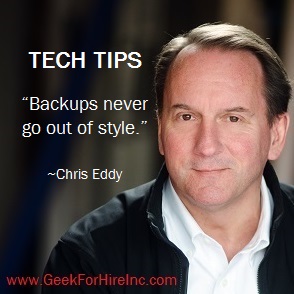
  • Back up your data to an external SSD (Solid State Drive) at least once a month.  Keep that drive in a different physical location than your computer. "Backups never go out of style". A quote from Chris Eddy who wants you to be outrageously happy with your computer system.

Once a Week:

  • Turn your computer off at least once a week. Don’t click on the “restart” button; totally turn it off. Wait a minute or overnight, and restart it. This helps to make sure your machine can clean up any weird problems that it finds and allows the bios to retest the hardware.

Conclusion

It’s easy to stay outrageously happy with your computer system. There aren’t a lot of things on this list. Print it out and check off the items when you’ve got them done! (Of course, if you need help with anything, let us know.)


Information About Geek For Hire, Inc.

I’ve created a free report to protect you from “phishing” scams. Click here to receive it!

Chris Eddy of Geek For Hire, Inc. has provided computer service to families and small businesses with Mac’s and PCs for the past eighteen years. He’s the geek for you! Angie’s List and the BBB rate Geek For Hire very highly.  You can find more on our website, or give us a call at 303-618-0154. Geek For Hire, Inc. provides onsite service (Tier 3 support) to the Denver / Boulder / Front Range area and remote service throughout North America.

Here’s a link to our Covid19 Policy.

We’ve been using Amazon Prime for the past few years.  We like the free and fast shipping.  With Prime, we have access to online streaming too. Prime is usually $119/year, but you can get a free 30-day trial by clicking on this link: Try Amazon Prime 30-Day Free Trial. As an Amazon Associate, we earn from qualifying purchases.

More Tips Here:

2021 Tech Year in Review

The past year has been all about how to work more efficiently away from the office, primarily at home. Faster internet is more commonly available, and people are springing for better equipment for their new home office. Here’s our take on the 2021 Tech Year in Review.

Supply Chain

But, this has contributed to the supply chain crisis. Each year, companies will look at the upcoming year, looking at forecasts for customer growth and the probability of ordering new equipment. Then they’ll go to their suppliers and place orders for the upcoming year so that they can manufacture the proper amount of their products. In 2020, many companies felt that by early in 2021, the Covid crisis would be well behind us and purchasing patterns would be “back to normal”. As a result, manufacturers either ordered too much or not enough. Luckily, Geek For Hire is seeing a slight delay of a few months for our customers ordering new equipment.

Electric Vehicles

2021 also saw an increased acceptance of electric vehicles. More EVs are being ordered and delivered. But, again, the supply chain crisis is hitting EV manufacturing as well. Both Ford and Tesla are experiencing delays in delivering their EVs due to supply chain issues.

More EVs mean more families upgrading the electrical service to their homes. So look for local electricians getting busier than ever. It also means that more rest areas along major highways are installing EV recharging stations. If you’re a road warrior like me, you’ll see more Service Areas temporarily closed for construction while they install new charging stations.

New Year, new Operating System

Microsoft Windows 11 was released on October 5th. Apple released MacOS12 (Monterey) on October 25th. Before you upgrade to either of these new operating systems, give Chris a call to see if your current machine is compatible.

Zoom Fatigue

It’s a thing. A recognized disorder. (Check out articles on Healthline.com, Psychiatrictimes.com, or even NationalGeographic.com.) Working from home so much and participating in online calls is stressful and exhausting. Some common recommendations are to:

  • Limit the number of Zoom calls
  • Turn off the video and just participate via audio
  • If you can, schedule the calls for times that work best for you.

The Space Race

This year not one, not two, but three billionaires went up to space in their own rockets. Jeff Bezos, Richard Branson, and Elon Musk. For anyone keeping track, that would be Blue Origin, Virgin Galactic, and SpaceX.

Less well-known is the Breakthrough Starshot project. Its goal is to gain first-hand information about the Alpha Centauri system which is 4.4 light-years away.

“In the last decade and a half, rapid technological advances have opened up the possibility of light-powered space travel at a significant fraction of light speed. This involves a ground-based light beamer pushing ultra-light nanocrafts – miniature space probes attached to light sails – to speeds of up to 100 million miles an hour. Such a system would allow a flyby mission to reach Alpha Centauri in just over 20 years from launch, beaming home images of its recently-discovered planet Proxima b …..”

Contactless Payments

This has always been an option. In fact, every time you make an online purchase you are using a form of contactless payment. But, I have a lot of friends that live a cash-based life. The last year and a half has been hard on them. More and more businesses don’t take cash at all. On a recent road trip, I noticed that most of the toll plazas are “interaction-free”! Most highways have installed overhead toll readers to capture your info as you drive by.The 2021 Tech Year in Review includes an increase in cashless payments

Robotic Food Delivery

One fun thing that’s expanded this year is robots delivering take-out. Since the pandemic, more robots are showing up on college campuses and city streets. They show up at their destination with a single order. The person enters a code and the robot heads back to home base for a charge before heading out again for its next delivery. While the robots seem to be proliferating on college campuses, several cities (including New York and San Francisco) have moved to ban them from sidewalks and bike lanes.

2021 Tech Year in Review Conclusion

Lots happened in the Tech World in 2021. What did I miss? Let me know in the comments below.


Information About Geek For Hire, Inc.

I’ve created a free report to protect you from “phishing” scams. Click here to receive it!

Chris Eddy of Geek For Hire, Inc. has provided computer service to families and small businesses with Mac’s and PCs for the past eighteen years. He’s the geek for you! Angie’s List and the BBB rate Geek For Hire very highly.  You can find more on our website, or give us a call at 303-618-0154. Geek For Hire, Inc. provides onsite service (Tier 3 support) to the Denver / Boulder / Front Range area and remote service throughout North America.

Here’s a link to our Covid19 Policy.

We’ve been using Amazon Prime for the past few years.  We like the free and fast shipping.  With Prime, we have access to online streaming too. Prime is usually $119/year, but you can get a free 30-day trial by clicking on this link: Try Amazon Prime 30-Day Free Trial. As an Amazon Associate, we earn from qualifying purchases.

More Tips Here:

6 Easy Steps to Using a TV as a Monitor

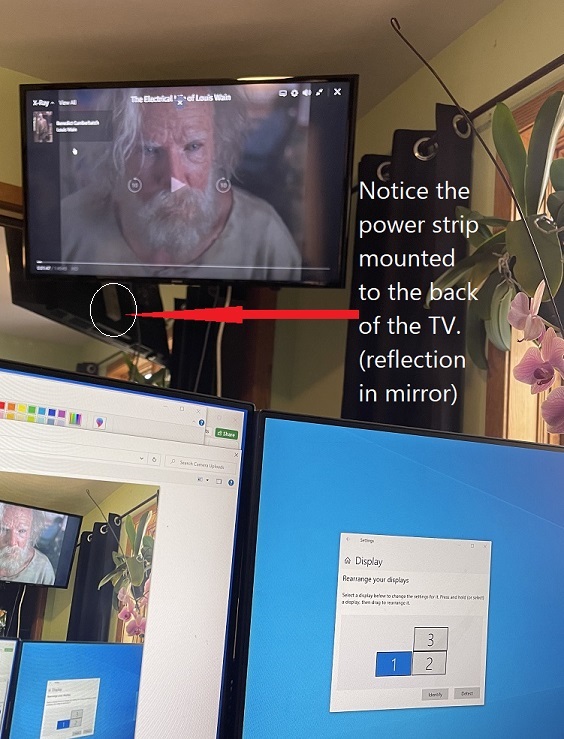
I frequently have a nature video running on my 2nd monitor while I’m working. Lately, I’ve been doing more things that require a back-and-forth between two different windows, and the nature video has been buried. Chris wanted me to have another monitor – mounted on the wall so I could watch movies on as well. A monitor big enough to watch movies on would be cost-prohibitive. Enter the concept of using a TV as a monitor!

Just so you know, when you purchase anything from the links on this page we may receive a small commission. As an Amazon Associate, we earn from qualifying purchases.

6 Easy Steps to Using a TV as a monitor:

Getting a new TV to use as a monitor with your Windows 10 computer is relatively easy to do. There are only a few steps to get it up and running:

  • Determine where in your office the monitor will sit. If you want it on the wall, you’ll need to get a Wall Mount. (Some things to keep in mind when purchasing a wall mount include maximum TV size/weight, and the distance between wall studs.)
  • Make sure the HDMI cable and power strip are long enough to reach. We purchased an extra-long HDMI cable and power strip so that we’ll have enough length to hide the cable along the wall and floor.
  • Plug the TV into wall power
  • Connect the HDMI cable from the TV to the computer
  • At this point, while your computer should automatically detect the new monitor through the HDMI cable, you may need to configure the monitor settings in your computer:
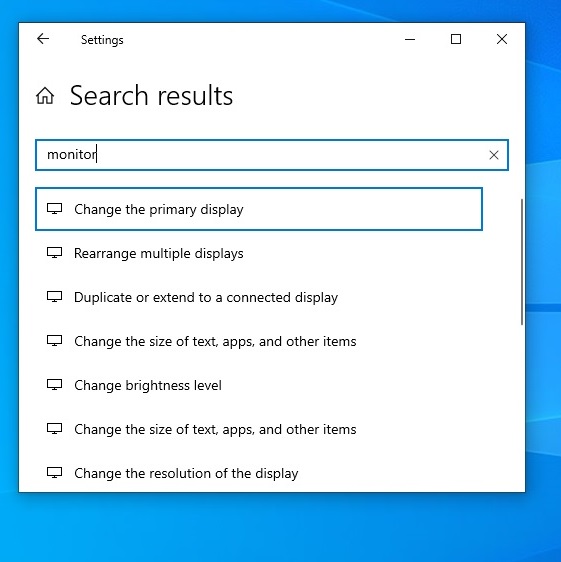
    • Click on the settings wheel on the taskbar
    • Type “Monitor” in the search barusing a tv as a monitor - w10 settings
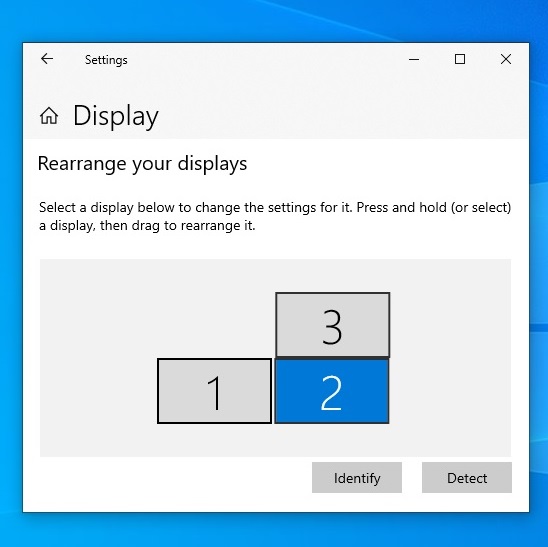
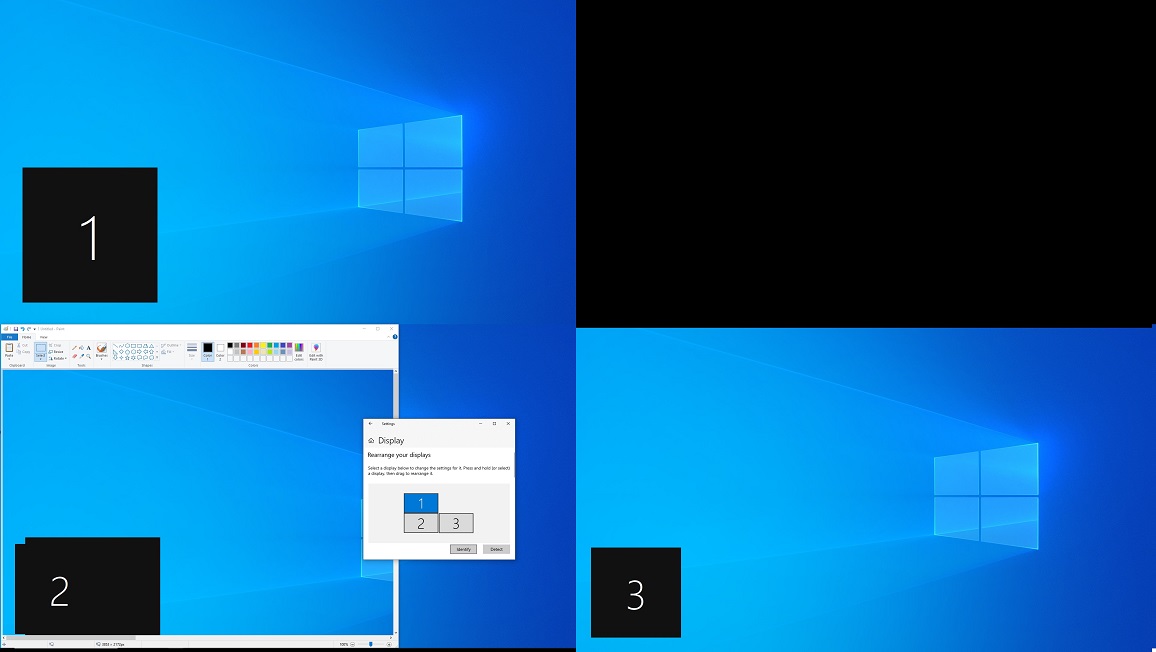
    • Click on “Rearrange multiple displays”. .Multiple monitor settings in Win10
    • and make sure your primary monitor is still identified properly
    • Open up a new window, log into Netflix or Amazon Prime, and play a movie!


Information About Geek For Hire, Inc.

I’ve created a free report to protect you from “phishing” scams. Click here to receive it!

Chris Eddy of Geek For Hire, Inc. has provided computer service to families and small businesses with Mac’s and PCs for the past eighteen years. He’s the geek for you! Angie’s List and the BBB rate Geek For Hire very highly.  You can find more on our website, or give us a call at 303-618-0154. Geek For Hire, Inc. provides onsite service (Tier 3 support) to the Denver / Boulder / Front Range area and remote service throughout North America.

Here’s a link to our Covid19 Policy.

We’ve been using Amazon Prime for the past few years.  We like the free and fast shipping.  With Prime, we have access to online streaming too. Prime is usually $119/year, but you can get a free 30-day trial by clicking on this link: Try Amazon Prime 30-Day Free Trial. As an Amazon Associate, we earn from qualifying purchases.

More Tips Here:

STEM Toys for Kids 2021

We don’t have kids in our home anymore, so when I want to get a gift for a little one, I go online. We’re a tech company so my favorite gift is almost always a STEM toys for kids. (Science, Technology, Engineering, and Mathematics) Generally, I’ll do some research to see which toys have won awards, which are well-liked by parenting magazines, which are highly rated online, and which my friends or family may have told me about.

Yup, I’ve done the work so you don’t have to! And, just so you know, if you purchase anything from the links on this page we may receive a small commission. As an Amazon Associate, we earn from qualifying purchases.

Why are STEM toys good for kids?

STEM toys help kids develop a love of learning while they figure out how things work. Some people think that STEM is only about teaching kids how to code, but it is so much more than that. These toys help kids develop:

  • Spatial awareness
  • Reasoning skills
  • Engineering thinking
  • Critical thinking skills
  • Engineering design
  • Problem-solving skills

Think about an infant playing on the floor with pots and pans. Can this bowl fit into this pot? Can this pot go on top of this plastic container? How high of a tower can I make with all of these cookbooks? That’s the learning process in action! STEM toys build on that early learning.

What are examples of STEM toys?

Learn more about the benefits of STEM toys for your kids:

The Best Tablets for Kids

Information About Geek For Hire, Inc.

I’ve created a free report to protect you from “phishing” scams. Click here to receive it!

Chris Eddy of Geek For Hire, Inc. has provided computer service to families and small businesses with Mac’s and PCs for the past eighteen years. He’s the geek for you! Angie’s List and the BBB rate Geek For Hire very highly.  You can find more on our website, or give us a call at 303-618-0154. Geek For Hire, Inc. provides onsite service (Tier 3 support) to the Denver / Boulder / Front Range area and remote service throughout North America.

Here’s a link to our Covid19 Policy.

We’ve been using Amazon Prime for the past few years.  We like the free and fast shipping.  With Prime, we have access to online streaming too. Prime is usually $119/year, but you can get a free 30-day trial by clicking on this link: Try Amazon Prime 30-Day Free Trial. As an Amazon Associate, we earn from qualifying purchases.

More Tips Here:

White Elephant Gifts

It’s that time of year where we are getting invited to lots of parties and they all seem to be having a White Elephant gift exchange. ** (And it’s not the kind where you can bring a toilet plunger that looks like a shotgun…) What are the best White Elephant gifts under $30? Well, Geek For Hire has some ideas!

Just so you know, if you purchase anything from the links on this page we may receive a small commission. As an Amazon Associate, we earn from qualifying purchases.

Creative White Elephant Gift Ideas:

Portable Power:

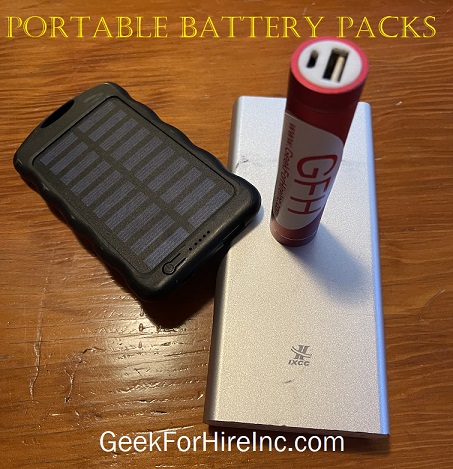
I don’t know about you, but our family always seems to be running out of juice. That’s where a portable battery pack comes in handy. What to look for:

  • Charging ports – It’s handy to have two or more ports to charge your devices.
  • Milliamp Hours – more is always better, 10000mAh should be the minimum you consider.
  • USB-C – Do you need a USB-C port? Not all portable chargers have one. Read the description carefully.
  • Size – The most useful charger is the one you use. I keep one in my purse that is teeny. It’s a square about four inches long and ½” per side. It’s useful for 1 phone charge when my battery is running low. When I travel, I carry a slightly larger one with 20000mAh that can totally charge a device 2 or 3 times.Portable Battery Pack for White Elephant gifts
  • Weight – is it light enough to carry around? My favorite one with the most charging power feels like a brick. The one I use most often can go in my front pocket.
  • Reviews – even if you’re not buying on Amazon, it is helpful to look at the reviews there. Remember, a rating of 4.8 stars with 1000 reviews is better than a rating of 5 stars with one review.

Smartphone Screen Magnifier:

Who else is watching videos on their smartphone? A screen magnifier is a fun way to watch Netflix when you don’t have access to a tablet or laptop. Here are some things to look for:

  • Screen size – most are 12”, but some are a little larger.
  • Does it come with a flat screen or is the screen curved? Some even provide a 3D experience.
  • Does it appear to be sturdy and easily portable?
  • Speaker – do you need or want a Bluetooth speaker? This will add complexity and require power. It will probably add to the price as well.
  • Read the Reviews!

Wearable sound:

You’ve got a whole bunch of options here. I have a headband with Bluetooth speakers that I use to help me fall asleep at night. If you like to listen to music or podcasts when you’re hiking or running, a hat with speakers built right in could work very well.  Or, you also check out earbuds:

  • How will they be used? Earbuds are more versatile if they can be used to make and answer phone calls. Some are made just for listening to music or an audiobook.
  • Many earbuds come with a storage case that is also used for charging. See if you can get a set with a fast-charging USB-C.
  • Controls – can you increase/decrease the volume from the earbuds, or do you need to do that with your smartphone? How large are the control buttons? Can you adjust by feel or do you need to take it out of your ear?
  • Interchangeable buds? Does it come with different-sized earbuds to provide a perfect fit?
  • Remember to check the reviews!

Portable Cord Organizer:

One of the best gifts I gave this year was a portable cord organizer for my nephew in grad school. He loves it because it fits easily in his backpack with his laptop, and helps keep everything protected and organized. (It’s pictured below.) Here’s what to look for:

  • Weight – you want something that doesn’t add measurably to your backpack or suitcase.
  • Size – how big does it need to be? Will it hold your phone, portable battery pack, and earbuds, or just your cords?
  • Closure – Do you want a zippered case to keep everything inside or something with strong elastic to keep it all in place.
  • Remember to read the Reviews!

Conclusion:

Have I given you some creative White Elephant gift ideas? It’s easy to get a useful item for a gift exchange with just a little bit of research. It’s a lot of fun when it’s your gift that keeps getting “stolen”. Now you know how to pick white elephant gifts everyone will fight for!

** There are so many options for gift exchanges. Whether you call it the Yankee Swap, a Chinese Gift Exchange, Dirty Santa, or White Elephant, you’re sure to have a lot of fun. Make sure the White Elephant gift rules are established in advance, with a dollar amount, process for exchanging the gifts, and a theme. Your basic White Elephant Gift exchange is where everyone brings one wrapped gift that is under a certain dollar limit. Each person then draws a number out of a hat and they select a gift in order. Each person can select one of the unwrapped gifts, or “steal” one from one that has already been opened. Here are the “official” White Elephant rules.

There’s also the White Elephant Dice Game. It’s a little more complicated – you roll the dice and follow the instructions. Rules here.


Information About Geek For Hire, Inc.

I’ve created a free report to protect you from “phishing” scams. Click here to receive it!

Chris Eddy of Geek For Hire, Inc. has provided computer service to families and small businesses with Mac’s and PCs for the past eighteen years. He’s the geek for you! Angie’s List and the BBB rate Geek For Hire very highly.  You can find more on our website, or give us a call at 303-618-0154. Geek For Hire, Inc. provides onsite service (Tier 3 support) to the Denver / Boulder / Front Range area and remote service throughout North America.

Here’s a link to our Covid19 Policy.

We’ve been using Amazon Prime for the past few years.  We like the free and fast shipping.  With Prime, we have access to online streaming too. Prime is usually $119/year, but you can get a free 30-day trial by clicking on this link: Try Amazon Prime 30-Day Free Trial. As an Amazon Associate, we earn from qualifying purchases.

More Tips Here: