Scary Tech Monsters and Spam Risk – Phishing and Hacking

Whether you know it or not, you are a spam risk.

It’s that time of year to be more aware of all the monsters out there. I wish I was just talking about the cute kids in a Frankenstein costume. I’m talking about the scary tech monsters, the phishers, the scammers, the spoofers, and the hackers. And, unfortunately, they don’t just confine themselves to making their mischief around Halloween. These are year-round monsters!

Some of the ways they can attack you include emails, text messages, phone calls, and social media. We’re talking about the Chase text scam, the Publisher’s Clearing House email scam, the Paypal email scam, and the Wells Fargo email scam, just to name a few. These all add up to more spam risk in your inbox.

But first, let’s define some terms:

Tech Terms Defined:

Scam:

“…an attempt to defraud a person or group after first gaining their trust.” (from Wikipedia)

Hacking

Hacking is when someone uses social engineering to obtain information from you or installs a virus onto your computer or phone. Here is Wiki’s formal definition of a hacker:

“A hacker is a person skilled in information technology who uses their technical knowledge to achieve a goal or overcome an obstacle, within a computerized system by non-standard means. Though the term hacker has become associated in popular culture with a security hacker – someone who utilizes their technical know-how of bugs or exploits to break into computer systems and access data which would otherwise be unavailable to them – hacking can also be utilized by legitimate figures in legal situations. For example, law enforcement agencies sometimes use hacking techniques in order to collect evidence on criminals and other malicious actors. This could include using anonymity tools (such as a VPN, or the dark web) to mask their identities online, posing as criminals themselves.” (from Wikipedia)

Spoofing:

“Email spoofing is the creation of email messages with a forged sender address.” (from Wikipedia)

“Caller ID spoofing is the practice of causing the telephone network to indicate to the receiver of a call that the originator of the call is a station other than the true originating station. This can lead to a caller ID display showing a phone number different from that of the telephone from which the call was placed.” (from Wikipedia)

For example, I got phone calls from a Denver physician and “Account Services” last week. When I answered, the recorded voice wanted to sign me up for an extended warranty for my car.

Also, when you get a spammy email “from” yourself, someone has spoofed the message to make it appear that it is coming from you.

We’ve also seen emails from CustomerService@Amazan.com. This is not technically spoofing, but at first glance, you do think the email is coming from Amazon.

Phishing:

“Phishing is a type of social engineering where an attacker sends a fraudulent (“spoofed”) message designed to trick a human victim into revealing sensitive information to the attacker or to deploy malicious software on the victim’s infrastructure like ransomware.”  (from Wikipedia)

I’ve created a Free Report to protect you from “phishing” scams. Click here to receive it.

SpearPhishing:

“Spear phishing involves an attacker directly targeting a specific organization or person with tailored phishing emails. This is essentially the creation and sending of emails to a particular person to make the person think the email is legitimate. In contrast to bulk phishing, spear phishing attackers often gather and use personal information about their target to increase their probability of success of the attack.”  (from Wikipedia)

How Can You Protect Yourself?

Whenever you receive a text, email, or phone call, take a minute to think before responding. Here are our suggestions to protect yourself from spam risk:

Email Scam:

If you’re like me, you receive multiple emails every day asking you to do something. How to tell if an email is fake? There are several steps that you should follow:

  • First, make sure the message is actually from the person or organization that it says it is from. Look at the email address to make sure it is correct and not subtly different. (For example: Amazan instead of Amazon, or J0hn instead of John. In one case I exchanged an “a” for  the letter “o”, in the second case I exchanged the number “0” for the letter “0”.)
  • If you reply, you should also scrutinize the “To” address. If your friend’s email has been hacked, the “To” address may go somewhere totally different.
  • Don’t click on any links in an email. If it is a company telling you that you need to contact them by clicking this link, call or email them using information that you already have. If it’s from a friend, ask them to confirm that they have actually sent you something.
  • Never click on short links like bit.ly, TinyURL, ow.ly, etc. It is too easy to hide malware in a link that appears to come from a legitimate source. (More about URL shorteners.)
  • Do check your spam folder in your email every week to 10 days to make sure a friend’s email didn’t get sent there by accident.

Phishing Text Scam:

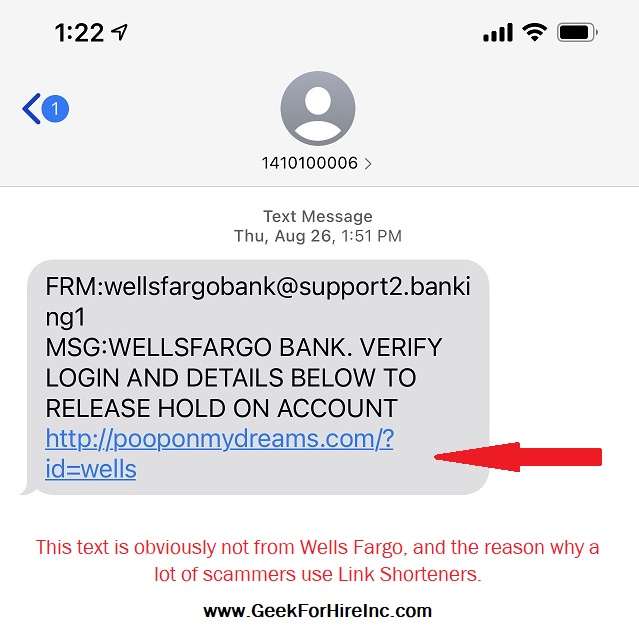
Text messages have become a more common way for scammers to attack. Sometimes they’ll send it just to you, and sometimes it will be a group text. When you look at those group texts, you might notice that they all have a similar phone number to you. Here is just one of the spam risk text messages I’ve received. Remember that the phone company is not going to reward you for paying your bill:

Everyone is a spam risk. The hackers just send out texts to a bunch of sequential phone numbers.Here’s an image of the Wells Fargo text scam. It’s my favorite scam text:
 

I haven’t received a scam message from a known contact yet. I’m sure that more sophisticated text scams are coming. Just be careful before replying to any text message.

Bogus Phone Calls:

Phone calls are where we are seeing the most issues. You receive a phone call and the person on the other end sounds legit. They create an urgency about a virus on your machine or an unauthorized charge on your bank card. Whatever it is, they’ve convinced you that you need their help RIGHT NOW! So you confirm your date of birth or give them access to your computer.

I’ve found that the best thing to do is to never answer phone calls from someone I don’t know. If it’s a real person, they’ll leave a voice mail. Even if it’s not a real person and they leave a voicemail, I can tell it’s not someone I want to call back.

If you do answer a call like this and don’t realize right away that it is a scam, the best policy is to never provide personal information or allow them access to your computer.

Studies have shown that older people are more trusting in general, and tend to get hacked more frequently. (Malwarebytes 9/2021 Report, LexisNexis 7/2021 Report) So, if you’re “of a certain age”, be extra careful about providing information to someone you don’t know.

  • If they say they are from your bank, tell them that you’ll call your bank on the number you already have in your contacts to confirm what they’re telling you.
  • If it’s “Microsoft” or “Apple” or “Dell” calling to tell you that there is a virus on your computer, thank them and hang up. Then run your virus scanner just to be on the safe side. You’ll get a call from a friend saying you’ve been hacked before a major corporation will let you know!

Social Media:

I’ve written several articles about hacked Facebook (and Social Media in general). Check them out here, here, and here.

Information About Geek For Hire, Inc.

Chris Eddy of Geek For Hire, Inc. has provided computer service to families and small businesses with Mac’s and PCs for the past eighteen years. Angie’s List and the BBB rate Geek For Hire very highly.  You can find more on our website, or give us a call at 303-618-0154. Geek For Hire, Inc. provides onsite service (Tier 3 support) to the Denver / Boulder / Front Range area and remote service throughout North America.

Here’s a link to our Covid19 Policy.

We’ve been using Amazon Prime for the past few years.  We like the free and fast shipping.  With Prime, we have access to online streaming too. Prime is usually $119/year, but you can get a free 30-day trial by clicking on this link: Try Amazon Prime 30-Day Free Trial. As an Amazon Associate, we earn from qualifying purchases.

More Tips Here:

Right To Repair Movement

For years I’ve been hearing about the “Right to Repair” movement and didn’t pay a whole lot of attention to the issue. It seemed to primarily deal with farmers having issues with their tractors. Apparently, farmers were prohibited by some manufacturers from fixing their own tractors. If they did try to fix the tractor or to get an unauthorized mechanic to fix it, the manufacturer could send a signal through their internet software system to shut the tractor down entirely. Many farmers resorted to downloading Ukrainian software to get things working again. From an article in the Guardian:

“The majority of tractors today are internet-connected, and resolving errors requires special diagnostic tools that only manufacturers, such as John Deere, and authorized dealers have access to or are allowed to use. They often charge hundreds of dollars in call-out fees for repairs, which can take weeks to complete.”

Right to Repair your technology:

Fast forward to 2015 when customers started asking Chris to repair their iPhones. Because we’re not an authorized Apple dealer we couldn’t help them. If we even attempted to open the phone, the customer’s warranty would be voided! There have also been a few instances where Chris was repairing other Apple products and needed a replacement part. Apple refused to sell him the parts and Chris had to send the customer to the Apple store instead.

Luckily, it’s easier now to get replacement parts for MacBooks and iMacs, but we’re still not able to help with iPhones or iPads.Right to repair - specialized screwdriver required

Another issue is repairability. When someone calls about a broken printer, I have to tell them they should just buy a new one. (Hardware problems. We can fix software and networking issues.) Printers are designed to be disposable. You can’t take a printer apart to fix it without breaking more components in the process. And if you’re careful enough to not break anything else, it will take hours to do. Sometimes even fixing a paper jam will fatally break a printer!

Some of the less-expensive laptops are like this too. They are put together with teeny, fragile, plastic micro-clips that are designed to break if you take the laptop apart.)  I have to tell our customers that it’s not very cost-effective to spend $300 to fix a $100 printer!

Medical Devices:

In doing a little more research into this issue, I read about hospitals that couldn’t get their equipment repaired in a timely manner during the past year. Hospitals had to go through the manufacturer who had huge backlogs. They couldn’t bring in a qualified but “unauthorized” repair person who could fix it more quickly and less expensively. Having access to repair manuals and parts would allow hospitals to repair the equipment themselves:

“Too many hospitals face long waits for authorized technicians to repair life-saving machines. In a survey published in July by the U.S. PIRG Education Fund, almost one-third of biomedical repair technicians said some equipment at their facilities could not be used because repairs were unavailable. To be clear, it isn’t just equipment needed for coronavirus treatment that’s impacted—preventative maintenance on all kinds of devices has fallen behind because manufacturer-certified technicians were unavailable. Everything from imaging equipment like MRI, CT X-ray, and ultrasound machines, to anesthesia machines, heart-lung machines, and other surgical equipment were affected.”

Individuals:

The Right to Repair doesn’t only impact farmers, hospitals, and computer repair companies. It takes its toll on regular people too. I read about Rob Oliver in Pennsylvania, who is paralyzed from the chest down. When the footrest on his shower chair broke, he reached out to the manufacturer. The part cost only a couple of dollars, but they wouldn’t sell it to him. They told him to purchase a new $1500 chair instead. Recently, I received an update from Rob:

The manufacturer “actually sent a tech out to install the new part, twice! The problem was that the manufacturer had sent the wrong part. After getting it wrong those 2 times, they then decided that they were not going to try to get the right part anymore. (The manufacturer decided, not the service provider.)”

Thank goodness the US government finally understands how the inability to repair a product you’ve purchased is a problem for individuals and across many industries.

Right to Repair Legislation:

It looks like all that may be coming to an end and consumers will soon have the right to repair any phone, car, washing machine, or shower chair that they purchase. The Federal Trade Commission issued a statement on July 21st saying that they would “Ramp up Law Enforcement Against Illegal Repair Restrictions”. Here’s a link to the full statement.

“The FTC has concluded that manufacturers use a variety of methods—such as using adhesives that make parts difficult to replace, (we’ve seen this) limiting the availability of parts and tools, (we’ve seen this too.) or making diagnostic software unavailable—that have made consumer products harder to fix and maintain….  In addition, manufacturers and sellers may be restricting competition for repairs in a number of ways that might violate the law.

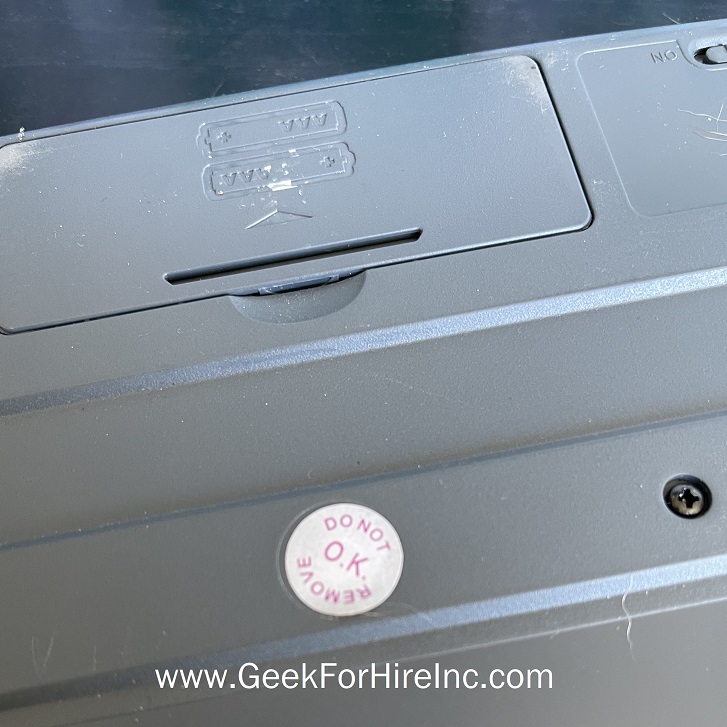
I’m not sure how long it will take for the FTC to enforce “Right to Repair”, but this is good news for consumers and independent repair people everywhere.Right to repair - don't even think of opening this keyboard

Not surprisingly, Apple, Tesla, and other companies are opposed to consumer’s right to repair products that they have purchased. When Massachusetts added an initiative to their 2020 ballot, Tesla sent an email to voters asking them to vote against it:

“As you go to the polls this fall, Tesla asks that you vote no on Question 1 … goes well beyond what is necessary … it potentially jeopardizes vehicle and data security. The requirements, pushed by two national auto shop lobbying groups, would make vehicles more vulnerable to cyberattacks and would make successful attacks more harmful.”

Conclusion:

Steve Wozniak is all for the right to repair. The aptly named Repair Preservation Group recently interviewed Woz. He reminds us that:

“We wouldn’t have had an Apple had I not grown up in a very open technology world.”


Information About Geek For Hire, Inc.

I’ve created a Free Report to protect you from “phishing” scams. Click here to receive it!

Chris Eddy of Geek For Hire, Inc. has provided computer service to families and small businesses with Mac’s and PCs for the past eighteen years. Angie’s List and the BBB rate Geek For Hire very highly.  You can find more on our website, or give us a call at 303-618-0154. Geek For Hire, Inc. provides onsite service (Tier 3 support) to the Denver / Boulder / Front Range area and remote service throughout North America.

Here’s a link to our Covid19 Policy.

We’ve been using Amazon Prime for the past few years.  We like the free and fast shipping.  With Prime, we have access to online streaming too. Prime is usually $119/year, but you can get a free 30-day trial by clicking on this link: Try Amazon Prime 30-Day Free Trial. As an Amazon Associate, we earn from qualifying purchases.

More Tips Here:

  • Are VPNs worth it? More here.
  • Are you interested in learning more about Extreme Privacy?
  • We have seen a lot of Facebook hacking lately. Here’s what you should do ahead of time to keep your account safe.
  • And here are the 10 Password Mistakes you don’t want to make!

What to do if your Facebook account has been hacked?

Lately, my inbox has been overrun with cries for help. Folks are telling me that their Facebook account has been hacked! The hackers are out there using a little social engineering to figure out your password and get total control of your Facebook.

  • “Someone hacked my Facebook and changed my password”
  • “Someone hacked my Facebook and changed my password and email”
  • “I was hacked on Facebook Messenger”
  • “My Facebook keeps getting hacked”
  • “Opened message from hacked Facebook account”

And, my favorite:

  • “My ex hacked my Facebook Can I press charges?”

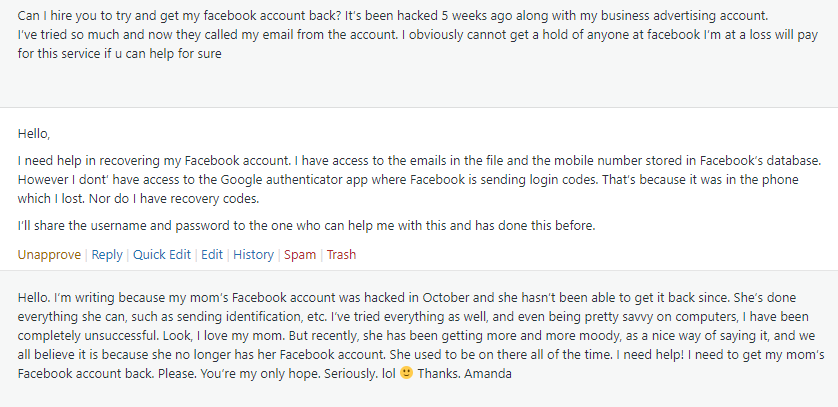
Here’s just a small sample of some of the messages I’ve received:

Examples of cries for help when someone's Facebook account has been hacked

Unfortunately, once you’ve lost control of your Facebook account, it’s awfully hard to get it back. We’ve tried to get accounts back, but, the hackers know what they’re doing. Once they take control, they lock the account down pretty tightly. They have already proved to Facebook that they are you, and once they’ve changed the email address and phone number, you’re not going to get it back.

What should you do right away if your Facebook account has been hacked, your password and email are changed, and you’ve lost control of it?

There are a number of things you should do right away. Think about your finances, online security for other accounts, your email, and other personal data like photos and notes.

What if my credit card or bank account is connected to my Facebook account?

The first thing you should do is contact your bank. If you have your credit card, debit card, or bank account connected to your Facebook you should cancel them right away. Period. Don’t even think about this. If the hacker has full control of your Facebook, they can go on a spending spree with your money. Until your bank officially cancels the card, keep a very close eye on your online banking activity.

Should I change my password on other accounts?

When your Facebook account has been hacked, you should change the password on these accounts right away:

  • Change the password on your email. If your Facebook uses multiple emails, change it on all of those accounts
  • Any account where you are using the same password as Facebook

Once you’ve changed the password on your email and any account using the same password as Facebook, change the passwords on all of your other accounts. (Yes, I said ALL!)

We recommend that you change your password on social media and your financial accounts at least monthly. Use a password that is at least 12 characters. (Longer is better.) Here’s an old blog on how to create a secure password that you’ll remember.

Use something like: “MyNewF@ceb0okPW!”, or “NewFB@ccount1nfo”. Both are 16 digit passwords. Notice that there is a mix of capital and small letters, numbers, and special characters. (I’ve replaced the “A”s with the @ symbol, one of the “o”s of Facebook is actually a zero, and the “I” of Info is actually the number one.) Change it at least once a month going forward.

Can they hack my email too?

Double-check your email settings. Have they changed? You should look especially at the “Reply-To” address. And change your password too!

I’ve been using Facebook to log into other apps. How do I get into them now?

If you’ve used another way to log into those apps, you can probably still log in with a password reset. If you only used Facebook to log in, you may be out of luck. Contact Customer Service for the app. Let them know what happened and tell them your email. They may let you back in. Since Instagram is owned by Facebook, you’ll probably have difficulties there.

I’m embarrassed. Should I tell my friends?

Absolutely! After you speak to your bank and change your password, call your friends. They should be on the lookout for messages that are not from you, especially if the message is asking for help or money.

How do I get all my photos back?

If you set up your account as “Public”, and the hacker hasn’t changed the settings, you may still be able to get access to your photos, albums, notes, etc. If you can’t, ask someone you trust (who is still a “friend” of the account) to download all of your data.

What about my Facebook business account?

If you’ve lost access to your personal Facebook account, you’ve lost access to your business account too. Make sure your customers know. If you’ve ever purchased advertising on Facebook, contact your bank and cancel that card or account.

Setting up a new Facebook account:

What should I do to securely set up a new personal Facebook account?

  • Set up a new email account to use only for Facebook
  • Set up Two-Factor Authorization with the new account.
  • Make sure your password is at least 12 characters long and contains a good mix of numbers, letters, capitals, and special characters.
  • Go through the Privacy and Security settings on your new Facebook and lock it down as much as you can.
  • Change the password on your new account monthly.
  • Don’t provide any financial information to Facebook. If you want to purchase something on the Marketplace, negotiate a different means of payment with the seller.

How should I set up a new Facebook Business account?

  • Create another new email account to only use with your Facebook business account. (You’ll need to set up a personal account first. And, yes, you’ll end up with two personal accounts.)
  • Follow the same steps outlined above for setting up your new business account.
  • If you advertise on Facebook, ask your bank for a separate credit card with a minimal spending limit. (Don’t use a debit card!)

How do I “Lock Down” my new account(s)?

If figuring out the Privacy settings on your new Facebook page is more than you want to do, let us know. We can set up a remote appointment with Chris to go through all of your settings to make sure another hacking is less likely. (Unfortunately, there are never any guarantees when it comes to protecting yourself from hackers.)

Information About Geek For Hire, Inc.

I’ve created a Free Report to protect you from “phishing” scams. Click here to receive it!

Chris Eddy of Geek For Hire, Inc. has provided computer service to families and small businesses with Mac’s and PCs for the past eighteen years. Angie’s List and the BBB rate Geek For Hire very highly.  You can find more on our website, or give us a call at 303-618-0154. Geek For Hire, Inc. provides onsite service (Tier 3 support) to the Denver / Boulder / Front Range area and remote service throughout North America.

Here’s a link to our Covid19 Policy.

We’ve been using Amazon Prime for the past few years.  We like the free and fast shipping.  With Prime, we have access to online streaming too. Prime is usually $119/year, but you can get a free 30-day trial by clicking on this link: Try Amazon Prime 30-Day Free Trial. As an Amazon Associate, we earn from qualifying purchases.

More Tips Here:

  • Are VPNs worth it? More here.
  • Are you interested in learning more about Extreme Privacy?
  • We have seen a lot of Facebook hacking lately. Here’s what you should do ahead of time to keep your account safe.
  • And here are the 10 Password Mistakes you don’t want to make!
Hacked Email? Check your “Rules”

This past week, we received hacked email messages “from” several different customers indicating that their email account has become compromised. I have “from” in quotes because the emails weren’t actually from those people.

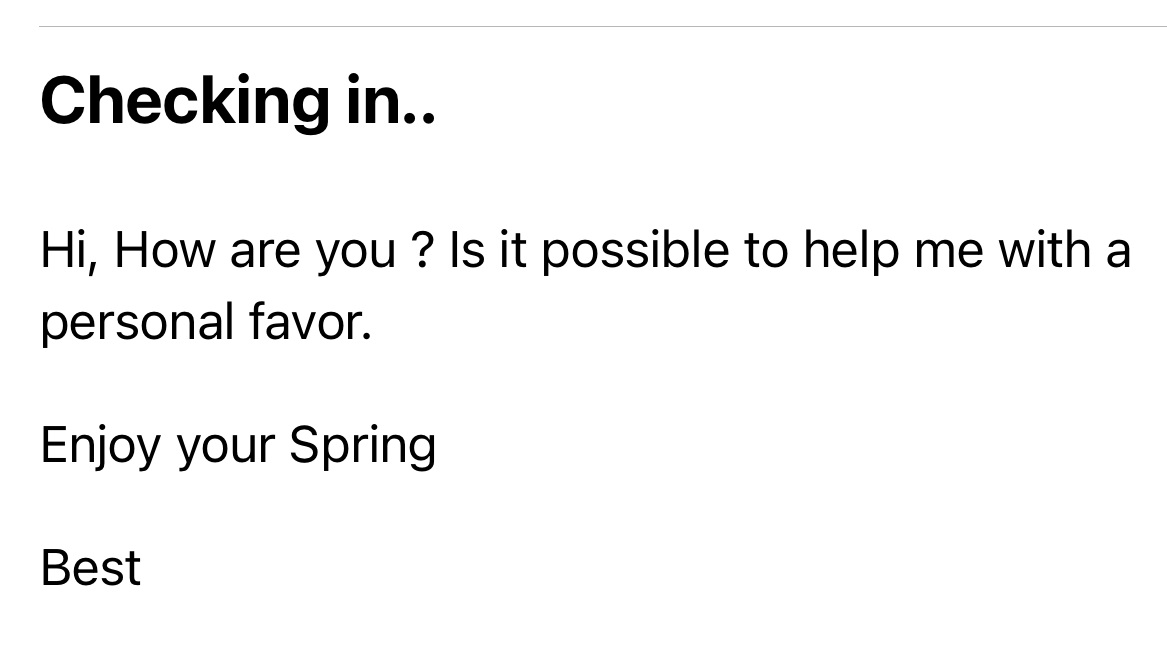
Each email was similar, in that they all started with a benign and short email message saying “Checking in” or “Favor to ask!” or “Hey there?”. The request said something like “I wonder if I could ask your help?”. All the messages were received within the past 7 days. This indicates an active and fruitful attack that is going on right now.

HACKED EMAIL – CHECKING IN:

Here’s a screenshot of one of the first hacked email messages we received:

Hacked email example - need a favor

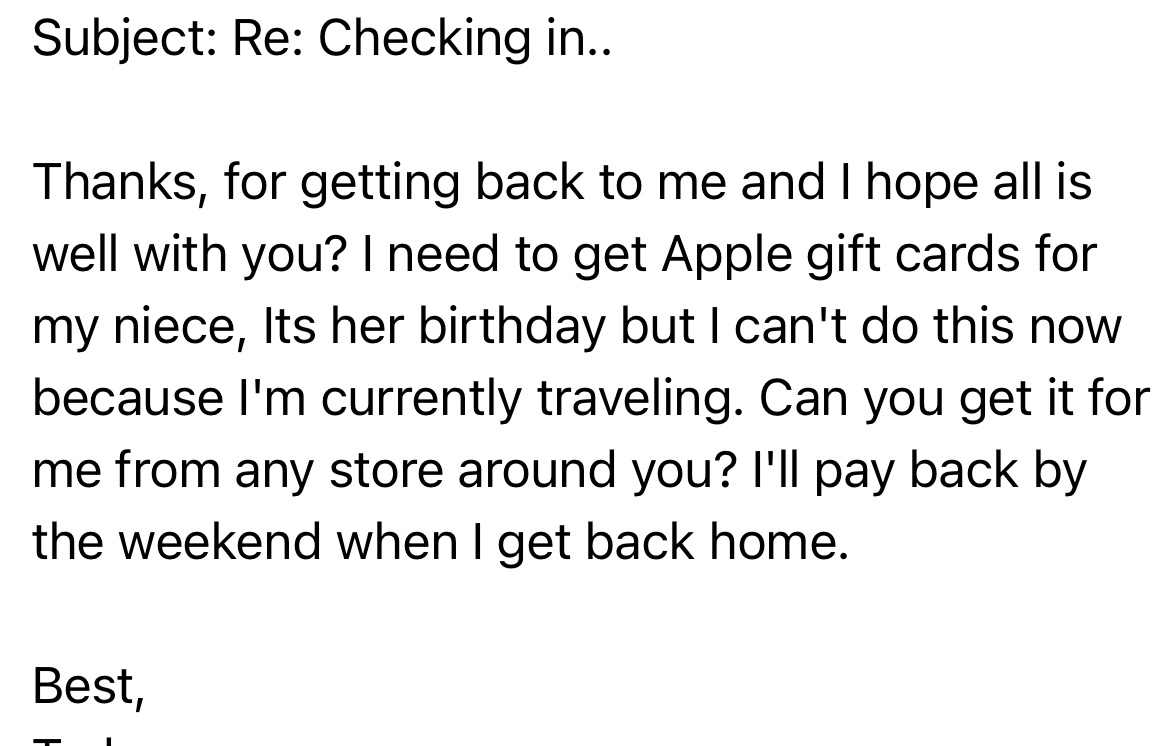
Chris replied with a quick email that said “Yes, I will call you later today”.  Our “Spider-Sense” was tingling about this message – because this is not something that this customer would do via email.  A few minutes later, we received this message:

email hacking example - Apple card for neice

We noticed that the “reply from” address was slightly different from his actual email address. (An “R” was added to the end of his name.) I called the customer a few minutes later, and he said he had not sent either of the messages. We talked for a while, and I recommended that he turn off his computer, and wait until I could arrive later that day.

Super-Geek To The Rescue:

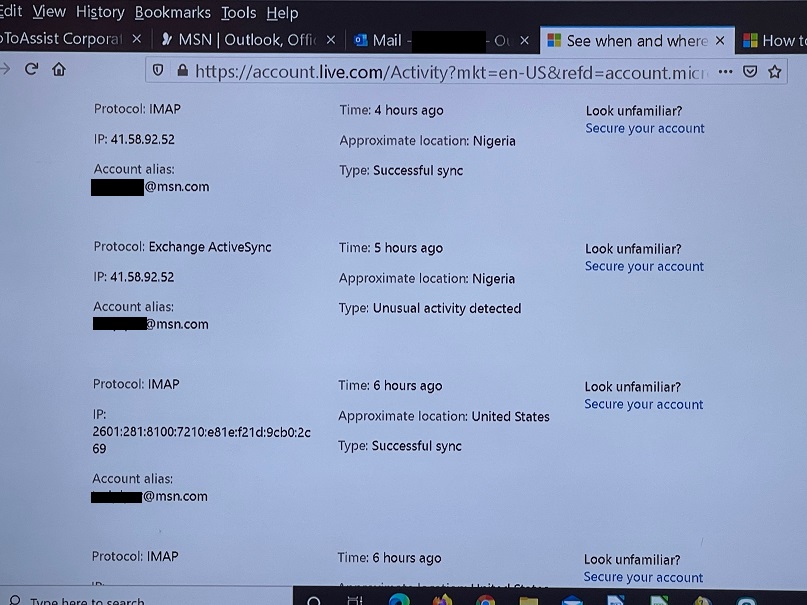
The first thing was to review his MSN account security information, such as the cell phone and alternate email addresses on file which can be used for account recovery, and to change his password.  I enabled a feature to disconnect all already connected email programs which might still be connected. We wanted to make sure the hacker did not still have access to his account, to possibly seize back control.  I looked through his past login history and found that there were several recent attempts from Nigeria using Exchange.  This was a smart and sneaky attack.

Hacked email - unusual activity from Nigeria

I scanned his machine, and found the machine was not infected – but there was something wrong with his MSN email account. His Inbox showed that it had not received any new email messages for the past several days. (He could send email messages just fine.)

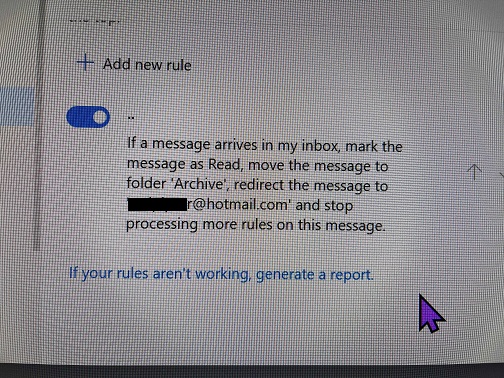
I looked through his account configuration within MSN, and found that a Rule (which did not have a name) had been added. It was applied to every new email message.

Hacked email - account rules changed and archive message

  • Mark the message as Read
  • Move the message to the Archive folder
  • Forward a copy of that email message to a different email account. This looked like the customer’s email address but with very subtle differences.

I found that all of the customer’s recent email was indeed in the Archive folder, and moved them back to the Inbox.  I deleted the Rule added by the Hijacker.

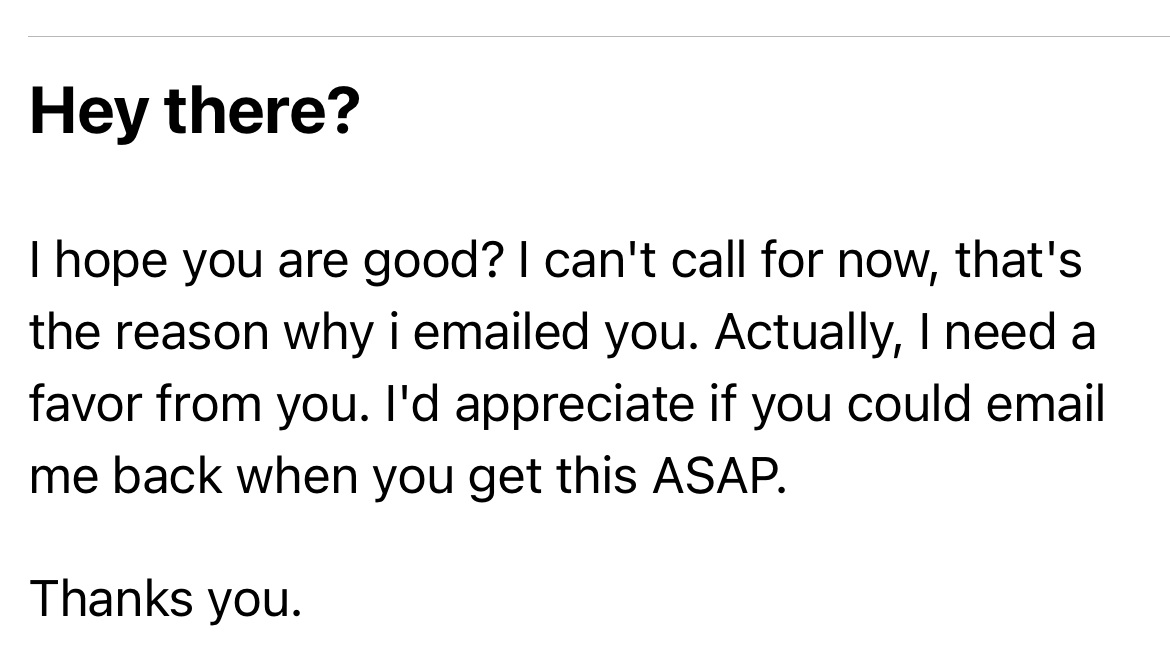
HEY THERE?

Here’s another hacked email we received:

Hacked Email Example - slick get back to me asap


This was a sneaky one too with multiple Rules added to their email. In this case, their Comcast email account had been modified to have a similar Rule added, which was forwarding a copy of all email messages to a similarly named email address under the Hotmail.com domain that did not belong to the customer.  The password was changed, the account recovery information was reviewed, and the silent email forwarding Rules (there were two) were found and deleted.

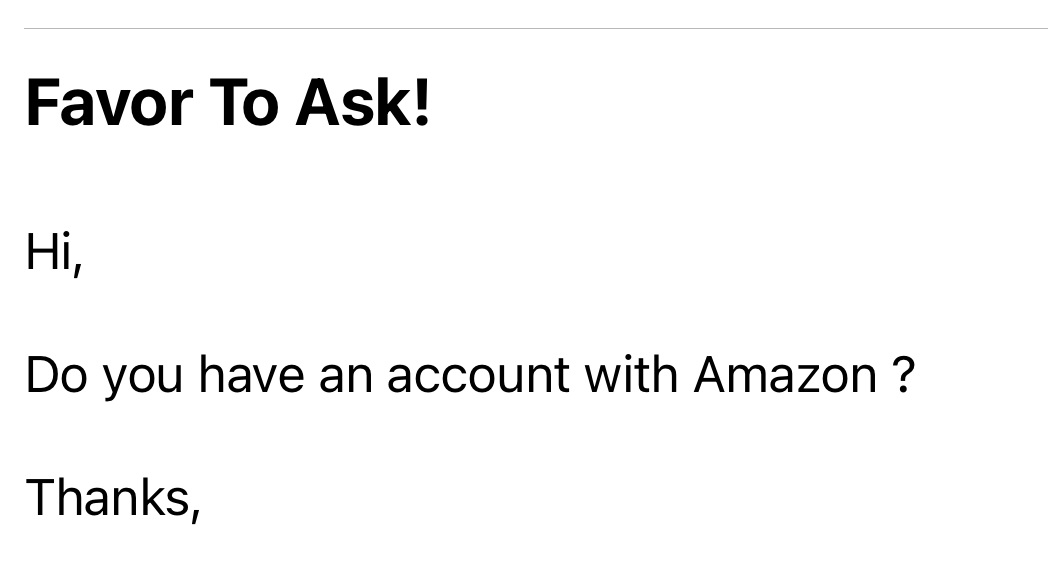
FAVOR TO ASK!

For another customer, we received this “Favor to Ask!” message:

Hacked email example - another Favor to Ask

We contacted them with a different email to let them know. They sent an email blast to their contacts announcing that their email address had been compromised, which is good. But they didn’t BCC everyone so we:

  • saw their complete list of contacts, and
  • so did everyone else.

Remember, if you need to send an email message to many contacts, follow good Netiquette and don’t use CC. Using BCC will hide all contacts that you are sending to. (Who remembers “carbon copies”, “blind carbon copies”, and getting their fingers all inky?!)

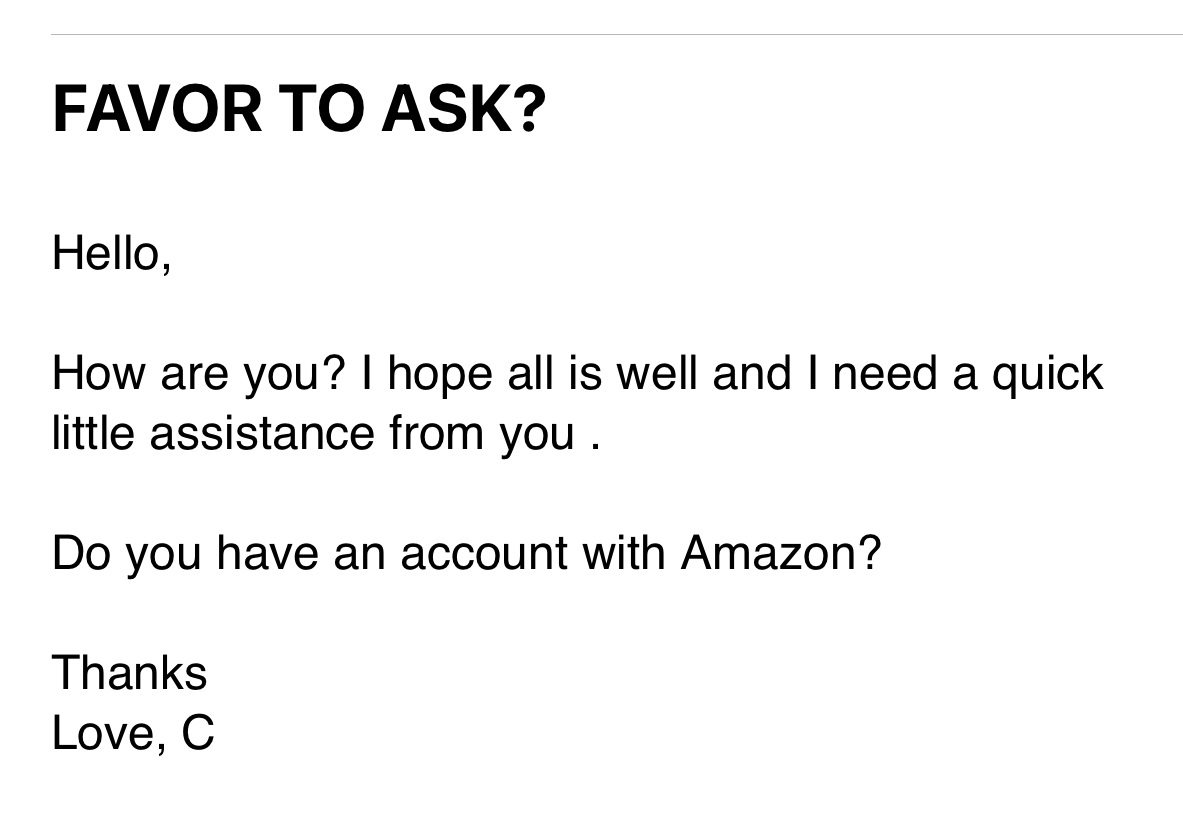
FAVOR TO ASK?

We also received this similar message from a hacked email:

example - favor to ask - AmazonAgain, the hacker changed the rules within their email account.

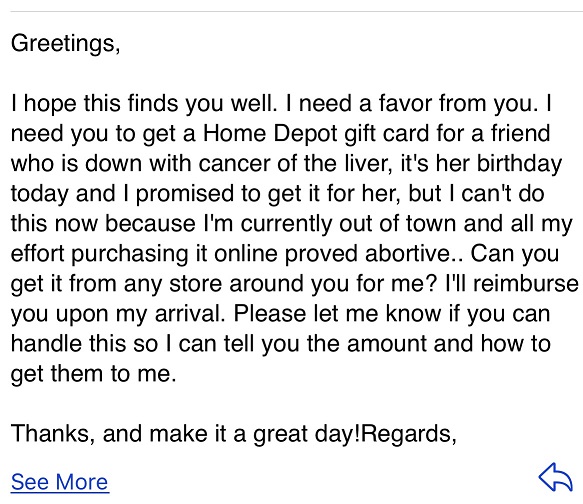
GREETINGS

And, last but not least, we received this convoluted request:

Another example requesting a Home Depot card

WHAT TO LOOK FOR IN YOUR EMAIL INBOX:

If you get an email like this, it’s important to let the person know, WITHOUT using the email address that was used to send the original message! The best option is to call or text them. If you don’t have their phone number, see if you have another email for them. You can also contact a family member and ask them to pass on the message. I’ve even resorted to sending the person a message on Facebook.

WHAT TO DO IF YOU’RE DEALING WITH A HACKED EMAIL ACCOUNT:

If you find out that your email has been compromised there are several things you should do right away:

  • Change your password on your email account.
  • Double-check that your “reply to” address is really your address. Look for an extra letter. Is the domain correct? (Comcast? Gmail? Outlook? etc.)
  • Check your email account “Rules” to see if any new emails are forwarded to a different address?
  • Let people know that your email is compromised. Make sure they know you’re fine and don’t need a gift card for Amazon or Apple. If you send one email to a bunch of people, please use BCC.

As always, if you need help, give us a call. In most cases, we can help you remotely.

CONCLUSION: 

Scammers, hackers, hijackers, and spear-phishers are getting more sophisticated in their attacks. Here’s a recent article about a big-time Nigerian email scam. Today is a great day to run your virus scanner, change passwords, set up two-factor authorization, and back up your data!


I’ve created a Free Report to protect you from “phishing” scams. Click here to receive it!

Information about Geek For Hire, Inc.

Chris Eddy of Geek For Hire, Inc. has provided computer service to families and small businesses with Macs and PCs for the past eighteen years. Angie’s List and the BBB rate Geek For Hire very highly.  You can find more on our website or give us a call at 303-618-0154. Geek For Hire, Inc. provides onsite service (Tier 3 support) to the Denver / Boulder / Front Range area and remote service throughout North America.

Here’s a link to our Covid19 Policy.

We’ve been using Amazon Prime for the past few years.  We like the free and fast shipping.  With Prime, we have access to online streaming too. Prime is usually $119/year, but you can get a free 30-day trial by clicking on this link: Try Amazon Prime 30-Day Free Trial. As an Amazon Associate, we earn from qualifying purchases.

More Tips Here:

Spring Cleaning Your Tech – 5 Easy Tips!

I don’t know about you, but when I think “Spring Cleaning”, I’m thinking about dust bunnies, dog nose art, and getting the sleeveless shirts from the back of the closet. (Fun trick: Turn hangers backward for your clothes at the start of a new season. At the end of the season, anything you haven’t worn, donate!)

Please note: We often recommend products, parts, and resources that we like.  Some of these are affiliate links, and we may receive a commission at no additional cost to you. As an Amazon Associate, we earn from qualifying purchases.

When I hear “Spring Cleaning”, I’m not thinking about my technology. What about you? Do you think about Spring Cleaning Your Tech? Here are some tips for you:

Spring Cleaning Your Tech – aka Computer Maintenance:

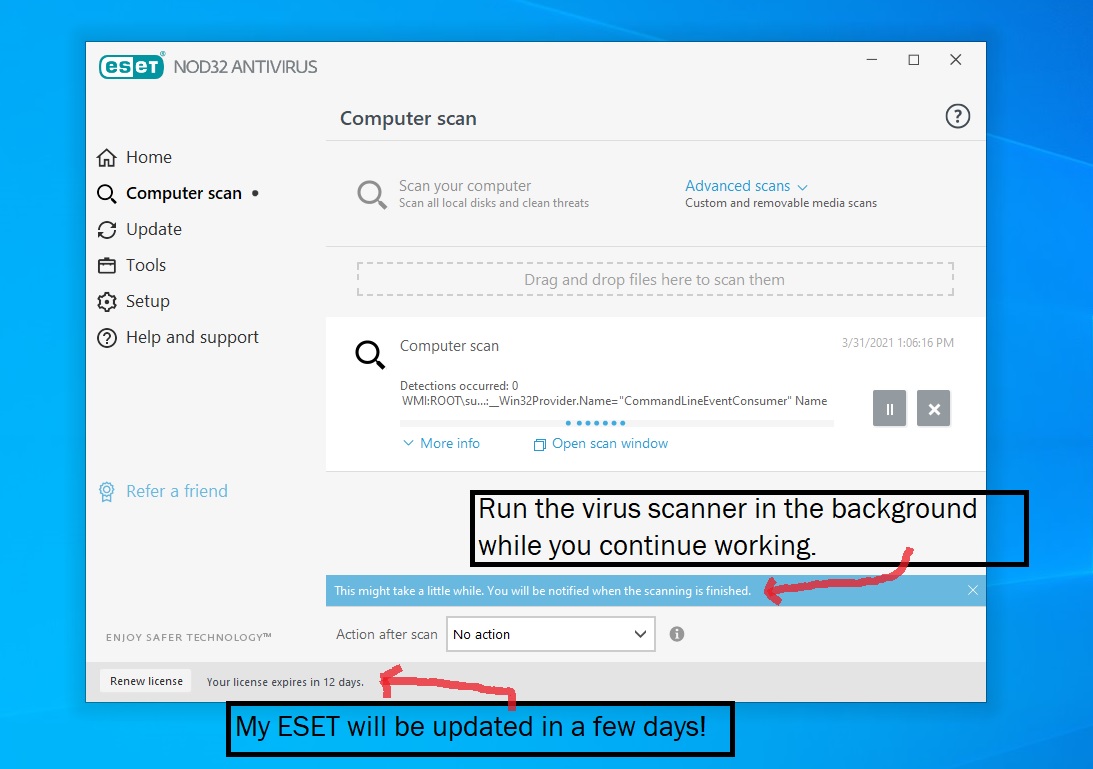
  1. Take a minute every month or so to scan your computer for viruses. Many of our customers use ESET, which Chris has recommended for years. It’s easy to do. Just open the ESET/NOD32 app and click on “Scan Your Computer”. It will run in the background while you continue working. Spring Cleaning - run your virus scannerWhen it’s done, it will tell you and let you know if it has found anything suspicious.
  2. Back up your computer regularly, especially if you have precious data on it. I use Dropbox which backs up everything automatically. I have the Dropbox app on my phone as well, so I can access files from anywhere. Plus, if my computer is down for any reason, I can head to the Library, log into Dropbox, and pull up the file I need to work on from there.
  3. Purchase several thumb drives and make a copy of the photo albums you have stored on your computer. Keep one and give the rest as gifts to your kids, parents, aunts, uncles, friends, etc.
  4. Change your passwords for financial accounts at least monthly. That includes your checking, saving, and investment accounts. Don’t forget about any app or website where you’ve saved credit card information, like eBay, PayPal, Amazon, etc.
  5. While you’re at it, please change the password on ALL of your social media accounts. Do it right now! And set up two-factor-authorization (2FA) at the same time. We’re getting between two and five requests every single day about a hacked Facebook or Instagram account. I haven’t heard any success stories here.

Dropbox:

Keep your frequently used files in the “Starred” folder. These come up first, so you won’t have to search for them. I keep insurance documents and other important papers, as well as frequently accessed Word and Excel files, in that folder.

More Tips:

Insurance Cards: Do you ever get to the DMV to renew your registration and they want to see your insurance card, but you haven’t brought it inside with you? Me too! Now, whenever the new cards arrive, I take a photo with my phone and put it in my “Favorites” album. Then if the DMV asks for it, I can bring it up quickly.

Speaking of important information, it’s not a bad idea to take a photo of everything you keep in your wallet in case you misplace it. Keep all those photos in a password-protected folder on your Mac or PC.

Conclusion: 

Today is a great day to run your virus scanner, change passwords, and back up your data!


I’ve created a Free Report to protect you from “phishing” scams. Click here to receive it!

Information about Geek For Hire, Inc.

Chris Eddy of Geek For Hire, Inc. has provided computer service to families and small businesses with Macs and PCs for the past eighteen years. Angie’s List and the BBB rate Geek For Hire very highly.  You can find more on our website or give us a call at 303-618-0154. Geek For Hire, Inc. provides onsite service (Tier 3 support) to the Denver / Boulder / Front Range area and remote service throughout North America.

Here’s a link to our Covid19 Policy.

We’ve been using Amazon Prime for the past few years.  We like the free and fast shipping.  With Prime, we have access to online streaming too. Prime is usually $119/year, but you can get a free 30-day trial by clicking on this link: Try Amazon Prime 30-Day Free Trial. As an Amazon Associate, we earn from qualifying purchases.

More Tips Here:

Daylight Savings Time – Atomic Clocks Reviewed

Between the extreme wind, heavy snow, and very cold temperatures, we’ve had a lot of power outages. I got tired of resetting all of the clocks plugged into shore power (see what I did there vanlifers?!), so I decided to get a few battery-powered atomic clocks. That way the clocks keep the time during power outages AND reset themselves when Daylight Savings Time (DST) begins and ends. Double win!

I ended up getting four different atomic clocks that sync with the WWVB broadcast from NIST.  (Bad joke: What time is it? It’s NisTime!) Two of the four I like. The others I am returning as soon as the driveway is shoveled and I can get into town!

Just so you know, if you purchase anything from the links on this page we may receive a small commission. As an Amazon Associate, we earn from qualifying purchases.

When DST begins and ends, I get so confused. Did I lose an hour? What is the true time? Will I get an extra hour of sleep? Did I spring ahead or is it time for turning back the clock? I just know that I hate Daylight Savings and it is time for a permanent daylight savings. Or permanent standard time. Either one is okay with me.

But today is not the day for those issues. Today is the day to find the best atomic clock. Here are the ones I purchased to review for you:

WallerGe Digital Atomic Wall Clock:

The first one to arrive was the WallerGe Atomic Clock:


This one is on the wall in our family room. The numbers are big enough to read from the couch, and I can see the temperature in the room at a glance. I give it a solid 3.8 out of 4 stars. It came with the batteries and quickly acquired the correct time and date from the official atomic clock at www.time.gov, aka NIST (National Institute of Standards and Technology) in Boulder, CO.  I love that it will automatically update the time when Daylight Savings Time (DST) kicks in. Why not four stars? It doesn’t light up in the dark which I didn’t realize I wanted until this one was on the wall. At the time I purchased it, the WallerGe clock was $28

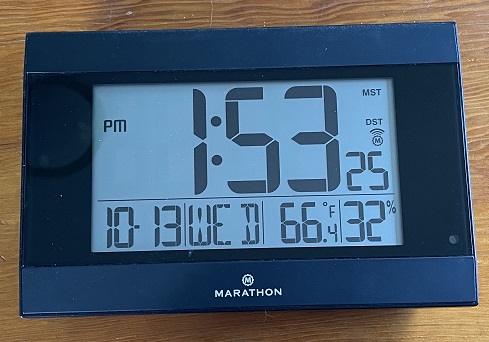
Marathon Atomic Clock:Digital Clocks make Daylight Savings easier

Once I realized I wanted a clock that would light up at night I ordered the Marathon clock which was about $40.


I really like this one. It came with batteries so I set it up right out of the box. I clicked the button to get the atomic time reading from NIST and it updated right away. I put it in the bedroom and when I wake up in the middle of the night I can easily read the time, even without my glasses.

There are three settings for the light; off, high, and low. There is a little sensor on the front that can tell if it’s dark or not. When it’s dark, the light turns on.

It’s got six times zones to choose from, so it works anywhere from Newfoundland to the west coast – all of Canada, Mexico, and most of the continental US. (Sorry, Alaska and Hawaii. You’ll need a different clock!)

October 2021 Update: The Marathon Clock is by far my favorite!

Sharp Atomic Clock:

An analog atomic clock is like a unicorn. This NIST clock from Sharp is perfect for just above the sink in the kitchen. It reminds me of a classroom clock. (I loved school!) I really wanted to like this one, but it wasn’t totally silent, and the time was sometimes off by a few minutes.

LaCrosse Technology Atomic Clock:

The last one we tried out was the LaCrosse Atomic Clock, and it was the worst.


I got this atomic alarm clock because the digits are large and I thought it might be hard to read the Marathon clock in the dark. Wrong.

  • You actually need to push a button to turn on the light. Having it across the bedroom and expecting to read it while still in the dark is unrealistic. The light on this one is either on or off. If it’s on, it is extra bright, even with the low setting. If the light is off, it’s unreadable in the dark.
  • In addition, it came with the alarm pre-set to midnight and turned on. So the first night we tried it, we were blasted awake at midnight!
  • Third, it didn’t come with batteries, so I had to dig around for a while before I found the right ones.
  • Then, it took its sweet time (55 minutes!) to get the time signal from NIST. After the first 20 minutes, I realized that it was no longer searching for the signal so I needed to push the button again. (And again and again every five minutes after that until it finally captured the signal.)
  • This clock was around $24. Since the Daylight Savings Time (DST) is tomorrow I’ll get a chance to see if it updates automatically before I return it. (It did.)

Conclusion: 

Now is a great time to get an atomic clock that you don’t have to reset after every power outage or Daylight Savings Time (DST) change. And, just for fun, here is a link to a daylight savings meme or two.


I’ve created a Free Report to protect you from “phishing” scams. Click here to receive it!

Information about Geek For Hire, Inc.

Chris Eddy of Geek For Hire, Inc. has provided computer service to families and small businesses with Macs and PCs for the past eighteen years. Angie’s List and the BBB rate Geek For Hire very highly.  You can find more on our website or give us a call at 303-618-0154. Geek For Hire, Inc. provides onsite service (Tier 3 support) to the Denver / Boulder / Front Range area and remote service throughout North America.

Here’s a link to our Covid19 Policy.

We’ve been using Amazon Prime for the past few years.  We like the free and fast shipping.  With Prime, we have access to online streaming too. Prime is usually $119/year, but you can get a free 30-day trial by clicking on this link: Try Amazon Prime 30-Day Free Trial. As an Amazon Associate, we earn from qualifying purchases.

More Tips Here:

Facebook Hacking is on the rise! (It’s not your imagination.)

This is short and sweet – 5 steps to keep you safe from Facebook Hacking. If you want more tips, please sign up for our emails.

(Updated from 31 March 2020.)

Chris has been getting a lot of calls recently about hacked Facebook accounts.  A lot of the Facebook hacking starts when you click on a video that a “friend” sent you via Facebook Messenger. It is most likely that your friend’s account has already been compromised, and it is the Facebook hacker sending you the video.

If someone else has gotten control of your Facebook account, it is really hard to get it back. So follow these steps before that happens!

What to do:facebook hacking

Here are Chris’ suggestions if your Facebook account has been hacked:

  1. Change your password.
  2. Change your security question(s) and answers (in case they were reviewed by someone else).
  3. Log out of all locations where you are logged in.
  4. Confirm that your recovery email address and your mobile phone number is still yours and not set to someone else’s.
  5. Tell your friends not to open any videos or any other links that you have sent.

Doing this will help you keep your account yours after you change your password.

Facebook Hacking via Messenger:

It seems like we are all using social media more now than we did even a month ago. Try not to send any links at all via Facebook Messenger for the time being.  If you do get a video (or other links) on Facebook Messenger, don’t click on it right away. Instead, send an email to your friend confirming that they sent the video.

Facebook Hacking Service:

I also did a quick Google search to see what other advice is out there to make your account more secure. Boy, was I surprised when I saw links to a Facebook Hacking Service and an ad to Hire a Facebook Hacker!

Online Security:

Finally, we recommend ESET to keep ALL of your devices safe online.

Other Hints:

  • Also, please remember to stay well clear of shortened links unless you know without a doubt where that link will take you. That includes most bit.ly and owl.ly links. Here’s a recent article about short links.
  • Likewise, there are a lot of scams out there. Read our article about Covid19 scams.

I’ve created a Free Report to protect you from “phishing” scams. Click here to receive it!

INFORMATION ABOUT GEEK FOR HIRE, INC.

Chris Eddy of Geek For Hire, Inc. has provided computer service to families and small businesses with Mac’s and PCs for the past eighteen years. Angie’s List and the BBB rate Geek For Hire very highly.  You can find more on our website, or give us a call at 303-618-0154. Geek For Hire, Inc. provides onsite service (Tier 3 support) to the Denver / Boulder / Front Range area and remote service throughout North America.

Here’s a link to our Covid19 Policy.

We’ve been using Amazon Prime for the past few years.  We like the free and fast shipping.  With Prime, we have access to online streaming too. Prime is usually $119/year, but you can get a free 30-day trial by clicking on this link: Try Amazon Prime 30-Day Free Trial. As an Amazon Associate, we earn from qualifying purchases.

Facebook Account – Has Yours Been Hacked?

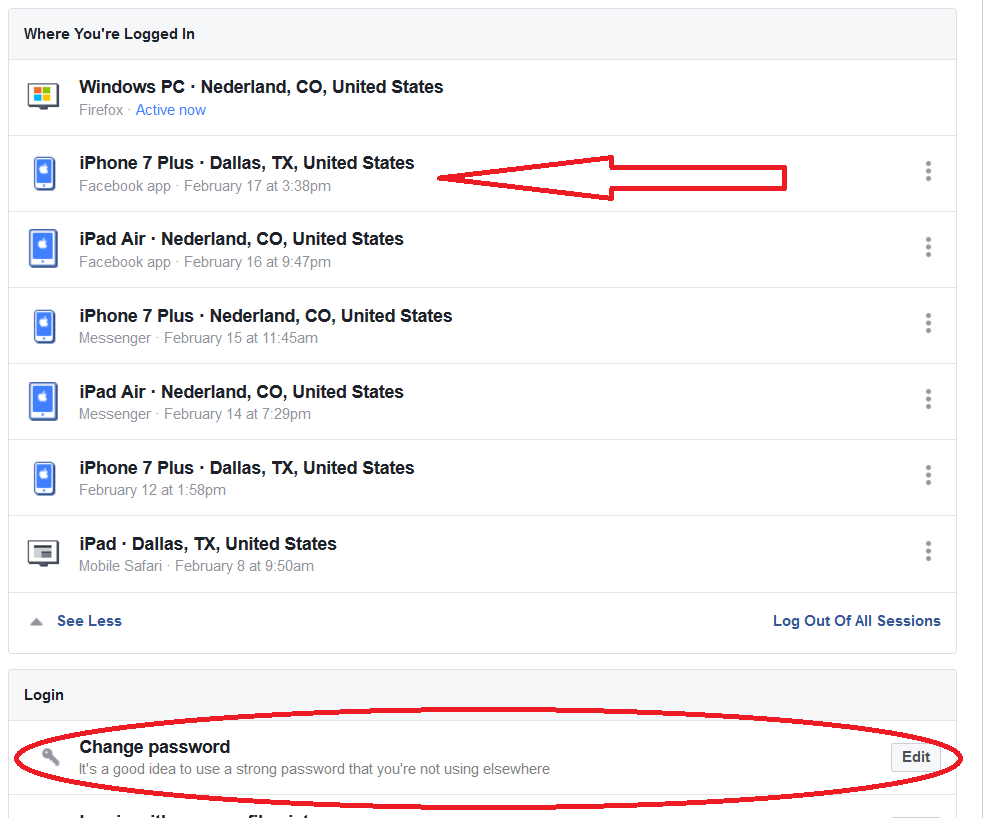
I read an article recently about how to find out if someone in a different location was logged into your Facebook account. I followed the steps and saw that someone in Dallas was logged into my account! Whoa! I logged out of the devices in those locations pretty quickly.

Originally posted on 13 February 2018.

There are several steps to follow to see if someone has hacked into your Facebook account.

The first thing to check on your Facebook account:Facebook Account

The first thing you want to do is to determine if you are logged into your Facebook account from odd locations. To check this, click on “Settings” and then on “Security and Login”. That screen will tell you all the places (and devices) that you are logged in. If something seems odd, then log out of that location. For example, did you use the library computer to check Facebook? Did you want to show your aunt that funny meme and logged into Facebook on her computer but forgot to log out.

Second thing:

Check your birthday and email to make sure they haven’t been changed. If they have been changed, change them back and then immediately check the recovery email. Is it still your email address, or was it changed?

Also, has anyone told you they received a second friend request from you? Or are there messages that have been sent, but not sent by you? Again, this is a good time to change your password and notify your friends not to open a recent private message from you. You should also notify Facebook that your account may be compromised.

You should also:

Now is a good time to change your password as well. It’s on the same screen as “Security and Login”. Click on “Change Password”, and choose a secure one! Here are some tips for creating a strong password.

Lastly:

Bump up your security settings. Ask Facebook to send you an alert when someone tries to log into your account. Now is also a good time to set up Two-Factor Authentication. You can access both of those settings from the same “Security and Login” screen.

You can also check out this recent post about Facebook Hacking too, for five easy tips to keep you safe.

ONLINE SECURITY:

We recommend ESET to keep ALL of your devices safe online.

Watch Out For Phone, Text, Email, and Other Scams:

  • Remember to stay well clear of shortened links unless you know without a doubt where that link will take you. That includes most bit.ly and owl.ly links. Here’s a recent article about short links.
  • Right now, there are a lot of scams out there. Read our article about Covid19 scams.


I’ve created a Free Report to protect you from “phishing” scams. Click here to receive it!

Information about Geek For Hire, Inc.

Chris Eddy of Geek For Hire, Inc. has provided computer service to families and small businesses with Mac’s and PCs for the past eighteen years. Angie’s List and the BBB rate Geek For Hire very highly.  You can find more on our website or give us a call at 303-618-0154. Geek For Hire, Inc. provides onsite service (Tier 3 support) to the Denver / Boulder / Front Range area and remote service throughout North America.

Here’s a link to our Covid19 Policy.

We’ve been using Amazon Prime for the past few years.  We like the free and fast shipping.  With Prime, we have access to online streaming too. Prime is usually $119/year, but you can get a free 30-day trial by clicking on this link: Try Amazon Prime 30-Day Free Trial. As an Amazon Associate, we earn from qualifying purchases.

Extreme Privacy: What it Takes to Disappear – Book Review

When I saw Extreme Privacy by Michael Bazzell on Amazon I was intrigued. Many of you know that Privacy and Security are very important to me. This book might give me tips on how to make my online presence even more private! I ordered it right away. (FYI, the third edition, published May 2021, was completely rewritten.)

As an Amazon Associate, we earn from qualifying purchases.

Extreme Privacy Overview:

At 566 pages, Extreme Privacy: What It Takes To Disappear, is a hefty book. There are so many topics covered, in so much detail, I wasn’t able to read it all the way through. In many places, the material was too dense for a layman to comprehend. One of my big complaints about the book is the Index on page 566. A one-page index does not do this 20-Chapter book justice.

Despite the length, I did thoroughly review the whole book. The first part of each chapter was interesting and was written at a pretty high level. I was able to get the gist of each chapter without having to read all the detail on subjects in which I wasn’t terribly interested.

This book is primarily targeted at high-profile people who need to implement extreme privacy. (Think movie stars, CEOs, and billionaires.) It’s also directed at people who have been seriously threatened and need to disappear. But it also has some great tips for people who just want to be more digitally secure. Our information is EVERYWHERE, and even companies who say they will be careful with our information are subject to cyber-attacks. (Right now, we’re still waiting to see the complete fallout of the 2020 Solar Winds attack on US government systems.)

What I learned:

One of the big takeaways I got from Extreme Privacy is that hiding is not cheap. There is new equipment to buy, with cash. A trust to set up. Accountants and Lawyers to advise you on what is legal and what is not. A new home to buy or rent. Multiple online devices to purchase; one to use only at home, and another to never use at home. And then there is all the equipment that normal people use, like a VPN, Servers, and routers.

Another thing I learned is that all of the work you do disappear can all be undone with a little social engineering. For example, if you have your mail delivered to a private mailbox in another state, which then forwards the mail to you. An unscrupulous person finds the address and phone number of the private mailbox company. They call and say they are your brother or wife and ask for the address to which mail is forwarded. Boom! All your hard work for privacy is gone.

Another potential problem is hacking. You bring your pet to a new Vet and provide your real address and phone number. Many Veterinarians provide their customer data to marketing firms so they can keep in touch with their clients. Then the marketing firm gets hacked and your data is “in the wild”.

I also learned how I could go about removing my information from public databases.

What I liked about Extreme Privacy:

I thought the book was well organized. Using the Table of Contents it was easy to find the sections that I was interested in. I learned about a lot of new tracking tools that are being used, and how to legally get around them. For example, license plate scanners: How can you legally get around having them scan your license plate?

Another thing I liked was that Mr. Bazzell has years of experience and he’s made a few mistakes. He discussed those mistakes openly – what the mistake was, and how he does things differently today.

I also liked that the book takes a proactive approach. It outlines the things you can do today before you run into issues with privacy and security.


I’ve created a Free Report to protect you from “phishing” scams. Click here to receive it!

Information about Geek For Hire, Inc.

Chris Eddy of Geek For Hire, Inc. has provided computer service to families and small businesses with Mac’s and PCs for the past eighteen years. Angie’s List and the BBB rate Geek For Hire very highly.  You can find more on our website or give us a call at 303-618-0154. Geek For Hire, Inc. provides onsite service (Tier 3 support) to the Denver / Boulder / Front Range area and remote service throughout North America.

Here’s a link to our Covid19 Policy.

We’ve been using Amazon Prime for the past few years.  We like the free and fast shipping.  With Prime, we have access to online streaming too. Prime is usually $119/year, but you can get a free 30-day trial by clicking on this link: Try Amazon Prime 30-Day Free Trial. As an Amazon Associate, we earn from qualifying purchases.

More Tips Here:

New Apple Watch 6 – Geek For Hire’s Review

I traded in my old Apple Watch for the new Apple Watch 6 a few weeks ago. I got the one with GPS and cellular. Now that I’ve gotten used to it and its functions, I think it’s time for a review. (As an Amazon Associate, and we earn from qualifying purchases.)

What I Like About My New Apple Watch 6:

Blood Oxygen:

The Apple Watch 6 measures your blood oxygen percentage. I never realized how important this measurement was until Chris’ mom moved in with us. Moving from Long Island, NY, at sea level to 8500’ was hard for her. She began having issues with breathing and low-energy in general. Then her new doctor recommended that we get a pulse oximeter. This would help us measure her O2 regularly and know if she was in trouble. Twenty years later, I sometimes have issues with my O2 levels as well. My new watch helps me keep on top of the measurement. I also like that it tells me that it measures in a “high elevation environment.” It also measures my O2 sat when I’m asleep, as long as I’m not moving around while I am dreaming!

Watch Faces:

The new iWatch gives me the option to have different watch faces. There are probably 50 items you can track on the Apple Watch, but not all of them will fit on the watch face at one time. I have one watch face that tells me the time and date, of course, but it also tells me the local temperature, the Air Quality Index, wind speed, elevation, my next calendar item, and the current time in Rochester, NY, where much of my family lives. Another watch face only tells the time and rotates through about 20 favorite photos and videos. Another one tells me what time the sun and moon will rise and/or set.

Exercise:

New Apple Watch 6 - Close Your Rings every day


I really like the way the Apple Watch tracks exercise. It gets me motivated each day to “close my rings.” There are three rings: One for active movement, one for exercise minutes, and one for standing each hour. I’m able to change the goals for each one to keep the pressure on. Apple has also added challenges each month. They’re always stretch goals, but not undoable. I’m looking forward to earning the October challenge by exercising a certain number of minutes this month.

Heart Rate:

The watch still measures my heart rate almost continuously. It tells me my high and low heart rate for the day, it tells me my average resting heart rate, and it tells me my heart rate recovery time after exercising. This is another way I can keep track of my overall health.

Hand Washing:

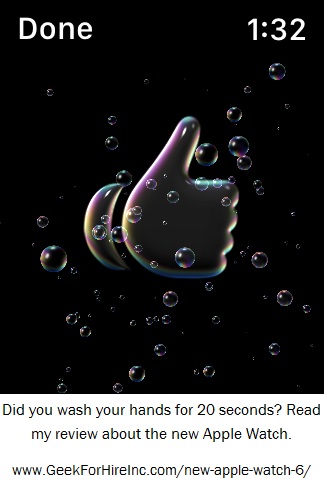
I get a “thumbs up when I’ve washed my hands long enough!Apple Watch 6 - Thumbs up for handwashing!

Sleep:

The new Apple Watch 6 still links with the Pillow app so I can check my sleep quality at a glance. I think the Pillow app is more robust than the sleep information provided by the Fitbit.

Colors:

Red is my color, and I love having a red watch. My second favorite is the blue one shown above. (But Chris said I could only get one!) Other colors include gold, graphite, silver, and space grey.

Charging:

The Apple Watch 6 charges WAAAAAY faster than my previous Apple Watch! I got this cute silicone charging stand to hold my Watch on my nightstand.

Watchbands:

The watchbands are interchangeable with my old watch. That’s a good thing. I really didn’t like the red shade the new Apple Watch came with. I was easily able to swap the weird red bands for basic black. And, it’s easy to order replacement watch bands to dress it up or make it sportier.

What I Don’t Like the new Apple Watch 6:New Apple Watch 6 - enable screenshots

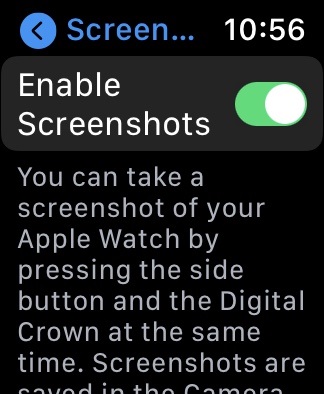
  1. With my old Apple Watch, I was just able to take screenshots. With the new Apple Watch 6, I needed to enable screenshots before that function would work.
  2. Siri is pretty intrusive and is constantly asking me what I need help with now.
  3. Sometimes when I’m really active, the watch asks me if I’ve taken a hard fall. Now, in general, I like this feature, and I’ve heard some great stories of people in the backcountry that have been rescued, but it seems a little too sensitive for me.
  4. Blood Oxygen measurement is not always accurate. Sometimes I’ll compare the measurement from my watch to the measurement with the pulse ox. About 20% of the time, the measurements are substantially different. I’m hoping that the Apple engineers are working on this and will push out an update to make it more accurate over time.
  5. I have to stay really, really still in order for the Watch to take an O2 measurement. I can’t take it when I’m exercising or in a moving car or when I’m moving around in any way at all.
  6. There isn’t an option to make the text on the Watch Face larger. My older eyes sometimes have a problem reading the data, especially the elevation!

How-To Book:

There are so many features on this new Apple watch. I got confused and overwhelmed when I was setting it up. This book helped me a lot. It’s available in paperback and Kindle format. I downloaded it to my Kindle which was good, because I had access to the information right away. The downside is that there weren’t links to the different sections of the book, so there was a lot of scrolling involved.

Important!

If you need help setting up your new Apple Watch, let us know. Here are some important things to remember:

  • If you’re trading in your old Apple Watch, remember to delete all of your personal data. (That’s what I did and the AT&T store gave me a great deal when buying it back.)
  • Back up your iPhone before setting up the new Watch and make sure it has the latest iOS.
  • Make sure you set up a passcode. The Apple Watch locks every time you take it off, which this security conscious gal says is a good thing!
  • The Apple Watch interacts with three separate apps on your iPhone;

Watch Out For Phone, Text, Email, and Other Scams:

  • Remember to stay well clear of shortened links unless you know without a doubt where that link will take you. That includes most bit.ly and owl.ly links. Here’s a recent article about short links.
  • Right now, there are a lot of scams out there. Read our article about Covid19 scams.


I’ve created a Free Report to protect you from “phishing” scams. Click here to receive it!

Information about Geek For Hire, Inc.

Chris Eddy of Geek For Hire, Inc. has provided computer service to families and small businesses with Mac’s and PCs for the past eighteen years. Angie’s List and the BBB rate Geek For Hire very highly.  You can find more on our website or give us a call at 303-618-0154. Geek For Hire, Inc. provides onsite service (Tier 3 support) to the Denver / Boulder / Front Range area and remote service throughout North America.

Here’s a link to our Covid19 Policy.

We’ve been using Amazon Prime for the past few years.  We like the free and fast shipping.  With Prime, we have access to online streaming too. Prime is usually $119/year, but you can get a free 30-day trial by clicking on this link: Try Amazon Prime 30-Day Free Trial. As an Amazon Associate, we earn from qualifying purchases.