Microsoft Security Warnings for Windows and Internet Explorer

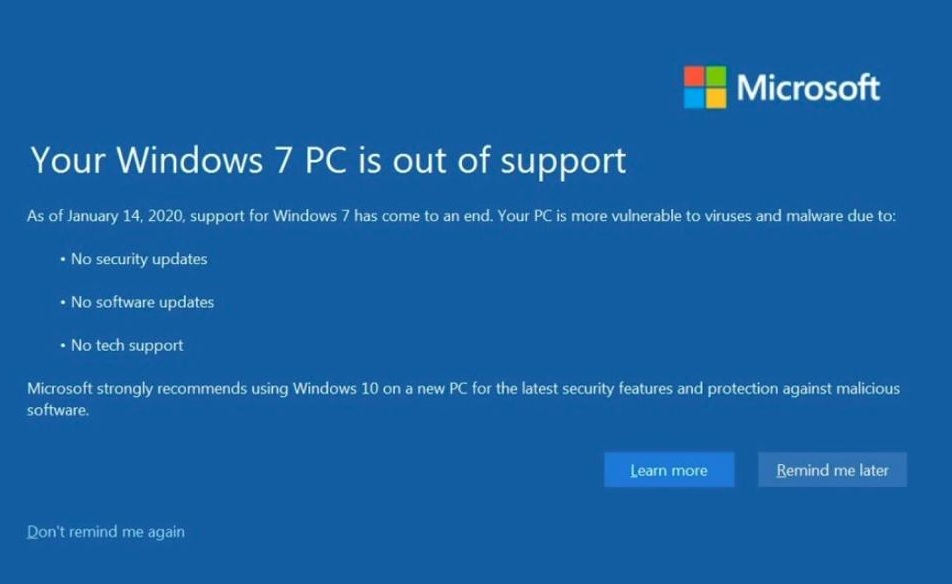
It’s been a busy week for Microsoft Security.  First, they took down all support for Windows 7 on January 14th. And, if you are still using Win7 you saw this warning message pop up on your screen that Tuesday morning:

microsoft security - Windows 7 end of life warning message

Microsoft Security – Windows 10:

And then, also on January 14th,  the National Security Agency or NSA tells us that Windows 10 has a major security breach.

“On January 14, Microsoft released a set of patches for the Windows platform. While all of the issues addressed in the patch release are serious, this article will discuss one of them: CVE-2020-0601. Above anything else, we urge everyone to take action and patch their systems. CVE-2020-0601 is a serious vulnerability, because it can be exploited to undermine Public Key Infrastructure (PKI) trust. PKI is a set of mechanisms that home users, businesses, and governments rely upon in a wide variety of ways. The vulnerability permits an attacker to craft PKI certificates to spoof trusted identifies, such as individuals, web sites, software companies, service providers, or others. Using a forged certificate, the attacker can (under certain conditions) gain the trust of users or services on vulnerable systems, and leverage that trust to compromise them.”

I don’t pretend to know what this security breach does, but I do know that if your Operating System is Windows 10 and you haven’t downloaded and installed the latest Windows 10 updates, you’re crazy!

Internet Explorer:

And, now we find out that Internet Explorer also has a major vulnerability. Cybersecurity and Infrastructure Security Agency (CISA) reports:

“Microsoft has released a security advisory to address a critical vulnerability in Internet Explorer. A remote attacker could exploit this vulnerability to take control of an affected system. According to the advisory, “Microsoft is aware of limited targeted attacks.””

And, from Newsgram:

“Microsoft has confirmed a security flaw affecting Internet Explorer is currently being used by hackers and it is working on a fix, to be released at a later date. The vulnerability was first reported by US Homeland Security on Friday evening, although the issue is not limited to American devices.”

Since 2014, CISA has recommended that people not use Internet Explorer, but use a different browser instead:

“US-CERT is aware of active exploitation of a use-after-free vulnerability in Microsoft Internet Explorer. This vulnerability affects IE versions 6 through 11 and could allow unauthorized remote code execution. US-CERT recommends that users and administrators review Microsoft Security Advisory 2963983 for mitigation actions and workarounds. Those who cannot follow Microsoft’s recommendations, such as Windows XP users, may consider employing an alternate browser.”

Our recommendation?  Use Firefox!

Is Your Machine Infected?

How can you tell if you have a virus or other malware? Here is a description of some possible malware symptoms you may be experiencing.

Remember, with software, you get what you pay for, so don’t use a free anti-virus. Do you have a great anti-virus?  We like Eset’s NOD32.

Conclusion:

Make sure you have your anti-virus set to automatically check everything you do.  At least once a week, you should also run a virus scan to make extra sure that your machine is good to go.

Information about Geek For Hire, Inc.

I’ve created a Free Report on what to look for to protect yourself from “phishing” scams. Click here to receive it!

Chris Eddy of Geek For Hire, Inc. has been providing computer service to families and small businesses with Mac’s and PCs for the past eighteen years. Angie’s List and the BBB rate Geek For Hire very highly.  You can find more on our website, or give us a call 303-618-0154. Geek For Hire, Inc. provides onsite service (Tier 3 support) to the Denver / Boulder / Front Range area as well as remote service throughout North America.

We’ve been using Amazon Prime for the past few years.  We like the free and fast shipping.  With Prime, we have access to online streaming too. Prime is usually $119/year, but you can get a free 30-day trial by clicking on this link: Try Amazon Prime 30-Day Free Trial. As an Amazon Associate, we earn from qualifying purchases.

Getting your Tech Ready for Fire Season

What a difference a year makes.  Last year, starting in April 2018, we had the hazy views from California, Arizona, and western Colorado forest fires which continued all summer and into the fall. We’ve had so much moisture this spring our fire ban hasn’t even started yet.  This may be the first time in a decade that there’s not a fire ban on Independence Day!  Regardless, you do need to have a plan to get your tech ready for Fire Season. When you live in the West, you need to be prepared to evacuate at a moments notice. It’s important to prepare ahead of time. You want to make sure you keep your data safe, and to make sure your technology continues to work at your friend’s house, the hotel, or shelter if you do need to evacuate.

Here are the 7 plus 3 steps that I take each year.

Recommendations to get your Tech ready for Fire Season:

  1. Use a laptop for your daily computer.  There is not a lot of difference between a laptop and a desktop anymore, so get the machine that will allow you to grab it fast.  You can still have a large monitor, mouse, and keyboard on your desk.  If you need to bug-out, just unplug everything.
  2. Get two charging cables for your laptop. (Chris calls them “charging bricks”!)  Keep one at your desk and the other in the laptop case.  This way, you won’t need to grab anything extra.
  3. Make sure you backup your data and have a reliable backup system. I can’t say this enough.  Make sure you frequently back up your data! We recommend backing up to the “Cloud.” (Check out this article about what the Cloud is and how to use it.)  Backing up to an external hard drive is good too, but it can accidentally get left behind.  Or worse, you may not even have time to grab your laptop.   I like Dropbox it automatically backs stuff up and because I can log onto the Internet from anywhere to quickly access my data.  And I can view my files on my tablet and phone too. (Dropbox even uploads my photos from my phone into the cloud!)  We also recommend that you backup your data to an external hard drive at least once a month and keep that drive in a location that is separate from your computer. (We believe in the law of three places!)
  4. Talk to your cell phone provider about turning your cell phone into a WiFi hot spot.  As long as your phone has access to a good cellular signal, you’ll be able to send a reliable WiFi signal to your laptop wherever you are.
  5. Make sure you have a bunch of fully charged battery packs.  I bought two portable battery chargers like this several months ago and am regularly using one or the other.  I carry one in my car, so if I run low on charge, I can easily get recharged again.
  6. Keep the Geek For Hire phone number handy. We can talk you through most issues you might be having.  Remember, if you just have a quick question, we don’t charge for phone calls under 15 minutes.
  7. Have a great, reliable backup system in place.

And more recommendations:

  1. Remember to keep your precious photos and other valuables in a bin by the door ready to go in case you do get evacuated.
  2. Keep your fuel tanks at least half full throughout the fire season.
  3. Grab your laundry basket.  All of your favorite clothes are already in there!


Fire Season
James Peak on 30 April 2018 – Haze is from the Tinder Fire in AZ
James Peak - get your tech ready for fire season
James Peak on 30 June 2019


Conclusion:

To keep your tech ready for fire season, it’s crucial to have a plan.  Talk with your family and make sure each person in your household is prepared.

Please forward this to your friends and neighbors, so we’re all ready for Fire Season this year.

Information about Geek For Hire, Inc.

I’ve created a Free Report on what to look for to protect yourself from “phishing” scams. Click here to receive it!

Chris Eddy of Geek For Hire, Inc. has been providing computer service to families and small businesses with Mac’s and PCs for the past eighteen years. Angie’s List and the BBB rate Geek For Hire very highly.  You can find more on our website, or give us a call 303-618-0154. Geek For Hire, Inc. provides onsite service (Tier 3 support) to the Denver / Boulder / Front Range area as well as remote service throughout North America.

We’ve been using Amazon Prime for the past few years.  We like the free and fast shipping.  With Prime, we have access to online streaming too. Prime is usually $119/year, but you can get a free 30-day trial by clicking on this link: Try Amazon Prime 30-Day Free Trial. As an Amazon Associate, we earn from qualifying purchases.
WordPress Security Tips

Do you have a blog or a static website?  Are you as concerned about WordPress security as I am?  I remember a day about two years ago when I received an email. WordPress locked the Geek For Hire website. When I frantically tried to log back in, I wasn’t able to.  I ended up by successfully logging in using Chris’ credentials.  Thank goodness I had set up two admin accounts! After I logged in, I deleted all of the other admin accounts.

(We sometimes provide links to products or services that we think will be beneficial to our readers.  Some of those links provide a small commission to Geek For Hire.)

How to ramp up your WordPress security:

There are several things you can do to make sure your WordPress site is secure.Wordpress Security Tips

  • First of all, don’t use “admin” as your login name.  If someone wants to hack your website, they will need two things.  One is your user id or your email.  The other is your password.  Admin is the most common user id for WordPress sites.  It’s kind of like using “password” as your password.  Don’t do it!
  • Your next step will be to play with your user id. Because “admin” or your name are standard user id’s, you want to use something unexpected. Make your user id something non-sensical.  A string of letters, numbers, and special characters will work.  Think of it as another level to your password.
  • Third, make sure your password is ultra secure.  WordPress has an option where they can generate a password for you.  I think it’s about 20 characters long with a healthy mixture of small and capital letters, numbers, and special characters.  Please use this option.
  • Fourth, check your list of users every few weeks.  There should only be you and whoever else you have authorized to have access to the account. If there are any other users, delete them.
  • Finally, use one of the WordPress plugins to ensure extra security. I use iThemes Security Pro. It has saved our website many times.  Because we have a name that is attractive to hackers, they constantly bombard us with break-in attempts; anywhere from 100-500 every day. If someone tries, unsuccessfully, to log into our account too many times, iThemes will lock them out.  We’re pleased with the level of protection they offer.

What we’re dealing with:

Here’s an example from one day last week.Wordpress SecurityYou can see that there were 243 separate login attempts, and one IP address has been locked out from trying to log in again.

Conclusion:

If you are concerned about WordPress Security, remember to use a secure password, do use an odd user id, check your users, and sign up for one of the WordPress plugins.

Please forward this to your colleagues who manage a static website or blog.

Information about Geek For Hire, Inc.

I’ve created a Free Report to protect you from “phishing” scams. Click here to receive it!

Chris Eddy of Geek For Hire, Inc. has been providing computer service to families and small businesses with Mac’s and PCs for the past eighteen years. Angie’s List and the BBB rate Geek For Hire very highly.  You can find more on our website, or give us a call 303-618-0154. Geek For Hire, Inc. provides onsite service (Tier 3) to the Denver / Boulder / Front Range area as well as remote service throughout North America.

We’ve been using Amazon Prime for the past few years.  We like the free and fast shipping.  With Prime, we have access to online streaming too. Prime is usually $119/year, but you can get a free 30-day trial by clicking on this link: Try Amazon Prime 30-Day Free Trial. As an Amazon Associate, we earn from qualifying purchases.

MultiFunction Printer – What To Look For When Purchasing A New One

We get a lot of questions about what to look for when purchasing new equipment.  If you’re looking at buying a new multifunction printer, here are some things to consider:

Index:

Price:

The first thing many people consider is the price range.  There are a few good printers in the under $125 price range, many more in the under $500 range. If you’re looking for the best color laser printer under $300, read on.

Ink-Jet vs. Laser

I certainly prefer laser printers. Yes, they are a little more expensive to purchase, but they cost less to operate in the long run, and your printed pages look better.  The ink cartridges also cost more than the inkjet cartridges, but they last much longer. If you are someone who only uses your printer occasionally, a laser printer is probably your best choice.  The ink can dry in the inkjet nozzles making the printer inoperable so that you would have to buy a new one.

Wired or WiFi?multifunction printer

It used to be that printers would only work when they were connected by a cable to the computer.  If you’re in a location with a marginal WiFi signal, that might be the way to go.  For everyone else, a wireless printer is a great option.  What I love about my WiFi printer is that I am able to print from my computer, my tablet, and my phone.

Black vs. 4-color:

These days, most of the multi-function printers are color.  If you mostly print in black but need a multi-function printer for other reasons, you can adjust your printer options on your computer to primarily print in black, but change it to full color if needed.

Printer only vs. MultiFunction Printer (Copy, Print, Scan, Fax)

I can’t remember the last time I sent a fax, but occasionally I do need to scan documents, and I have to copy something at least once a week.  So, I’m glad to have a multi-function printer at the ready. If you never need to copy anything, then a multifunction printer might be the best option for you.  If you ever have to take a trip to Staples to get something copied, you might consider getting a multi-function printer.

  • I have the previous version of the HP LaserJet Pro M426fdw and really love it.  I’ve had three HP printers since I got my first one in the early 1990s.  I love their reliability and durability.

Duplex?

Many of the newer printers are duplex.  This means that they print front and back. I like this option because it saves on paper!

Is Your MultiFunction Printer not working?

Check out this blog first. If none of those suggestions work, we can help. Give us a call and give me a run-down of the symptoms.  Do I think we can fix it in a reasonable amount of time?  I’ll let you know before we schedule an appointment.  If not, I’ll let you know that it’s probably time for a new one.

Geek For Hire Recommends These Printers:

We like Hewlett Packard printers.  We’ve been using them since 1990ish when we got our very first HP LaserJet 4.  It was a workhorse, and we loved it!

Here are several inkjet multi-function printers:

  • The HP OfficeJet Pro 8025 is a good inexpensive multi-function printer with wireless functionality.
  • This HP OfficeJet Pro 8035 is a little faster and a little smaller.  It’s also a good choice for a multi-function WiFi printer.
  • The HP OfficeJet 8702 is a faster multi-function color WiFi printer.

If you’re looking for a laser printer:

  • I have this Brother laser printer on my desk. It’s not wireless, but it’s fast and efficient. I like that it prints in black only. Plus, it’s a duplex (prints double-sided) which saves paper. In my opinion, it’s the best laser printer under $100.
  • I have the previous version of the HP LaserJet Pro M426fdw.  It has served me well for the past few years, and I love it.  It’s a multi-function/all-in-one color LaserJet printer with WiFi and double-sided/duplex printing.

Please forward this to your friends who need a checklist for buying a multifunction printer.

I’ve created a Free Report to protect you from “phishing” scams. Click here to receive it!

INFORMATION ABOUT GEEK FOR HIRE, INC.

Chris Eddy of Geek For Hire, Inc. has provided computer service to families and small businesses with Mac’s and PCs for the past eighteen years. Angie’s List and the BBB rate Geek For Hire very highly.  You can find more on our website or give us a call at 303-618-0154. Geek For Hire, Inc. provides onsite service (Tier 3 support) to the Denver / Boulder / Front Range area and remote service throughout North America.

Here’s a link to our Covid19 Policy.

We’ve been using Amazon Prime for the past few years.  We like the free and fast shipping.  With Prime, we have access to online streaming too. Prime is usually $119/year, but you can get a free 30-day trial by clicking on this link: Try Amazon Prime 30-Day Free Trial. As an Amazon Associate, we earn from qualifying purchases.

What Is Wrong With My Multi-Function Printer?!

When I mention what I do to new acquaintances, I get this question a lot: What Is Wrong With My Multi-Function Printer?!  A major problem with printers these days is that they are designed to be disposable, a throw-away appliance.  The cheaper ones might only last for a year. Even the more expensive ones break down.  Then it could be more cost-effective to get a new one rather than trying to get it fixed.

What Is Wrong With My Multi-Function Printer?!

Here are some common printer problems:

Paper Jam

If you have a paper jam, the first thing to do is to pull out the paper tray. Sometimes the paper is stuck just as it comes out of the tray. You can also try this: carefully open up your machine and turn all the knobs and wheels that move the paper forward. If you can see where the paper is stuck, carefully give the paper a little tug to see if you can pull it out. If it feels like it might start to tear, stop pulling. Continue moving the knobs and wheels until the entire piece of paper has been removed. In rare cases, the jam is so severe that you cannot remove the paper.  Sometimes trying to remove the paper can bend some of the metal wires.   In that case, it’s probably time to look for a new printer.

Driver upgrade

Sometimes, with both Mac and Windows machines, your computer will take an upgrade overnight which then requires a new software printer driver for your printer.   Go to your printer’s website – Hewlett Packard, Dell, Brother, etc. – and download the new software. Once you have downloaded and installed the software, your printer should work again.  Call us if you need help.

What Is Wrong With My MF (Multi-Function) PRINTER?!

Wireless printer won’t connect to the wifi

If your computer suddenly can’t find your wireless printer, somehow the printer lost its connection to the Wi-Fi router.  Turn both your computer and printer off and on again.  If that doesn’t work, input your Wi-Fi code into the printer control panel and you should be good to go.

What Is Wrong With My MF (Multi-Function) PRINTER?!

New Ink Jet Cartridge doesn’t work:

Your printer tells you it is time to replace the cartridge.  You install the new one and still get the same error message!  This is most likely because the ink dried inside the printer nozzles.  This happens when you haven’t used your printer in a while.  If you still have a warranty on the printer, take it in to see if they can repair it.  They may decide to replace it.  If you routinely go a week or more without using your printer,  consider replacing it with a laser printer.

Printer won’t turn on

Sometimes a printer just won’t turn on. Check all of the connections. Is the cord firmly plugged into the wall outlet?  Is the cord firmly pushed into the back of the printer?  You might need to try a hardware reset of the printer back to its default settings.  If it still won’t turn on, remove the power cord and let it rest for a little while or overnight. If it still won’t turn on, it’s probably time to get a new printer.

New Printer?

What do you look for in a new printer? Check out our Buyers Guide to see what your options are.

Of course, we can help you with your printer issues.  Give us a call and give me a run-down of the symptoms.  Do I think we can fix it in a reasonable amount of time?  I’ll let you know before we schedule an appointment.  If not, I’ll let you know that it’s probably time for a new one.

Please forward this to your colleagues who ask you: What is Wrong with my Multi-Function Printer?

Information about Geek For Hire, Inc.

I’ve created a Free Report to protect you from “phishing” scams. Click here to receive it!

Chris Eddy of Geek For Hire, Inc. has been providing computer service to families and small businesses with Mac’s and PCs for the past eighteen years. Angie’s List and the BBB rate Geek For Hire very highly.  You can find more on our website, or give us a call 303-618-0154. Geek For Hire, Inc. provides onsite service (Tier 3) to the Denver / Boulder / Front Range area as well as remote service throughout North America.

We’ve been using Amazon Prime for the past few years.  We like the free and fast shipping.  With Prime, we have access to online streaming too. Prime is usually $119/year, but you can get a free 30-day trial by clicking on this link: Try Amazon Prime 30-Day Free Trial. As an Amazon Associate, we earn from qualifying purchases.

Security Summit Thoughts – Hack-Proof Your Mac or PC

Last week I attended Microsoft’s “Virtual” Security Summit.  I have the word virtual in quotes because I didn’t have to travel anywhere.  My son and I watched the live streaming video in our living room! While I like the buzz of meeting new people, staying at home and learning new things has its advantages as well.  The Summit was primarily targeted towards management of large enterprise firms, I did pick up a few nuggets of information that will help the average person with the security of their machine as well.

First tip for Security:Security

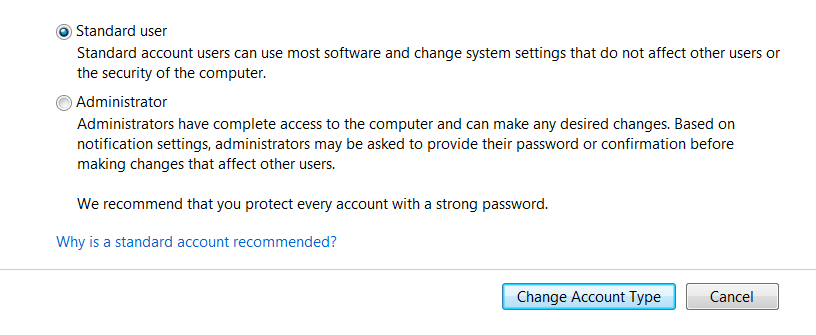
Make sure the user permissions on your account are set to “Standard User” and not “Administrator”. This cuts down on the chance that viruses or other malware can be easily installed on your machine. This also protects a random bad operator from installing a bitcoin mining operation on your machine.  You provide the computer and electricity, they get the benefit.  If anyone has ever installed the SETI program on their machine, it would work similarly to that.  (The “Search for Extra-Terrestrial Intelligence” program gave the opportunity for ordinary computer users like Chris Eddy to allow SETI to use some of their computer operating power.)

Next:

Make your machine harder for the bad guys to get access to. Use a very secure password, set up two-factor authentication wherever you can. Install updates to your Operating System as soon as they are available.

Finally:

Use good security practices. Patti Chrzan, head of Microsoft’s cyber-security fraud division said this:

“90% of all cyber crime starts with a phishing email”

A reminder that the phishing email is an attempt to get access to your personal information, like your birthday or password.  A phishing email might also install a virus, ransomware, or other malware.

Being hyper-alert of every click, and every email you open puts you way ahead of the average person. Even if the email seems legit, never click on a link in an email from a corporation until you have confirmed its legitimacy.  Call the company to confirm that your account has been hacked, or your password was changed, or a large purchase was made.  Never take the word of an email at its face value!

The highlight of my day was when Microsoft retweeted my comment:

security

Just because you have an antivirus installed, does not automatically make you secure. You must have good personal systems in place too.

Past blogs you may find helpful:

Information about Geek For Hire, Inc.

I’ve created a Free Report on what to look for to protect yourself from “phishing” scams. Click here to receive it!

Chris Eddy of Geek For Hire, Inc. has been providing computer service to families and small businesses with Mac’s and PCs for the past eighteen years. Angie’s List and the BBB rate Geek For Hire very highly.  You can find more on our website, or give us a call 303-618-0154. Geek For Hire, Inc. provides onsite service (Tier 3 support) to the Denver / Boulder / Front Range area as well as remote service throughout North America.

We’ve been using Amazon Prime for the past few years.  We like the free and fast shipping.  With Prime, we have access to online streaming too. Prime is usually $119/year, but you can get a free 30-day trial by clicking on this link: Try Amazon Prime 30-Day Free Trial. As an Amazon Associate, we earn from qualifying purchases.


Instagram Account Security

I’ve spent a lot of time talking about Facebook, and how to make your Facebook Account more secure.  You should be doing the same thing with your Instagram account!  Here are some suggestions to make your Instagram account more secure.

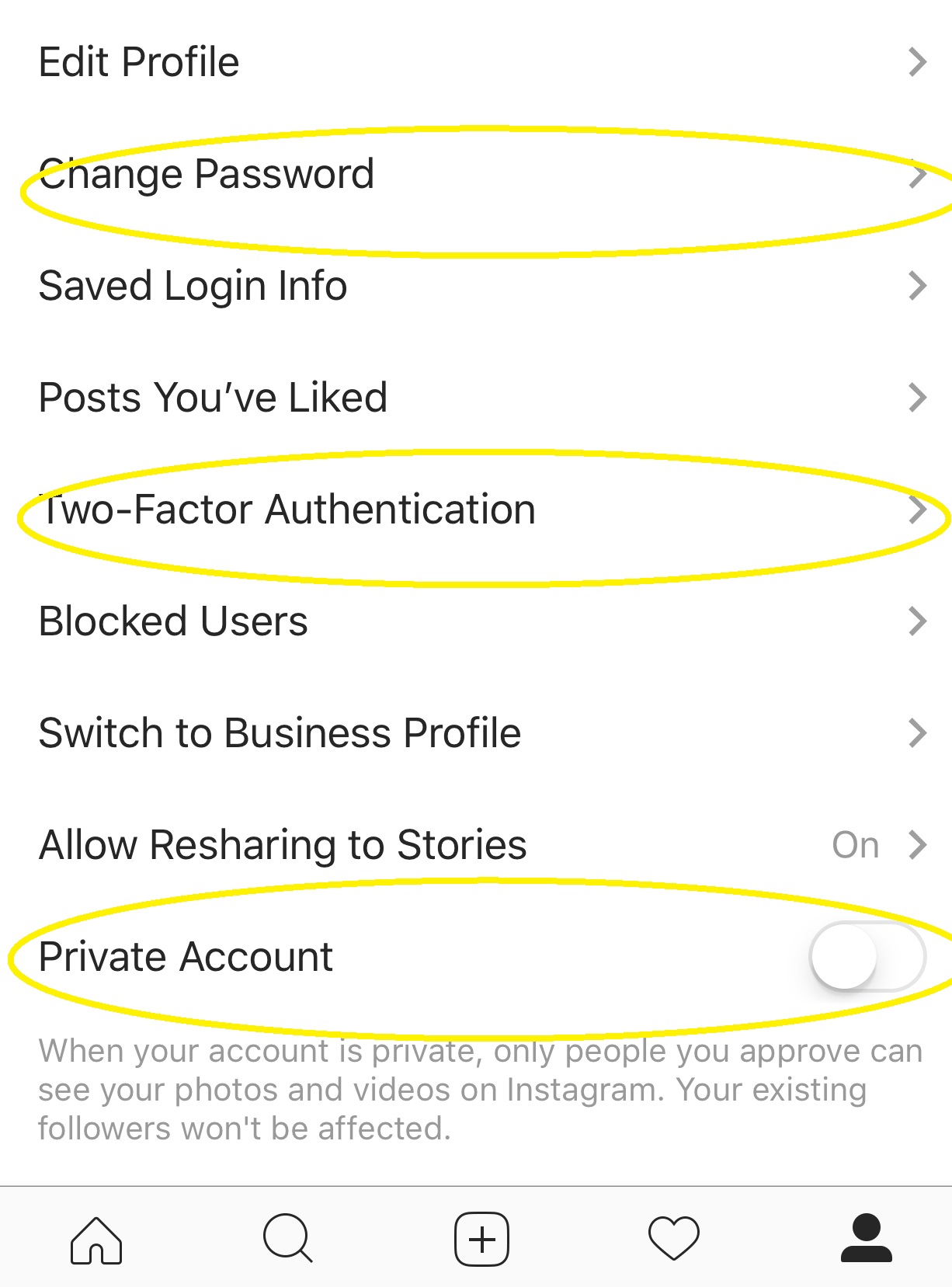
First – Change Your Password!Instagram Account Security

I know I’ve said this before.  (You’re tired of hearing me say this, aren’t you?)   You should change your password on all of your banking, social media, email, etc. accounts at least once a month.  Ideally, you should use a different password for each account.  You should also use a password that contains upper and lower case letters, numbers, and special characters. Check out my tips from last weeks blog.  If you think your account may have been hacked, you should change your password right away.  (By the way, I use a password protected document to keep track of my passwords.)

Make your Instagram Account Private:

From Instagram: “When your account is private, only people you approve can see your photos and videos on Instagram.  Your existing followers won’t be affected.”  Essentially this means that your account will be shared with friends only.  If your Instagram Account is not set to Private, every post can be viewed by anyone.  So, for my personal account, I have it set to private.  For my business account, it is all public.  Remember, if you choose to un-follow someone, they will no longer be able to see your posts or other information.

Enable Two-Factor Authentication:

Two-factor authentication makes any account that you log into more secure.  Many banks require two-factor authentication.  When you enable 2FA on your Instagram Account, Instagram will send you a code to you via text or email that you will need to enter in order to access your account.  Generally, once you have logged into your account from a specific device, you won’t need to do the 2FA thing again, unless you log out.

What did I forget?  How do you keep your Instagram Account as secure as it can be?

Chris Eddy of Geek For Hire, Inc. has been providing computer service to families and small businesses with Mac’s and PC’s for the past fifteen years. His company is highly rated by both the BBB (Better Business Bureau) and by Angie’s List. You can find more on our website, or give us a call 303-618-0154. Geek For Hire, Inc. provides onsite service (Tier 3) to the Denver / Boulder / Front Range area as well as remote service throughout North America.

We’ve been using Amazon Prime for the past few years.  We like the free 2-3 day shipping and the online streaming. I haven’t tried the Kindle lending library yet.  I’ll try that next!   Prime is normally $99/year, but you can try it for 30 day for free by clicking on this link: Try Amazon Prime 30-Day Free Trial (Yes, we’ll get a small commission if you check it out.)

Your New iPhone: How to Set it Up For Ease and Security

Did you get a brand new iPhone over the holidays?  There are some things you should do right away to make sure it stays secure and you keep being happy with it.  Even if you’ve had your phone for several months, make sure you’ve taken care of these.

Lock down your new iPhone:

First – you want to make sure your new iPhone can be locked down.  Go to “Settings”, and scroll down to “Touch (or Face) ID and Passcode”.  If you’ve already set up a passcode, you’ll need to enter it before continuing to these options. Decide if you want to use the Touch or Face ID, or if you just want to use a passcode.  If you do want to use a passcode, we recommend that you select one that is more than four digits.  You can select a custom alph-numeric code, or a custom numeric code.

Fine Tune Location Settings:

You’ll also want to lock down your Location settings.  Click on “Settings”, and then “Privacy”.  You can see which Apps get location data and turn off the ones that don’t really need to know where you are located.

Set up Siri:Setting up your new iPhone

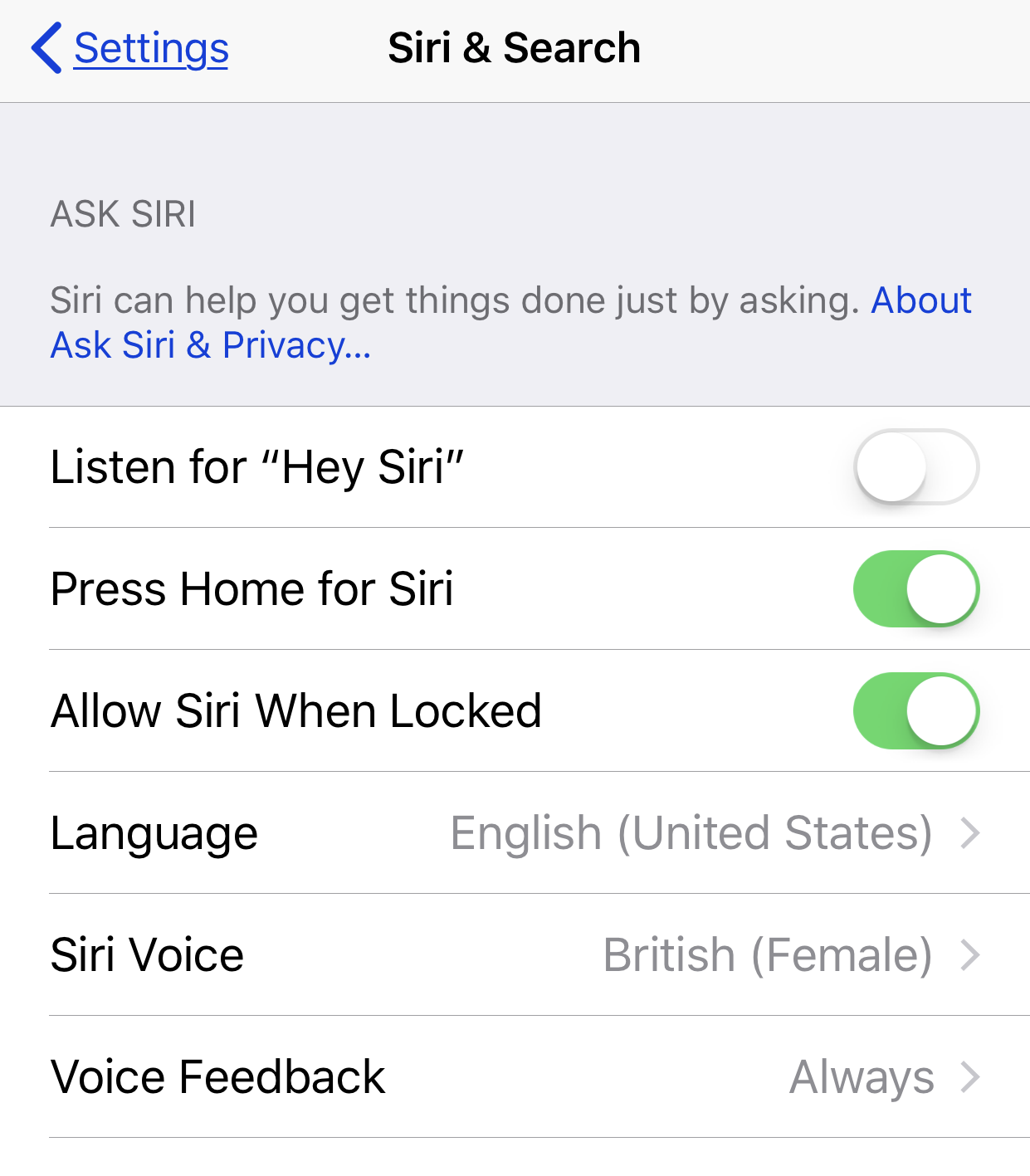
When I’m on a road trip, I turn on “Hey Siri”.  This allows me to have hands-free interaction with my iphone.  To turn this on, click on “Settings”, and then “Siri & Search”.  Slide the button to “on” to allow for Siri to listen.  You can also select a language and voice for Siri on this screen.

Sharing Analytics:

Decide if you want to share analytics from your iPhone with Apple.  Apple collects usage data and location information.  To turn this off click on “Settings”, and then “Privacy”.  Scroll to the bottom and click on “Analytics”.  Make sure the button is turned off.

Targeted Ads:

Opt out of receiving targeted ads.  Click on “Settings”, “Privacy”.  Scroll to the bottom and click on “Advertising”.  Slide the green button On to Limit Ad Tracking.

Save Your Photos!

This is a good time to decide what to do with your photos. Do you have a plan in place for saving them off of your phone?  I have set up  Dropbox to save my photos onto the cloud every day.

Add Shortcuts for Favorite Websites:

Do you have websites that you go to frequently?  You can add them as an icon on your new iPhone screen by clicking on the up arrow at the bottom of your Safari screen.  Slide the bottom row of options over until you see “Add to Home Screen”.  Click on that, personalize the text, and then click “Add”.

What do you do to set up your new iPhone?  Share in the comments below!

Chris Eddy of Geek For Hire, Inc. has been providing computer service to families and small businesses with Mac’s and PC’s for the past fifteen years. His company is highly rated by both the BBB (Better Business Bureau) and by Angie’s List. You can find more on our website, or give us a call 303-618-0154. Geek For Hire, Inc. provides onsite service (Tier 3) to the Denver / Boulder / Front Range area as well as remote service throughout North America.

We’ve been using Amazon Prime for the past few years.  We like the free 2-3 day shipping and the online streaming. I haven’t tried the Kindle lending library yet.  I’ll try that next!   Prime is normally $99/year, but you can try it for 30 day for free by clicking on this link: Try Amazon Prime 30-Day Free Trial (Yes, we’ll get a small commission if you sign up.)

Year in Review from Geek For Hire, Inc.

It’s time for our 2017 Year In Review.  This year has seen some big changes in Technology.  But we focused a lot on keeping safe when you are using your computer and your Smartphone.  It’s primarily about using common sense.  Microsoft or Apple will not call you when you have a virus on your machine.  Trickier, though are the emails which look like they are coming from a company you use and trust.  We spent a good bit of time this year explaining how to protect yourself from scams.

Keeping safe on the internet has been our prime focus throughout the year:

  • We started the year with how to protect yourself from Phishing Attacks. “Phishing” is when someone tries to obtain your personal information to log into your bank accounts, or hack your email to send scam messages.  Protect Yourself from Phishing Attacks
  • A few months later, we focused on phishing again in Phishing Expeditions
  • With the Holidays, everyone is just a little more vulnerable, and some people let their guard down when they are shopping online. Here was my guide to keeping safe online during the holidays: Holiday Phishing
  • Throughout this year, we’ve seen an uptick in the number of scammy phone calls our customers have been receiving. In the spring I wrote about how to tell if the person on the other end of the line is for real or not: 4 Ways To Tell if the Person Calling You is not a Scammer
  • Early this fall, we learned that the US Government has had software made and sold by Kaspersky Labs on their “Do Not Trust / Do Not Use” list for years. Here is my write-up about that issue: Kaspersky Anti-virus

Online Privacy

We wrote several times about online privacy.  Keeping safe on the internet isn’t just about not clicking on those bad links.  You also need to make sure that you are keeping your personal information private.  Here are several articles about Online Privacy and Social Media:Year In Review

We also talked about new technology:

  • With the new iPhone X getting so much attention with their new unlocking technology, we thought it was time to take a look at the history of Facial Recognition
  • And, Virtual Reality has made some strides in the past few years. We took a look at some of the changes: Virtual Reality Update

And the newest hot topic:


Chris Eddy of Geek For Hire, Inc. has been providing computer service to families and small businesses with Mac’s and PC’s for the past fifteen years. His company is highly rated by both the BBB (Better Business Bureau) and by Angie’s List. You can find more on our website, or give us a call 303-618-0154. Geek For Hire, Inc. provides onsite service (Tier 3) to the Denver / Boulder / Front Range area as well as remote service throughout North America.

We’ve been using Amazon Prime for the past few years.  We like the free 2-3 day shipping and the online streaming. I haven’t tried the Kindle lending library yet.  I’ll try that next!   Prime is normally $99/year, but you can try it for 30 day for free by clicking on this link: Try Amazon Prime 30-Day Free Trial (Yes, we’ll get a small commission if you sign up.)

Weather Websites and Apps for Traveling

The winter holidays are coming up and lots of folks will be on the road.  I thought this would be a good time to revisit my list of favorite weather websites and smartphone applications.

NOAA –  When you enter your city and state into the “Local Forecast” box, you can see just what is in store for your area.  In addition, if there is a big storm coming, you’ll see a “Hazardous Weather Conditions” box across the top.  I like the NOAA forecast because it is generally right on target.  NOAA also has radar and satellite maps.  By the way, NOAA stands for the National Oceanic and Atmospheric Administration and is located right here in Boulder, Colorado!Weather Websites - Spring Snowstorm

Weather Underground  – My favorite of all the weather websites is Weather Underground.  I like it because I have several different weather stations to choose from in my town. In addition to the forecast, WU tells me what’s happening right now.  When you click on the information from a particular station, you can also see if they have a webcam set up.  Then you can see the snow and wind for yourself!  Those webcams are especially helpful if you’d like to see the weather in a place where you are traveling to.  You can also save favorite locations, so it’s easy to see what’s going on at Grandma’s house before you get there!

The Weather Channel – The Weather Channel has all the same information the other websites have.  Because they consider themselves a news site, they’ve also got, what I can only call Weather Entertainment.  Big Floods! Amazing Ancient Ruins!  20 Places Overrun by Animals!  And More!!  My favorite feature on the Weather Channel is their travel map found here.  When you enter your starting place and destination, and the date you will be departing, the map calculates your route AND the expected weather.

NEXRAD – “Nexrad (Next-Generation Radar) is a network of 158 high-resolution Doppler weather radars operated by the National Weather Service” This website shows the radar for the whole US, or just your state.

WeatherTalk –  is a Facebook page.  Colorado Weather Analyst Greg Berman gained recognition when he accurately forecasted the extent of the rains and subsequent Front Range floods in September 2013.  If you’re on Facebook, I’d highly recommend this page to “Like” and bookmark.  His forecasts include most of the Colorado Springs and other Front Range areas.

Aurora Alerts – And if you’re looking to see if there may be an Aurora in your neighborhood, check out the NOAA sun activity page.

What is your favorite of all the Weather Websites? Share in the comments below!

Chris Eddy of Geek For Hire, Inc. has been providing computer service to families and small businesses with Mac’s and PCs for the past eighteen years. Angie’s List and the BBB rate Geek For Hire very highly.  You can find more on our website, or give us a call 303-618-0154. Geek For Hire, Inc. provides onsite service (Tier 3 support) to the Denver / Boulder / Front Range area as well as remote service throughout North America.

We’ve been using Amazon Prime for the past few years.  We like the free and fast shipping.  With Prime, we have access to online streaming too. Prime is usually $119/year, but you can get a free 30-day trial by clicking on this link: Try Amazon Prime 30-Day Free Trial. As an Amazon Associate, we earn from qualifying purchases.
Save

Save

Save