Why Isn’t My Printer Working?

You printed a document last night and now, this morning, your computer can’t seem to talk to your printer.  What gives?  It’s a common problem which has several possible causes.

Power?

Check to make sure your printer is on.  Is the printer securely plugged into the outlet? Is your house experiencing a power outage? You can try a different outlet too.

Printer Cable Securely connected?

Printer Cables (Source: WikiMedia)

If your printer has a cable connecting it to the computer, is it securely fastened?  Check the connections at both the printer and the computer.

WiFi?

If you have a wireless computer, check to see that your WiFi is working. Does your computer have the WiFi turned on?  Is the signal strong enough? Is the WiFi working on the printer?

Is it Wednesday?

If you have a Windows machine, Microsoft sometimes sends out updates on “Patch Tuesday”, the second Tuesday of every month.  (Microsoft has been talking about discontinuing “Patch Tuesday” for the past year or two, in favor of automatic updates, so this may not be a reliable indicator in the future.) Occasionally, the update will change some of your computer’s settings.  Try reinstalling the printer.  You can also check to make sure you have the proper driver installed for the printer. Even if Microsoft moves from a monthly update to automatic, any update can still mess with your printer settings.

When All Else Fails:

Turn your computer off and back on.  Turn the printer off and back on.  Sometimes that will reset whatever bug was preventing you from printing. If you still can’t print, it might be time to bring in the services of an independent IT professional.

Time to purchase a New Printer?

If you’re thinking of a new printer, check out our Buyers Guide.

Information about Geek For Hire, Inc.

I’ve created a Free Report on what to look for to protect yourself from “phishing” scams. Click here to receive it!

Chris Eddy of Geek For Hire, Inc. has been providing computer service to families and small businesses with Mac’s and PCs for the past eighteen years. Angie’s List and the BBB rate Geek For Hire very highly.  You can find more on our website, or give us a call 303-618-0154. Geek For Hire, Inc. provides onsite service (Tier 3 support) to the Denver / Boulder / Front Range area as well as remote service throughout North America.

We’ve been using Amazon Prime for the past few years.  We like the free and fast shipping.  With Prime, we have access to online streaming too. Prime is usually $119/year, but you can get a free 30-day trial by clicking on this link: Try Amazon Prime 30-Day Free Trial. As an Amazon Associate, we earn from qualifying purchases.


Save

Save

Save

Save

Save

Save

Save

Save

Save

Save

Save

Save

Save

Save

Save

Save

Save

Save

Save

Save

Save

Save

Save

Save

Save

Save

Save

Save

Save

Save

Save

Save

Save

Save

Save

Save

Save

Save

Save

Save

Save

Save

Save

Save

Save

Save

Save

Save

Save

Save

Save

Save

Save

Save

Save

Save

Save

Save

Save

Save

Save

Save

Save

Save

Save

Save

Save

Save

Save

Save

Save

Save

Save

Save

Save

Save

Save

Save

Save

Save

Save

How To: Internet Searching Tips

Internet Searching Tips:

More than once I have been extremely frustrated trying to find something on the internet.  Internet searching either gives WAY too much information or info that isn’t relevant. Most of the tips I will share with you I’ve picked up bit by bit.  I’m hoping they will help you.

Exact Match:

When you use quotation marks, you only search for what is inside the quotes.  For example:

Coffeehouses “live music”

will bring up all the coffeehouses that have live music.

Exclusion:

When you use the minus sign, you’ll exclude that information from your search.  For example:

“Scottish Novels: -“Outlander”

will bring up information about many novels that occur in Scotland except the Outlander series.

Wild Card:

When you use the asterisk with another word or phrase, you’ll get lots of different options. For example:

Hollywood *

will provide results like “Hollywood Bowl”, “Hollywood Blacklist”, and “Hollywood movies”.

Specific Web Site:

Do you want to search within a specific web site?  Use “site:website”. For example:

“Jerry Lewis” site:nyt.com

will bring up articles relating to Jerry Lewis on the New York Times site.

More:

Have you used Google’s Search Tabs? Underneath Google’s search bar, there are a number of options. For example:

WEB     NEWS     IMAGES     VIDEOS     BOOKS     MORE     SEARCH TOOLS

News:

If you are looking specifically for a news story that occurred in the last 24 hours,  follow these steps:

  • Firstly, Enter your search terms in the search bar.
  • Secondly, Click on the News tab.
  • Third, Click on the Search Tools Tab
  • Last, Click on “Anytime” and select “24 hours” from the drop-down menu

Images:

If you’re looking for an image, enter a description in the search bar and then click on the Images Tab.  If you want to fine-tune your search, then you can add other criteria.  Click on “Search Tools” and then, select the color, type of image, usage rights, etc.

Location:

If you want to find something in a particular location, click on “Search Tools”, then click on “Location”, then type in where you would like to search.  For example:

“Hot Springs” California

will bring up a list of all the hot springs in California.

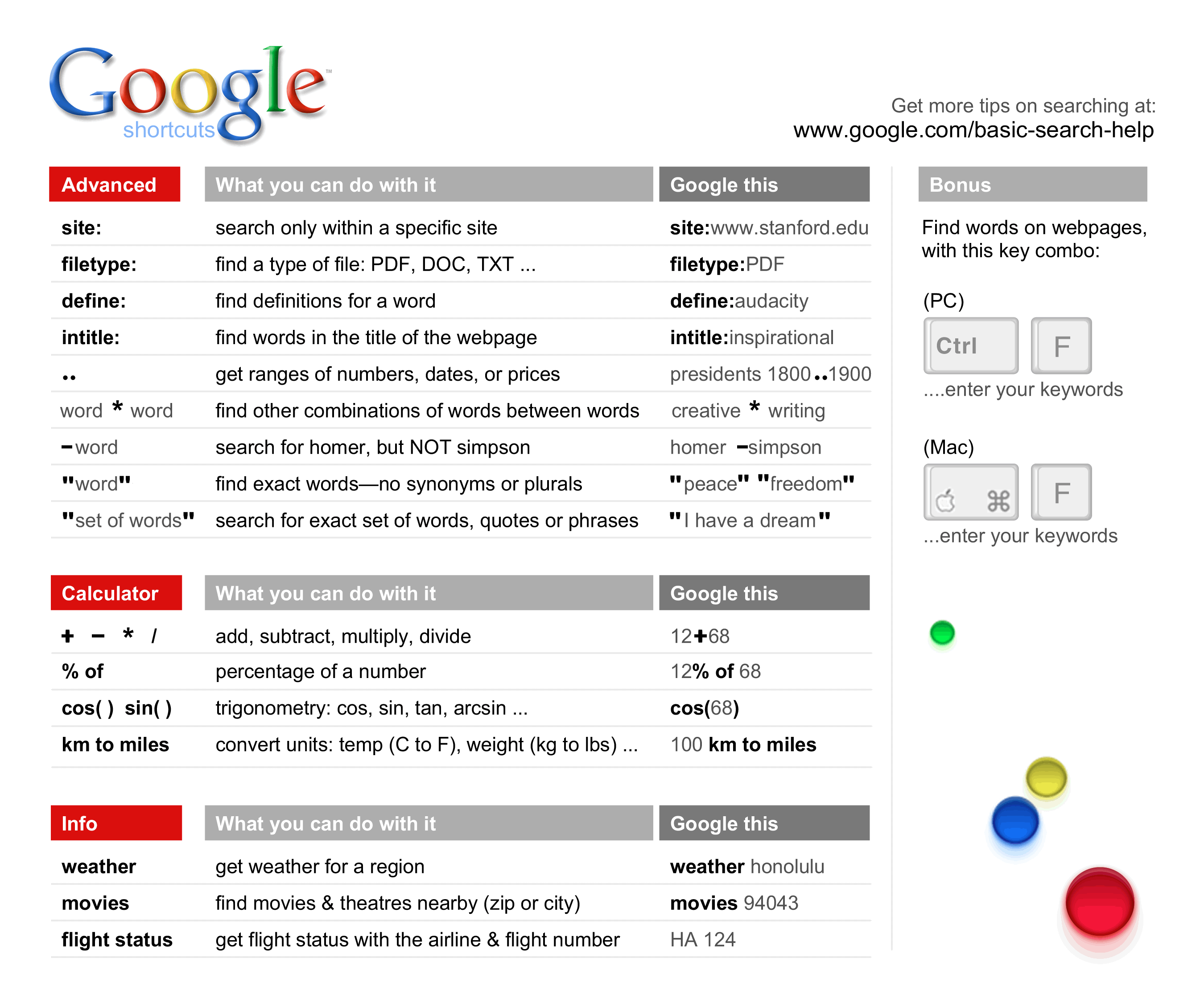
You can also print out this cheat sheet from Google:

Internet Search Tool

Have you used any of these Internet Searching tips?  Are there other tips you use?  Please share them in the comments below!

Conclusion:

Using these Internet Searching Tips will save you time!

Information about Geek For Hire, Inc.

I’ve created a Free Report on what to look for to protect yourself from “phishing” scams. Click here to receive it!

Chris Eddy of Geek For Hire, Inc. has been providing computer service to families and small businesses with Mac’s and PCs for the past eighteen years. Angie’s List and the BBB rate Geek For Hire very highly.  You can find more on our website, or give us a call 303-618-0154. Geek For Hire, Inc. provides onsite service (Tier 3 support) to the Denver / Boulder / Front Range area as well as remote service throughout North America.

We’ve been using Amazon Prime for the past few years.  We like the free and fast shipping.  With Prime, we have access to online streaming too. Prime is usually $119/year, but you can get a free 30-day trial by clicking on this link: Try Amazon Prime 30-Day Free Trial. As an Amazon Associate, we earn from qualifying purchases.

Save

Save

Save

Save

Save

Save

Save

Save

Save

Save

Save

Save

Save

Save

Save

My 7 Favorite Weather Websites and Apps

With all the snow in the forecast, I thought it was time to revisit my list of favorite weather websites and smartphone applications.

NOAA –  When you enter your city and state into the “Local Forecast” box, you can see just what is in store for your area.  In addition, if there is a big storm coming, you’ll see a “Hazardous Weather Conditions” box across the top.  I like the NOAA forecast because it is generally right on target.  NOAA also has radar and satellite maps.  By the way, NOAA stands for the National Oceanic and Atmospheric Administration and is located right here in Boulder, Colorado!

Spring Snowstorm

Weather Underground  – I like Weather Underground because I have several different weather stations to choose from in my town. In addition to the forecast, WU tells me what’s happening right now.  When you click on the information from a particular station, you can also see if they have a webcam set up.  Then you can see the snow and wind for yourself!  Those webcams are especially helpful if you’d like to see the weather in a place where you are traveling to.

The Weather Channel – The Weather Channel has all the same information the other websites have.  Because they consider themselves a news site, they’ve also got, what I can only call Weather Entertainment.  Big Floods! Amazing Ancient Ruins!  20 Places Overrun by Animals!  And More!!  My favorite feature on the Weather Channel is their travel map found here.  When you enter your starting place and destination, and the date you will be departing, the map calculates your route AND the expected weather.

NEXRAD – “Nexrad (Next-Generation Radar) is a network of 158 high-resolution Doppler weather radars operated by the National Weather Service” This website shows the radar for the whole US, or just your state.

WeatherTalk –  is a Facebook page I’ve recently found.  Colorado Weather Analyst Greg Berman gained recognition when he accurately forecasted the extent of the rains and subsequent Front Range floods in September 2013.  If you’re on Facebook, I’d highly recommend this page to “Like” and bookmark.  His forecasts include most of the Ft. Collins / Denver / Colorado Springs / Front Range area.

Storm Shield Weather Radio will send severe weather alerts to your smartphone.

Aurora Alerts – And if you’re looking to see if there may be an Aurora in your neighborhood, check out the NOAA sun activity page.

Do you have a favorite website for weather forecasts? Share in the comments below!

Chris Eddy of Geek For Hire, Inc. has been providing computer service to families and small businesses with Mac’s and PCs for the past eighteen years. Angie’s List and the BBB rate Geek For Hire very highly.  You can find more on our website, or give us a call 303-618-0154. Geek For Hire, Inc. provides onsite service (Tier 3 support) to the Denver / Boulder / Front Range area as well as remote service throughout North America.

We’ve been using Amazon Prime for the past few years.  We like the free and fast shipping.  With Prime, we have access to online streaming too. Prime is usually $119/year, but you can get a free 30-day trial by clicking on this link: Try Amazon Prime 30-Day Free Trial. As an Amazon Associate, we earn from qualifying purchases.

Save

Save

Save

DDoS? And Why YOU May be to Blame

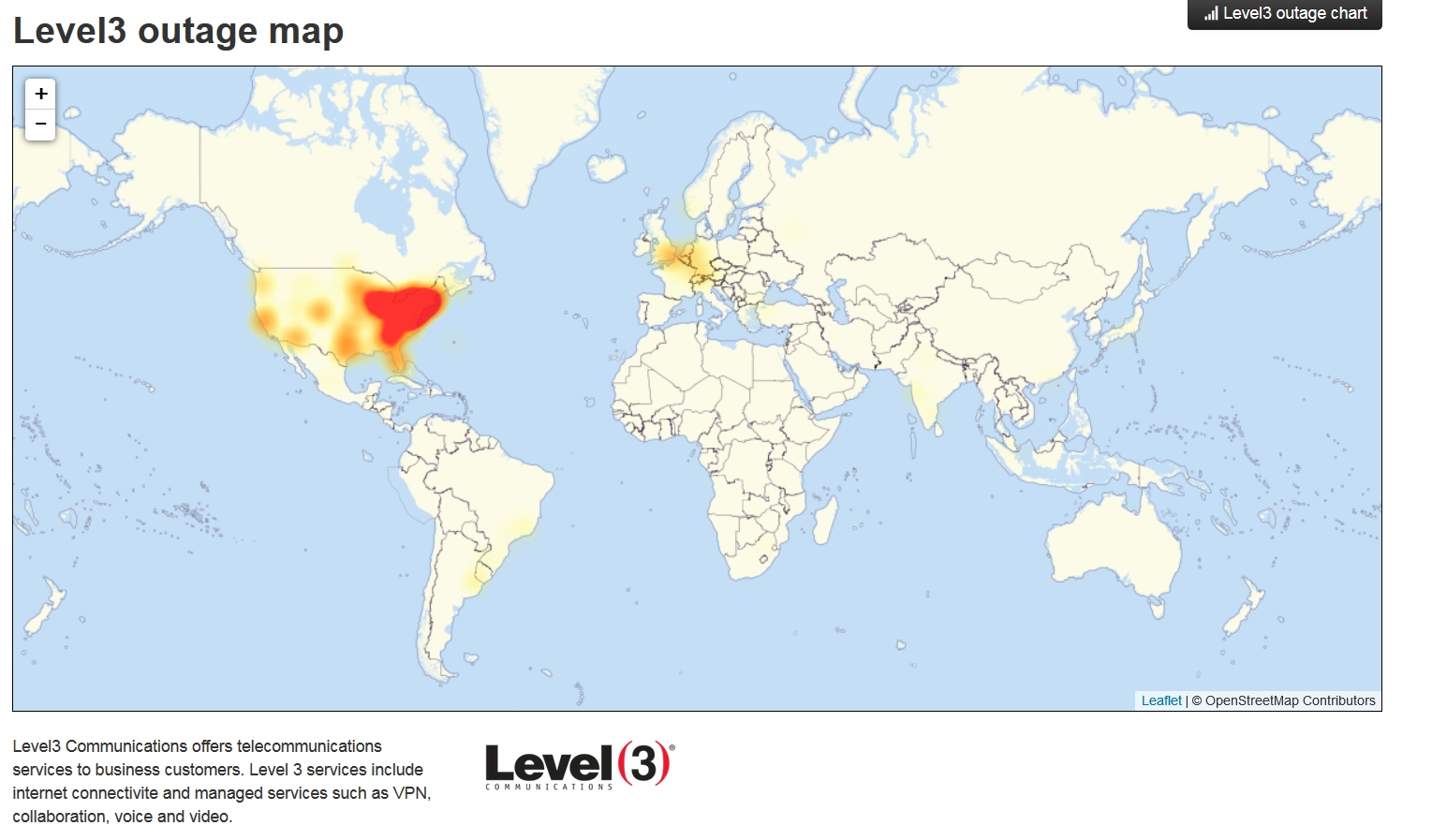
Last week, many websites and apps were severely compromised, especially on the East Coast. Apps like Twitter, Reddit, Spotify, AirBnB, and Netflix slowed to a crawl or were shut down altogether.  A DDoS attack was launched against Dyn, a New Hampshire company that provides DNS routing.

Level3 Outage map on 24Oct16 Screen Shot by Geek For Hire, Inc.
Level3 Outage map on 24Oct16
Screen Shot by Geek For Hire, Inc.

What did you just say?

  • DDoS = A “Distributed Denial of Service” occurs when hundreds of thousands of messages are sent to specific internet addresses with the intent to overload that service and shut it down. (In this case, the intent was to take down Dyn in order to affect many websites and not just one.)
  • DNS = The Internet’s Domain Name System translates the URL’s we enter, like www.google.com, into “the numerical IP addresses needed for the purpose of locating and identifying computer services and devices.” (From wikipedia)

In the past, most DDoS attacks were focused on a particular website.  Last Friday, the attack was focused on a company which the NY Times calls “one of the Internet’s giant switchboards”, which had a devastating impact.

So, how is this MY fault?

Do you have a surveillance camera on your front door? A wireless printer? A “smart” refrigerator”? All of these are connected to the internet with their own numerical IP address.  The “bad guys” can run through a list of IP address to see which addresses can easily be compromised.  Once they’ve identified these devices, they can use them to add to their arsenal to send the messages that create the attack.

I still don’t get it.  How is this MY fault?

Do you use a password on all of your internet connected devices? Is it secure? A password of “admin”, “123456”, or “password” is NOT secure!  Have you ever been out looking for free WiFi, and something like “HP-M475-5E3F78” was presented as an available WiFi that you could connect to?  That is what happens when someone does not put a password on their printer.  There are literally millions of WiFi connected devices in the US.  How many of those are vulnerable to participating in these types of attacks?

Please make it a point to use a secure password on all of your internet connected devices.  Change it today!

Chris Eddy of Geek For Hire, Inc. has been providing computer service to families and small businesses with Mac’s and PC’s for the past fourteen years. His company is highly rated by both the BBB (Better Business Bureau) and by Angie’s List. You can find more on our website.  Geek For Hire, Inc. provides onsite service (Tier 3) to the Denver / Boulder / Front Range area and remote service throughout North America.

We’ve been using Amazon Prime for the past few years.  We like the free 2-3 day shipping and the online streaming. I haven’t tried the Kindle lending library yet, but I’m tempted!   Prime is normally $99/year, but you can try it for 30 day for free by clicking on this link: Try Amazon Prime 30-Day Free Trial (Yes, we’ll get a small commission when you sign up.)

Save

Save

Save

Save

Save

Save

Save

Save

Save

Save

Save

Save

Save

Save

Save

Save

Save

Save

Save

Save

Save

Save

Save

Save

Save

Save

Save

Save

Save

Save

Save

Save

Save

Save

Save

Save

Save

Save

Save

Save

Save

Save

Save

Save

Save

Save

Save

Save

Save

Save

Save

Save

Save

Save

Save

Save

Save

Save

Save

Save

Save

Save

Save

Save

Save

Save

Save

Save

Save

Save

Save

Save

Save

Save

Save

Save

Save

Save

Save

Save

Save

Save

Save

Save

Save

Save

Adventures!

As some of you know, our kids are taking an epic trip this year.  They’ll be hiking the entire Appalachian Trail.  They start at Springer Mountain (north east of Atlanta, Georgia) next week and plan on arriving at Katahdin (Maine) by September.

Can you say “Wow!”?

Our son has been doing the back-country adventure thing for awhile so he has most of the gear he needs.  But our daughter needed more modern gear.  Most of her gear was hand-me-down stuff from friends and family.  An eight pound pack and six pound tent just won’t cut it when you’re walSPOT Messengerking 2200 miles with them on your back.  So, she’s been getting all the equipment she needs over the past six months or so.  Some of the things she’s acquired include an ultra-light tent and backpack, a bear-bag, an efficient stove, and a warm sleeping bag.

One of the things we got – more for our peace of mind than anything else – is a SPOT Gen3 Satellite GPS Messenger.  Josh had one several years ago and we liked being able to see where he was, and, more importantly, that he was still alive!  At the push of a button, the SPOT Messenger lets you tell your friends and family:

    • Where you are
    • That you are okay
    • or, That you need emergency assistance

Because it uses satellites, and not WiFi or the cellular system, you can use it just about anywhere.  I think it will update a website too, but we’re still looking into that.

Have you ever thought about an amazing adventure like this one?  Here are some…

Helpful Links:

You can follow their adventures on Bailey’s blog – AT-2feet  She’ll be keeping it up-to-date using the WordPress app and camera on her iPhone.

Chris Eddy of Geek For Hire, Inc. has been providing computer service to families and small businesses with Mac’s and PC’s for the past fourteen years. His company is highly rated by both the BBB (Better Business Bureau) and by Angie’s List. You can find more at http://www.GeekForHireInc.com Geek For Hire, Inc. provides onsite service (Tier 3) to the Denver / Boulder / Front Range area.


A Look Back at 2015 in Technology

Every year there are new developments in the Technology world, and 2015 was no exception.  Here are just a few:

VR Headset – At the CES 2015 show in January, no one expected Virtual Reality for the masses to be available this year.  They were wrong!  Announced in time for Black Friday, Oculus as released a headset that works exclusively with the Samsung Galaxy smartphone.  More info here:

iWatch – Apple has been developing their watch since 2011 and it was finally available in the spring of this year.  Reviews on the different tech sites that review these things have been mixed.  Reviews by Amazon consumers are much higher.

Intel Skylake – Chris is pretty excited about the new 6th generation Intel Core Processor.  He says it will run better on mobile technology.  Do you know what the 1st generation was?  Check out this article and astonish your geeky friends!

Tesla – Chris is also excited about the new Ludicrous upgrade to the Tesla Model S P90DL.  Well, anything that takes you from zero to sixty in under three seconds has got to be worthy of some salivation!  Here’s a link to DragTimes video.

Car Hacking – This was a big story this past spring.  Computers in cars are pretty ubiquitous now and are just as susceptible to hacking as other computers are.  The difference  here is that car manufacturers don’t seem concerned and are not doing what they could to make their systems more secure.  A previous blog about a report released by Senator Ed Markey has more information.

DieselGate – Earlier this year we found out that VW and Audi installed software on many of its 2009-2015 diesel models that would essential “cheat” emissions tests.  From this NYTimes article The software sensed when the car was being tested and then activated equipment that reduced emissions, United States officials said. But the software turned the equipment off during regular driving, increasing emissions far above legal limits, possibly to save fuel or to improve the car’s torque and acceleration.”  There’s more info here: Late last month, VW announced their fix for the diesel engines.  Automotive News describes the modifications that will need to be made here

What do you were the most significant technology announcements in 2015?  Share in the comments below!

Information about Geek For Hire, Inc.

I’ve created a Free Report on what to look for to protect yourself from “phishing” scams. Click here to receive it!

Chris Eddy of Geek For Hire, Inc. has been providing computer service to families and small businesses with Mac’s and PCs for the past eighteen years. Angie’s List and the BBB rate Geek For Hire very highly.  You can find more on our website, or give us a call 303-618-0154. Geek For Hire, Inc. provides onsite service (Tier 3 support) to the Denver / Boulder / Front Range area as well as remote service throughout North America.

We’ve been using Amazon Prime for the past few years.  We like the free and fast shipping.  With Prime, we have access to online streaming too. Prime is usually $119/year, but you can get a free 30-day trial by clicking on this link: Try Amazon Prime 30-Day Free Trial. As an Amazon Associate, we earn from qualifying purchases.

My Favorite Websites

Several months ago, I blogged about Chris’ favorite websites.  People keep asking me what mine are so here goes!

Searching:

For searching, I prefer Google over all the other search sites like Bing or Yahoo.  I think it’s results are accurate – it finds what I am looking for, especially if I use the provided search tools, like Images, Video, Date, etc.

News Sites:

I’m a Jersey girl and grew up with the Sunday New York Times – every week!  For a long time I didn’t like it because at my friend’s house, they had a newspaper with comics!  But as I got older, I learned how to read and enjoy it.  Now it’s my go-to website for what’s going on in the world.

I like the Huffington Post for its left-leaning news, and its separate pages for meditation, healthy living, and eastern religions.

I started following Mashable on Twitter ages ago.  Now, the website is my go-to site for news that not everyone is writing about.

Other:

Call me weird, but I have a huge collection of books.  I like LibraryThing because it helps me keep them organized.  You can borrow and lend books with other LibraryThing members too.

Entertainment:

If I ever have a question about a movie, or an actress, or who was that guy in that TV show, I head over to IMdb.com, short for Internet Movie database.

Eagles:

In the spring, there are a couple of webcams pointed at eagle nests.  I found it very relaxing to watch the mama and papa eagles tend the eggs and then the eaglets.  There’s one from Minnesota, one from Georgia, and one from Pennsylvania.  The webcams generally operate from February thru July.

What are your favorite websites?  Let me know why!

Information about Geek For Hire, Inc.

I’ve created a Free Report on what to look for to protect yourself from “phishing” scams. Click here to receive it!

Chris Eddy of Geek For Hire, Inc. has been providing computer service to families and small businesses with Mac’s and PCs for the past eighteen years. Angie’s List and the BBB rate Geek For Hire very highly.  You can find more on our website, or give us a call 303-618-0154. Geek For Hire, Inc. provides onsite service (Tier 3 support) to the Denver / Boulder / Front Range area as well as remote service throughout North America.

We’ve been using Amazon Prime for the past few years.  We like the free and fast shipping.  With Prime, we have access to online streaming too. Prime is usually $119/year, but you can get a free 30-day trial by clicking on this link: Try Amazon Prime 30-Day Free Trial. As an Amazon Associate, we earn from qualifying purchases.

Data Recovery vs. Data Transfer

We’ve been doing a lot of Data Recovery lately so I asked Chris to tell us what is involved in Data Recovery and how it is different from Data Transfer.

Updated: October 2020

Although Data Transfer and Data Recovery are similar phrases, they are different in important ways.

Data Transfer:

Data transfer is the act of copying data directly from one device to another. (For example when you purchase a new Mac and need to transfer your data from your old PC.) Data transfer tends to be much faster than Data Recovery, because it uses the native copy function provided by the Operating System. But, if there are physical problems on the device, or if the file system on the device is corrupt, data transfer will not work because it is not tolerant of errors.

Exploding Disk Drive!

Data Recovery:

Data recovery is performed by specialized software that is tolerant of physical disk errors and errors in the file system. It takes much more time to perform Data Recovery because the process has several steps.

Although Data Recovery is much slower to produce a Gigabyte of data, it is tolerant of errors so it is capable of getting to files and putting them back together.

There are five main steps in Data Recovery:

  1. Is the device accessible?
    • if the disk controller is unresponsive, we would need to replace that and retest;
    • Sometimes the disk does not physically turn. We will not attempt to fix;
    • if the disk “clicks” when it is turned on, this indicates internal damage within the hard drive which we will not attempt to fix;
    • The data could be overwritten. We will not know this until after the data is recovered and you have inspected your data
  2. Media Analysis (to find where the good data blocks and the bad data blocks are)
  3. File Analysis (to discover what disk blocks comprise which files and folders, and in what order)
  4. Data Selection (to choose which files and folders should be recovered because they are interesting and necessary, and which files and folders should not)
  5. Data Production (the act of creating new files from the recovered data onto an external hard drive).

How we do Data Recovery:

Our method of recovering data is “Read Only”, meaning that we will not open the hard drive to get to your data; We will connect your hard drive to an adapter, and attempt to access the data through the disk. We will not open your hard drive because we don’t have a “Clean Room”, and we don’t have the spare parts or the specialized equipment necessary to transfer your platters to another drive in a way that would work and not damage your data. If we were to physically open your hard drive, we would introduce significant contamination to your disk, and this would not improve the chances of getting back your data.

What if we can’t get your data?

We are usually successful, and we can determine in a reasonable amount of time whether Data Recovery is something we are likely to be successful in doing or not. If we find that we cannot access your data, we will stop work. Proceeding will not improve the chances of getting your data.

If we cannot get your data, and you have a business case for getting your data, we recommend that you send your hard drive to one of the major data recovery companies and not to a local company which says they can do it. Because you only get “one bite of the apple” to recover your data. They would need to be able to open the disk in a “clean room”.  In addition, they must have the resources to get your data, because there is a serious risk that your drive will be polluted by their attempt.

There are a handful of Data Recovery companies in the country which specialize in recovering data from physically bad hard drives. They have a clean room, spare parts, and invasive methods of getting your data. They charge a lot more than we do and are almost always successful. Just a reminder that we sometimes recommend resources that we love. Some of those resources may pay us a small commission if you click on the links, at no additional cost to you. 

We’ve had a long relationship with DriveSavers and are pleased with their work. We refer one to three people to them every year. Here is their info and a discount code:

And if you want to see how DriveSavers works, watch this video, then click on the link above for the discount code:

Success!

Our most exciting Data Recovery story happened several years ago.  There was a fire near Gold Hill, Colorado.  Our customer’s home survived the fire. The next spring, however, with all the snow melt and spring rains, a mud slide buried their basement.  Their computer was covered in several feet of mud.  Chris carefully cleaned the machine and then started the data recovery process.  Success!

Windows or Mac?

We can recover data from Windows or Mac hard drives.  The device can be formatted using the Windows filesystem or for the Mac filesystem. It doesn’t matter to us if the computer that the device came from is bootable or not. The device will be removed from the “source” computer. It will then be connected to an adapter. This will allow the data to be accessed directly.

Let us know if you have any questions about this process. Give us a call or send an email.

Chris Eddy of Geek For Hire, Inc. has been providing computer service to families and small businesses with Mac’s and PC’s for the past fourteen years. His company is highly rated by both the BBB (Better Business Bureau) and by Angie’s List. You can find more on our website.  Geek For Hire, Inc. provides onsite service (Tier 3) to the Denver / Boulder / Front Range area. We provide remote service throughout North America.

Internet Searching Tips

Do you ever find yourself frustrated when searching for something on the internet?  You either get too much information, or it’s hard to find exactly what you’re looking for.  Here are some tips that I use to streamline my searching:

EXACT MATCH:
When you use quotation marks, you only search for what is inside the quotes.  For example:

Coffeehouses “live music”

will bring up all the coffeehouses that have live music.

EXCLUSION:
When you use the minus sign, you’ll exclude that information from your search.  For example:

“Republican candidates” -“Donald Trump”

will bring up information about all the Republican candidates except Donald Trump.

WILD CARD:
When you use the asterisk with another word or phrase, you’ll get lots of different options. For example:

Hollywood *

will provide results like “Hollywood Bowl”, “Hollywood Blacklist”, and “Hollywood movies”.

SPECIFIC WEB SITE:
Do you want to search within a specific web site?  Use “site:website”. For example:

“Jerry Lewis” site:nyt.com

will bring up articles relating to Jerry Lewis on the New York Times site.

MORE:
Have you used Google’s Search Tabs? Underneath Google’s search bar, there are a number of options:

WEB     NEWS     IMAGES     VIDEOS     BOOKS     MORE     SEARCH TOOLS

NEWS:
If you are looking specifically for a news story that occurred in the last 24 hours,  follow these steps:

  1. Enter your search terms in the search bar.
  2. Click on the News tab.
  3. Click on the Search Tools Tab
  4. Click on “Anytime” and select “24 hours” from the drop down menu

IMAGES:
If you’re looking for an image, enter a description in the search bar and click on the Images Tab.  If you want to fine tune your search, you can add other criteria.  Click on “Search Tools” and select the color, type of image, usage rights, etc.

LOCATION:
If you want to find something in a particular location, click on “Search Tools”, then click on “Location”, then type in where you would like to search.  For example:

“Hot Springs” California

will bring up a list of all the hot springs in California.

Have you used these tips before for searching?  Are there other tips you use?  Please share them in the comments below!

Chris Eddy of Geek For Hire, Inc. has been providing computer service to families and small businesses with Mac’s and PC’s for the past fourteen years. His company is highly rated by both the BBB (Better Business Bureau) and by Angie’s List. You can find more on our website.  Geek For Hire, Inc. provides onsite service (Tier 3) to the Denver / Boulder / Front Range area and remote service throughout North America.

What Do I Do With My MF (Multi-Function) PRINTER?!

I’ve updated this page – check out the new blog here.

Of course, we can help you with  your printer issues.  Give us a call on 303-618-0154 and give me a run-down of the symptoms.  If it can be fixed in a reasonable amount of time, I’ll let you know.  If not, I’ll let you know that too.

Information about Geek For Hire, Inc.

I’ve created a Free Report on what to look for to protect yourself from “phishing” scams. Click here to receive it!

Chris Eddy of Geek For Hire, Inc. has been providing computer service to families and small businesses with Mac’s and PCs for the past eighteen years. Angie’s List and the BBB rate Geek For Hire very highly.  You can find more on our website, or give us a call 303-618-0154. Geek For Hire, Inc. provides onsite service (Tier 3 support) to the Denver / Boulder / Front Range area as well as remote service throughout North America.

We’ve been using Amazon Prime for the past few years.  We like the free and fast shipping.  With Prime, we have access to online streaming too. Prime is usually $119/year, but you can get a free 30-day trial by clicking on this link: Try Amazon Prime 30-Day Free Trial. As an Amazon Associate, we earn from qualifying purchases.