MultiFunction Printer – What To Look For When Purchasing A New One

We get a lot of questions about what to look for when purchasing new equipment.  If you’re looking at buying a new multifunction printer, here are some things to consider:

Index:

Price:

The first thing many people consider is the price range.  There are a few good printers in the under $125 price range, many more in the under $500 range. If you’re looking for the best color laser printer under $300, read on.

Ink-Jet vs. Laser

I certainly prefer laser printers. Yes, they are a little more expensive to purchase, but they cost less to operate in the long run, and your printed pages look better.  The ink cartridges also cost more than the inkjet cartridges, but they last much longer. If you are someone who only uses your printer occasionally, a laser printer is probably your best choice.  The ink can dry in the inkjet nozzles making the printer inoperable so that you would have to buy a new one.

Wired or WiFi?multifunction printer
It used to be that printers would only work when they were connected by a cable to the computer.  If you’re in a location with a marginal WiFi signal, that might be the way to go.  For everyone else, a wireless printer is a great option.  What I love about my WiFi printer is that I am able to print from my computer, my tablet, and my phone.

Black vs. 4-color:

These days, most of the multi-function printers are color.  If you mostly print in black but need a multi-function printer for other reasons, you can adjust your printer options on your computer to primarily print in black, but change it to full color if needed.

Printer only vs. MultiFunction Printer (Copy, Print, Scan, Fax)

I can’t remember the last time I sent a fax, but occasionally I do need to scan documents, and I have to copy something at least once a week.  So, I’m glad to have a multi-function printer at the ready. If you never need to copy anything, then a multifunction printer might be the best option for you.  If you ever have to take a trip to Staples to get something copied, you might consider getting a multi-function printer.

  • I have the previous version of the HP LaserJet Pro M426fdw and really love it.  I’ve had three HP printers since I got my first one in the early 1990s.  I love their reliability and durability.

Duplex?

Many of the newer printers are duplex.  This means that they print front and back. I like this option because it saves on paper!

Is Your MultiFunction Printer not working?

Check out this blog first. If none of those suggestions work, we can help. Give us a call and give me a run-down of the symptoms.  Do I think we can fix it in a reasonable amount of time?  I’ll let you know before we schedule an appointment.  If not, I’ll let you know that it’s probably time for a new one.

Geek For Hire Recommends These Printers:

We like Hewlett Packard printers.  We’ve been using them since 1990ish when we got our very first HP LaserJet 4.  It was a workhorse, and we loved it!

Here are several inkjet multi-function printers:

  • The HP OfficeJet Pro 8025 is a good inexpensive multi-function printer with wireless functionality.
  • This HP OfficeJet Pro 8035 is a little faster and a little smaller.  It’s also a good choice for a multi-function WiFi printer.
  • The HP OfficeJet 8702 is a faster multi-function color WiFi printer.

If you’re looking for a laser printer:

  • I have this Brother laser printer on my desk. It’s not wireless, but it’s fast and efficient. I like that it prints in black only. Plus, it’s a duplex (prints double-sided) which saves paper. In my opinion, it’s the best laser printer under $100.
  • I have the previous version of the HP LaserJet Pro M426fdw.  It has served me well for the past few years, and I love it.  It’s a multi-function/all-in-one color LaserJet printer with WiFi and double-sided/duplex printing.

Please forward this to your friends who need a checklist for buying a multifunction printer.

I’ve created a Free Report to protect you from “phishing” scams. Click here to receive it!

INFORMATION ABOUT GEEK FOR HIRE, INC.

Chris Eddy of Geek For Hire, Inc. has provided computer service to families and small businesses with Mac’s and PCs for the past eighteen years. Angie’s List and the BBB rate Geek For Hire very highly.  You can find more on our website or give us a call at 303-618-0154. Geek For Hire, Inc. provides onsite service (Tier 3 support) to the Denver / Boulder / Front Range area and remote service throughout North America.

Here’s a link to our Covid19 Policy.

We’ve been using Amazon Prime for the past few years.  We like the free and fast shipping.  With Prime, we have access to online streaming too. Prime is usually $119/year, but you can get a free 30-day trial by clicking on this link: Try Amazon Prime 30-Day Free Trial. As an Amazon Associate, we earn from qualifying purchases.

Poor Cell Phone Service – Some Tips to Remedy

Even with all the improvements in cellular technology I still run into areas which have very poor cell phone service. There are the times when I’m the passenger in a car and the cell phone quality just gets worse and worse.

Does this ever happen to you?  You’re talking on the phone and the quality of the call keeps decreasing.  You keep waiting for your call to switch to the next cell tower but that never seems to happen.  What should you do?

We used to drive up and over a section of the highway that we dubbed “The Hill of Cellular Death”.  It was pretty much guaranteed that when you got about two-thirds of the way up the hill on either side, your cell call would drop.  It got to be that I wouldn’t even answer my cell phone when the vehicle I was traveling in was within a half mile of that hill.  Thankfully they now have a low profile tower on that hill and my calls don’t get dropped anymore.

What should you do when your smartphone gets really poor cell phone service?

This is what that pesky “Airplane Mode” button is for!  Put your phone into “Airplane Mode” so that it turns off your cell service, your WiFi, and your Bluetooth. Leave it off for about five to ten seconds and then turn it back on.  This will force the phone to search for the strongest cell tower in the area.

bad cell service

More Info:

Please forward this to your friends who complain about their poor cell phone service.

Information about Geek For Hire, Inc.

I’ve created a Free Report to protect you from “phishing” scams. Click here to receive it!

Chris Eddy of Geek For Hire, Inc. has been providing computer service to families and small businesses with Mac’s and PCs for the past eighteen years. Angie’s List and the BBB rate Geek For Hire very highly.  You can find more on our website, or give us a call 303-618-0154. Geek For Hire, Inc. provides onsite service (Tier 3) to the Denver / Boulder / Front Range area as well as remote service throughout North America.

We’ve been using Amazon Prime for the past few years.  We like the free and fast shipping.  With Prime, we have access to online streaming too. Prime is usually $119/year, but you can get a free 30-day trial by clicking on this link: Try Amazon Prime 30-Day Free Trial. As an Amazon Associate, we earn from qualifying purchases.


What Is Wrong With My Multi-Function Printer?!

When I mention what I do to new acquaintances, I get this question a lot: What Is Wrong With My Multi-Function Printer?!  A major problem with printers these days is that they are designed to be disposable, a throw-away appliance.  The cheaper ones might only last for a year. Even the more expensive ones break down.  Then it could be more cost-effective to get a new one rather than trying to get it fixed.

What Is Wrong With My Multi-Function Printer?!

Here are some common printer problems:

Paper Jam

If you have a paper jam, the first thing to do is to pull out the paper tray. Sometimes the paper is stuck just as it comes out of the tray. You can also try this: carefully open up your machine and turn all the knobs and wheels that move the paper forward. If you can see where the paper is stuck, carefully give the paper a little tug to see if you can pull it out. If it feels like it might start to tear, stop pulling. Continue moving the knobs and wheels until the entire piece of paper has been removed. In rare cases, the jam is so severe that you cannot remove the paper.  Sometimes trying to remove the paper can bend some of the metal wires.   In that case, it’s probably time to look for a new printer.

Driver upgrade

Sometimes, with both Mac and Windows machines, your computer will take an upgrade overnight which then requires a new software printer driver for your printer.   Go to your printer’s website – Hewlett Packard, Dell, Brother, etc. – and download the new software. Once you have downloaded and installed the software, your printer should work again.  Call us if you need help.

What Is Wrong With My MF (Multi-Function) PRINTER?!

Wireless printer won’t connect to the wifi

If your computer suddenly can’t find your wireless printer, somehow the printer lost its connection to the Wi-Fi router.  Turn both your computer and printer off and on again.  If that doesn’t work, input your Wi-Fi code into the printer control panel and you should be good to go.

What Is Wrong With My MF (Multi-Function) PRINTER?!

New Ink Jet Cartridge doesn’t work:

Your printer tells you it is time to replace the cartridge.  You install the new one and still get the same error message!  This is most likely because the ink dried inside the printer nozzles.  This happens when you haven’t used your printer in a while.  If you still have a warranty on the printer, take it in to see if they can repair it.  They may decide to replace it.  If you routinely go a week or more without using your printer,  consider replacing it with a laser printer.

Printer won’t turn on

Sometimes a printer just won’t turn on. Check all of the connections. Is the cord firmly plugged into the wall outlet?  Is the cord firmly pushed into the back of the printer?  You might need to try a hardware reset of the printer back to its default settings.  If it still won’t turn on, remove the power cord and let it rest for a little while or overnight. If it still won’t turn on, it’s probably time to get a new printer.

New Printer?

What do you look for in a new printer? Check out our Buyers Guide to see what your options are.

Of course, we can help you with your printer issues.  Give us a call and give me a run-down of the symptoms.  Do I think we can fix it in a reasonable amount of time?  I’ll let you know before we schedule an appointment.  If not, I’ll let you know that it’s probably time for a new one.

Please forward this to your colleagues who ask you: What is Wrong with my Multi-Function Printer?

Information about Geek For Hire, Inc.

I’ve created a Free Report to protect you from “phishing” scams. Click here to receive it!

Chris Eddy of Geek For Hire, Inc. has been providing computer service to families and small businesses with Mac’s and PCs for the past eighteen years. Angie’s List and the BBB rate Geek For Hire very highly.  You can find more on our website, or give us a call 303-618-0154. Geek For Hire, Inc. provides onsite service (Tier 3) to the Denver / Boulder / Front Range area as well as remote service throughout North America.

We’ve been using Amazon Prime for the past few years.  We like the free and fast shipping.  With Prime, we have access to online streaming too. Prime is usually $119/year, but you can get a free 30-day trial by clicking on this link: Try Amazon Prime 30-Day Free Trial. As an Amazon Associate, we earn from qualifying purchases.

Wondering How To Rent And Stream “A Star Is Born” And Other Oscar Nominated Movies In 2019?

Have you been wondering how to rent and stream “A Star Is Born” and other Oscar Nominated movies in 2019?  Technology seems to change so quickly and it’s hard to know how to do stuff that was easy just a few years ago.  (A few years ago we would run down to the local video store, then pick out what we wanted, and finally get ready to pay the late fee when it wasn’t returned in two days!)

I don’t know about you, but ever since this version of “A Star Is Born” came out, I’ve been thinking about the one with Kris Kristofferson from decades ago. Maybe not the best actor, but I loved his music!

Here’s a list of all the nominees for Best Picture:

Available to stream on Netflix:

  • Black Panther
  • Roma

Available to Buy or Rent on Amazon Prime, iTunes, and YouTube:wondering how to rent and stream "A Star Is Born"?

  • Black Panther
  • BlacKkKlansman
  • Bohemian Rhapsody
  • There’s a link to a free Amazon Prime trial below.

Available for pre-order:

  • The Favourite
  • Green Book
  • Vice

Are you still wondering how to rent and stream “A Star Is Born”?

Head over to their webpage.  You’ll see all of the options there to stream online, or to go to a physical store to purchase it.  Then pop up a big batch of popcorn and enjoy!

Free Movie Streaming

There aren’t a lot of places to watch movies for free online.  Doing my research today, I did find a website that has (older) movies, documentaries, educational, and training films.  It’s called Kanopy.   The only catch is that your library needs to be registered with them.  Check them out!

Please forward this to your movie loving colleagues.

Information about Geek For Hire, Inc.

I’ve created a Free Report to protect you from “phishing” scams. Click here to receive it!

Chris Eddy of Geek For Hire, Inc. has been providing computer service to families and small businesses with Mac’s and PCs for the past eighteen years. His company is highly rated by both the BBB (Better Business Bureau) and by Angie’s List. You can find more on our website, or give us a call 303-618-0154. Geek For Hire, Inc. provides onsite service (Tier 3) to the Denver / Boulder / Front Range area as well as remote service throughout North America.

We’ve been using Amazon Prime for the past few years.  We like the free and fast shipping.  With Prime, we have access to online streaming too. Prime is usually $119/year, but you can get a free 30-day trial by clicking on this link: Try Amazon Prime 30-Day Free Trial. As an Amazon Associate, we earn from qualifying purchases.

Weird, but easy to fix computer problems

Weird, but easy to fix computer problems:

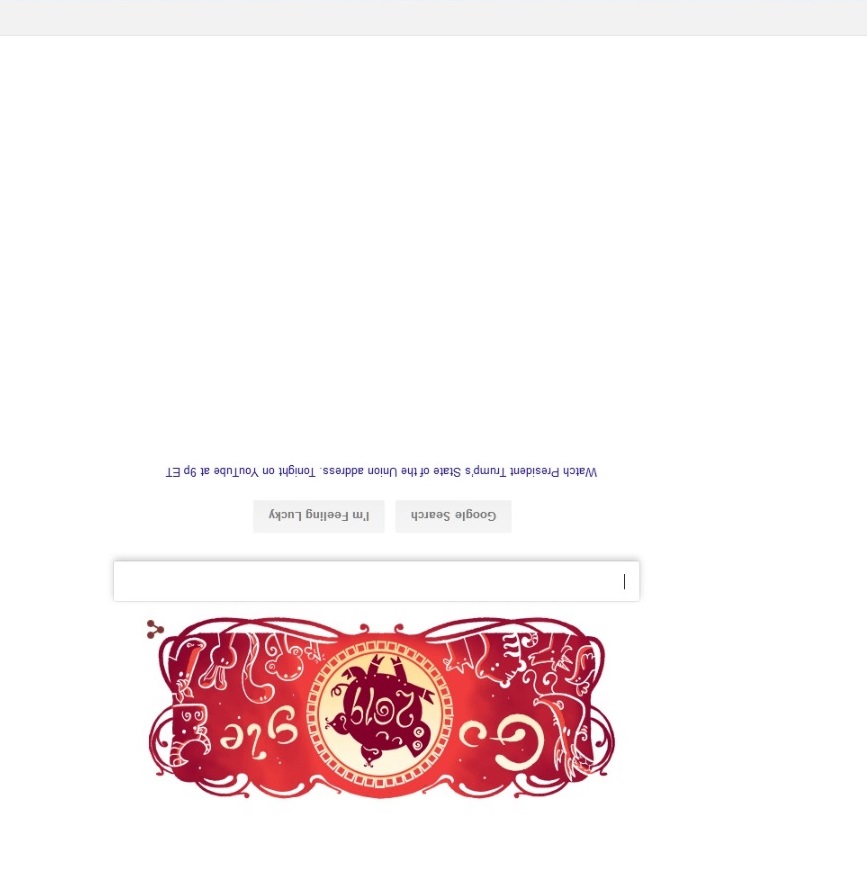
I received a call this morning from someone who was having a whale of a time trying to figure out what happened to his machine.  It ended up being one of those weird, but easy to fix computer problems.  His screen had turned upside down!  Now, this has happened to me a few times.  It generally happens when I’m juggling a notebook and phone which both fall onto my keyboard.  When you have an unexpected upside down screen, it’s pretty hard to do a Google search to figure out how to fix it.

How to do a Google search when your screen is upside down:weird, but easy to fix computer problems

  • First, open up a new tab in your browser by pressing the CTRL key and the N Key at the same time.
  • Next, carefully bring your mouse to the bottom of your screen and click inside the search bar
  • Finally, type your question in the search bar and then click on ENTER.
  • You could also do this search on your smartphone!

Email doesn’t arrive:

Another one of those weird, but easy to fix computer problems happened to me today.  I was expecting an important email from a business associate.  It didn’t arrive.  I asked them to send it again which they did.  Again, it didn’t arrive.  I was freaking out, wondering if someone had hacked my email account and was receiving all of my emails.  (That totally didn’t make sense, because I was receiving other emails from other people.) She resent it four times before either of us thought to check my spam folder.  Yup, that’s where all those emails were.

Also, I do try to check my spam folder two or three times a week.  We sometimes get customer emails that land up there, or an email from Staples when I really do need more copy paper.

Slow WiFi:

Another one of those weird, but easy to fix computer problems is when your wifi suddenly becomes g…l…a…c…i…a…l.  It still works, but just takes forever for a page to load.  When this happens, simply reboot your Router.  It’s just like your Windows machine.  Turn it off, wait 10 seconds, then turn it back on again.  If it continues to be really slow, contact your Internet Service Provider (ISP) and report the problem. They will run some diagnostics to confirm the problem or not.  If it ends up being in their network, they’ll get it fixed.  If it is a problem inside your house, ask them what they think the problem is.  They may tell you to get a technician in to help, or to get a new router.  Here’s a link to Chris’ favorite router.  If you need to troubleshoot the issue, we are happy to help.

So How Do I Fix the Upside Down Screen?

Press the CTRL key, the ALT key, and the Up Arrow at the same time.  (You can see that you probably pressed CTRL, ALT, and the down arrow to get there.)

Please forward this to your colleagues who have weird, but easy to fix computer problems.

Information about Geek For Hire, Inc.

I’ve created a Free Report to protect you from “phishing” scams. Click here to receive it!

Chris Eddy of Geek For Hire, Inc. has been providing computer service to families and small businesses with Mac’s and PCs for the past eighteen years. His company is highly rated by both the BBB (Better Business Bureau) and by Angie’s List. You can find more on our website, or give us a call 303-618-0154. Geek For Hire, Inc. provides onsite service (Tier 3) to the Denver / Boulder / Front Range area as well as remote service throughout North America.

We’ve been using Amazon Prime for the past few years.  We like the free and fast shipping.  With Prime, we have access to online streaming too. Prime is usually $119/year, but you can get a free 30-day trial by clicking on this link: Try Amazon Prime 30-Day Free Trial. As an Amazon Associate, we earn from qualifying purchases.
Need To Call 911 – Don’t Use Alexa!

Last week I learned that you can’t use Alexa or other “smart speakers” or “virtual assistants” to call 911 in an emergency.  It seems like this would be the perfect use for such a device.  You slip getting out of the shower, without your smartphone or smartwatch nearby, and break your arm. You call out to Alexa in the next room. “Alexa! Call 911!” And it says “I’m sorry, I can’t make that call.”

Well, why the heck not? (Go ahead. Say that with Lwaxana Troi’s voice like I just did!)  It seems like that would be the perfect application for such a device.

Why You Can’t Call 911:

It turns out that the FCC needs several things in order to allow a device to access its Emergency System.  Here are the most significant requirements:Call 911 - FCC logo

  • First, it needs a two-way connection and must be able to receive incoming calls so the emergency responder can call back.  Currently, most (maybe all) “smart speakers” aren’t designed for that.
  • Also, it needs to be able to provide an exact location.  Frankly, I’m not sure what the issue is here since the location information is much more stable than your standard cell phone.  After all, you’re probably not driving around with it in your car, or bringing it on airplanes to distant cities.  It seems like you would just have to register the device to a set address and they would know where to go.  (Unless you’re using it in your RV or Camper.)
  • Finally, once those obstacles are overcome, the FCC will probably charge a per device fee.  They do this for landlines and cell phones now, so this would not be unprecedented.

Important:

If you do happen to call 911 accidentally, stay on the phone and let the dispatcher know it was an accident.  Because they need to follow up on each call, even hang-ups, it takes less time for them to receive your “Sorry, wrong number” than to try to track you down after you hang up.

I am sure that this technology will all be worked out within the next few years.  For now though, if you (or your parents) are at risk of falling, it would be better to purchase a medical alert necklace or bracelet, the kind you don’t take off for bathing.

Please forward this to your colleagues who have a “smart speaker” at home.

Information about Geek For Hire, Inc.

I’ve created a Free Report to protect you from “phishing” scams. Click here to receive it!

Chris Eddy of Geek For Hire, Inc. has been providing computer service to families and small businesses with Mac’s and PCs for the past eighteen years. His company is highly rated by both the BBB (Better Business Bureau) and by Angie’s List. You can find more on our website, or give us a call 303-618-0154. Geek For Hire, Inc. provides onsite service (Tier 3) to the Denver / Boulder / Front Range area as well as remote service throughout North America.

We’ve been using Amazon Prime for the past few years.  We like the free and fast shipping.  With Prime, we have access to online streaming too. Prime is usually $119/year, but you can get a free 30-day trial by clicking on this link: Try Amazon Prime 30-Day Free Trial. As an Amazon Associate, we earn from qualifying purchases.

pwned? 1 PAINLESS step To Find Out If Your Email Info Has Been Compromised

Have you heard of the term “pwned”? Last week Chris shared a news item with me about a recently discovered list of email addresses and passwords.  These are for sale on hacker websites.  If you are on this list or any of the other lists of stolen emails, you have been pwned. This list, “Collection 1”, consists of 772.9 million unique emails along with 21.2 million passwords.  You might wonder why there are so many more email addresses than passwords.  That is because so many people with multiple email addresses use the same password for everything.

Don’t do that!

A little history about the word “Pwned”:

The Urban Dictionary postulates that Pwned came into use after one of the designers for the game World of Warcraft typed “has been pwned” instead of “has been owned”. Another Urban Dictionary contributor says it is actually a commonly used chess term, where you use your pawn to check your opponent. Regardless of the various definitions, this term means “you are dominated”.

Have You Been Pwned? 1 Painless Step to Find Out:Wondering if you have been pwned?

Head over to Have I Been Pwned to find out if your email address is compromised.  Many people use different email addresses for work and home.  If you have multiple emails, be sure to check each of them.

This site will also tell you on which websites or apps the data breach has occurred.  (My email is compromised.)  I immediately changed the password for both accounts.  It also told me that the breach came from my Dropbox account.  I then changed my login information on Dropbox as well. Another breach occurred on my LinkedIn account so I changed my info there too.

5 Quick Steps to keep your information safe:

  1. Change your password on each account frequently. I change my passwords every 3-6 weeks.
  2. Change your password on financial accounts even more frequently – at least every two weeks.
  3. Never use the same password again!
  4. MOST IMPORTANT: Use a password that is hard to guess.  Make sure you use at least 10 characters.  You should use at least one of each of the following: an uppercase letter, a lowercase letter, a number, and a special character.  I always end with punctuation too.  Swap out letters for numbers or special characters. Lately, I’ve been using book titles to craft secure passwords.  So “The New Relationship Marketing” would become “th3NewRel@t1onshipMarket1ng;”  (Check it out.  It’s a great book by Mari Smith.)
  5. Next, always keep track of your passwords using a secure system.  I use a password-protected spreadsheet. (Why don’t I recommend a cloud-based password manager?  I’ve recently heard of two people who lost access to their online password tracking system. They had to go to each of their emails and apps to change their passwords. Each One!)

Let me know if you have an effective tip for setting up great, secure passwords.

Please forward this to your colleagues who never change their passwords.

Information about Geek For Hire, Inc.

I’ve created a Free Report to protect you from “phishing” scams. Click here to receive it!

Chris Eddy of Geek For Hire, Inc. has been providing computer service to families and small businesses with Mac’s and PCs for the past eighteen years.  His company is highly rated by both the BBB and by Angie’s List.  You can find more on our website, or give us a call 303-618-0154. Geek For Hire, Inc. provides onsite service (Tier 3) to the Denver / Boulder / Front Range area as well as remote service throughout North America.

We’ve been using Amazon Prime for the past few years.  We like the free and fast shipping.  With Prime, we have access to online streaming too. Prime is usually $119/year, but you can get a free 30-day trial by clicking on this link: Try Amazon Prime 30-Day Free Trial. As an Amazon Associate, we earn from qualifying purchases.

When Should I Turn Off My Computer?

When I got my first computer, I would turn it off every time I left my office for more than a half hour. A few years later I would turn it off when I left for the day. Now, I’ll turn it off a couple of times a week. Why the change? Have you ever wondered: When Should I Turn Off My Computer? You might wonder how often you need to turn off your machine, or if you even need to turn it off at all!

Here’s what Chris says:

“I really wish Gail would turn her machine off more frequently!” When Should I Turn Off My Computer? Not as often as you think. Hint: Don't just puss the power button

Do I need to turn off my machine?

The short answer is Yes! When you turn it off the machine will clean itself, reorganize files, empty the trash, install any updates, and generally make itself faster and more efficient for the next time you turn it on. Other reasons to turn your machine off include saving power.

It’s really a balancing act. The process of turning your machine off and back on takes its toll on the mechanics of your computer. But leaving the machine on all the time does the same thing. If you use your machine constantly throughout the day, by all means, leave it on. If you access your machine from a remote location, then you definitely need to keep it on most of the time!

When should I turn off my computer?When Should I Turn Off My Computer - windows start button

Every couple of days save all of your documents, close all of your applications, and turn the machine off. Leave it off overnight, or just for a few minutes.

If you use it for only an hour or two at a time, then you should turn it off when you are done. If you know you won’t use your machine all weekend, you should turn it off.But, if you use your machine all day long, there’s really no need to turn it off every day. Turning your machine off once a week should be sufficient.

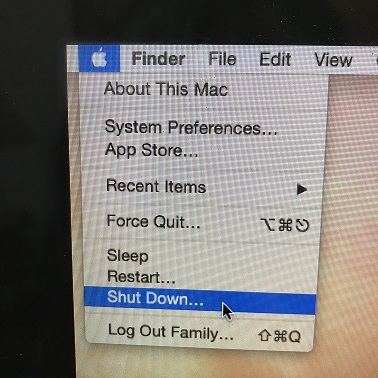
Remember, when you turn off your machine, don’t do it with the power button. Use the off button on the screen menu. This allows the machine to shut off gracefully.

General computer health & Well-being:When should I turn off my machine?

Some other things you should do for the general health and well-being of your machine are:

  • Always use a surge protector. These help even out any power spikes so that they don’t damage your machine. We also advise that you use a UPS (Universal Power Supply). This is a battery backup system that protects your equipment from power surges and provides a limited time of battery life. This is helpful when you’re in the middle of working on a project when the power goes out. It gives you enough time to finish up and save everything. (There is an annoying and frequent beep to let you know that you are using battery power.)
  • During lightning storms, you should turn off AND unplug all of your electronics. Even a surge protector can’t always help protect your equipment if there is a nearby lightning strike.
  • Uninstall and delete any programs that you are no longer using. Even if you’re not running a program, it may still be processing in the background.  This will undermine the efficiency of your machine. (Yes, we can help you with this if you don’t feel comfortable choosing which programs to uninstall.)
  • Keep your machine clean! Periodically open it up and remove all the dust and pet hair that have accumulated. Dust tends to accumulate on the fan, which is there to keep your machine cool. If too much dust is there, the fan won’t run properly and your machine will overheat. (We can help you with this too!)
  • Finally, When Should I Turn Off My Computer?  At least once a week!

Please forward this to your colleagues who ALWAYS leave their machine running.

Information about Geek For Hire, Inc.

I’ve created a Free Report to protect you from “phishing” scams. Click here to receive it!

Chris Eddy of Geek For Hire, Inc. has been providing computer service to families and small businesses with Mac’s and PCs for the past eighteen years. His company is highly rated by both the BBB (Better Business Bureau) and by Angie’s List. You can find more on our website, or give us a call 303-618-0154. Geek For Hire, Inc. provides onsite service (Tier 3) to the Denver / Boulder / Front Range area as well as remote service throughout North America.

We’ve been using Amazon Prime for the past few years.  We like the free and fast shipping.  With Prime, we have access to online streaming too. Prime is usually $119/year, but you can get a free 30-day trial by clicking on this link: Try Amazon Prime 30-Day Free Trial. As an Amazon Associate, we earn from qualifying purchases.

Best Way to Catalog Your Books, Movies, and Music

If you’re a collector like me, sometimes it is hard to keep track of everything.  How do you catalog your books, movies, and music?  I’ve been using a great app for my books, but when it comes to my movies and books, I don’t know what I have.

BOOKS:catalog your books, music, and movies

For books, hands down, the app to use is LibraryThing.  I’ve been using it for the past eight to ten years, at least, and it does a great job at keeping everything organized.  It’s free, but if you’d like to make a donation, they’ll be happy to take it.  I contributed a modest amount a few years ago and am now a “Lifetime Member”.  It’s easy to add books and to put them into different categories.  I have categories like “historical fiction”, “Written by Family”, “Religion”, and “signed by author”.  I especially love adding books using the app on my iPhone because I can use the camera to scan the bar code on the back.  It automatically adds the book and all associated details.  The iPhone app doesn’t allow you to do everything though.  You do need to go to your computer to add tags and notes.  I do not think they have a limit for the number of books.

MUSIC:

I looked at two apps to categorize music.

  • CLZ music has a limit of 100 entries in their free version and it seemed easy to search online to add different albums. For each album you add, it includes a list of the songs.  It did appear that you could only add CD’s.  I wasn’t able to add any vinyls to my collection.
  • RW Music seemed very complex. In order to get started, I had to enter the IP address of my computer, even though I accessed the app via my iPhone.  I don’t recommend that one.

MOVIES:

I also looked at two apps for movies.

  • The first one, My Movies, allowed only 50 titles in the free version. You also needed to create an account before you could trial it. Since I don’t like providing personal information unless I absolutely have to, I moved on.
  • I also looked at Movie Buddy. There did not appear to be a limit to the number of movies you could enter.  It was easy to search and add new movies and it gives you the ability to tag a movie that you have loaned out, and to whom. There was a link to watch the trailer and it listed a summary of the movie along with the cast and producers.  All in all, I thought this one was very good.

Which apps do you use to catalog your books, movies, and music?

Chris Eddy of Geek For Hire, Inc. has been providing computer service to families and small businesses with Mac’s and PC’s for the past fifteen years. His company is highly rated by both the BBB (Better Business Bureau) and by Angie’s List. You can find more on our website, or give us a call 303-618-0154. Geek For Hire, Inc. provides onsite service (Tier 3) to the Denver / Boulder / Front Range area as well as remote service throughout North America.

We’ve been using Amazon Prime for the past few years.  We like the free 2-3 day shipping and the online streaming. I haven’t tried the Kindle lending library yet.  I’ll try that next!   Prime is normally $99/year, but you can try it for 30 day for free by clicking on this link: Try Amazon Prime 30-Day Free Trial (Yes, we’ll get a small commission if you check it out.)

Save

Save

Save

Save

Save

Save

Save

Save

Save

Save

Backing Up Your Data and The Cloud

It’s time again for my reminder about backing up your data!  For many people, when you travel, your laptop could get banged up at the airport or in the camper.  For others, summer is the season for extreme weather.  It could be fires or floods or tornadoes or hurricanes, but there is always the chance that your home could be damaged, and your computer as well.

That’s why it is so important to make sure your data back up is current.  The most convenient way to keep your data backed up is to use one of the Cloud backup services.  I’ve had many people ask what “the Cloud” is and how it might affect them.  The Cloud is a term used to describe using another company’s servers to store your data or to provide off-site computing.

Here’s a better definition from wiki:

Cloud computing, also known as on-the-line computing, is a kind of Internet-based computing that provides shared processing resources and data to computers and other devices on demand. It is a model for enabling ubiquitous, on-demand access to a shared pool of configurable computing resources (e.g., networks, servers, storage, applications and services), which can be rapidly provisioned and released with minimal management effort. Cloud computing and storage solutions provide users and enterprises with various capabilities to store and process their data in third-party data centers.   https://en.wikipedia.org/wiki/Cloud_computing

There are a many companies that provide cloud storage.  I’ve been using Dropbox for a number of years and like the simplicity of it.  (Disclaimer: if you use that link to sign up for backing up your data, you’ll get 500 mb for free, and I’ll receive 1g as a thank you from Dropbox.)   https://db.tt/0ZRkMXZ

backing up your data

I like Dropbox for a number of reasons:

  • It will automatically upload a file to the cloud every time I make a change to it.
  • I’ve set it up so that it uploads photos I take on my phone to my account.
  • I can open files on my iPhone and iPad when I’m away from my computer.
  • Dropbox stores data for several weeks.  If I get a bad virus, I can ask them to restore my data to a particular date.

All of this enthusiasm about cloud storage for backups aside, it’s also important to keep a physical copy of your data.  About once a month, I backup my data to an external hard drive.  Chris has set me up with the Seagate Backup 2TB Portable External Hard Drive which is convenient and easy to use.

If you need help backing up your data, let us know!

Chris Eddy of Geek For Hire, Inc. has been providing computer service to families and small businesses with Mac’s and PC’s for the past fourteen years. His company is highly rated by both the BBB (Better Business Bureau) and by Angie’s List. You can find more on our website.  Geek For Hire, Inc. provides onsite service (Tier 3) to the Denver / Boulder / Front Range area and remote service throughout North America.

Join Amazon Prime – Watch Thousands of Movies & TV Shows Anytime – Start Free Trial Now